Jev in practice: cheaper LLM apps and faster 3D characters
TypeSafe's Jev picks one answer from options you define, in under half a second. How to use it as a router that cuts LLM costs, as the reflexes of a 3D character and as a guardrail, with diagrams and the limits to know first.

On this page
TypeSafe AI released Jev on September 15. It is the first model from the company founded by former OpenAI researcher Diogo Almeida, announced together with a $40 million funding round. Two numbers caught developers’ attention first: a response in 70 to 500 milliseconds, and $0.042 per million input tokens. Output tokens are not billed at all.
The low price follows from a narrow job. Jev picks one of the options you defined in advance and returns that choice with probabilities attached. It never writes sentences. TypeSafe calls this a System One model, after Daniel Kahneman’s name for fast, intuitive thinking.
Below is how Jev works, then three places it fits, each with a diagram: a router in front of your LLMs, fast reactions for 3D characters and NPCs, and checks on what other AI produces. The last sections cover the limits to know before you build on it.
Jev answers multiple-choice questions
Asking an LLM for a decision is like setting an essay question. The answer comes back as prose, and your code has to interpret it. With Jev you set a multiple-choice question instead. You send a state that describes the situation along with a few questions, and each question comes back as a typed answer with probabilities.
There are three kinds of question.
| Question | Asks | Returns | Example |
|---|---|---|---|
| Choice | Which of these options? | The chosen option, a probability per option, confidence | Is this ticket for billing, technical or sales? |
| Score | Where on this scale? | A score, a probability per level, confidence | How frustrated is the customer, from 0 to 2? |
| Noul | Is this statement true? | The probability of yes, from 0 to 1 | Is this request urgent? |
A Choice can offer up to 255 options. Questions in one request are evaluated in parallel, so adding questions barely changes the response time.
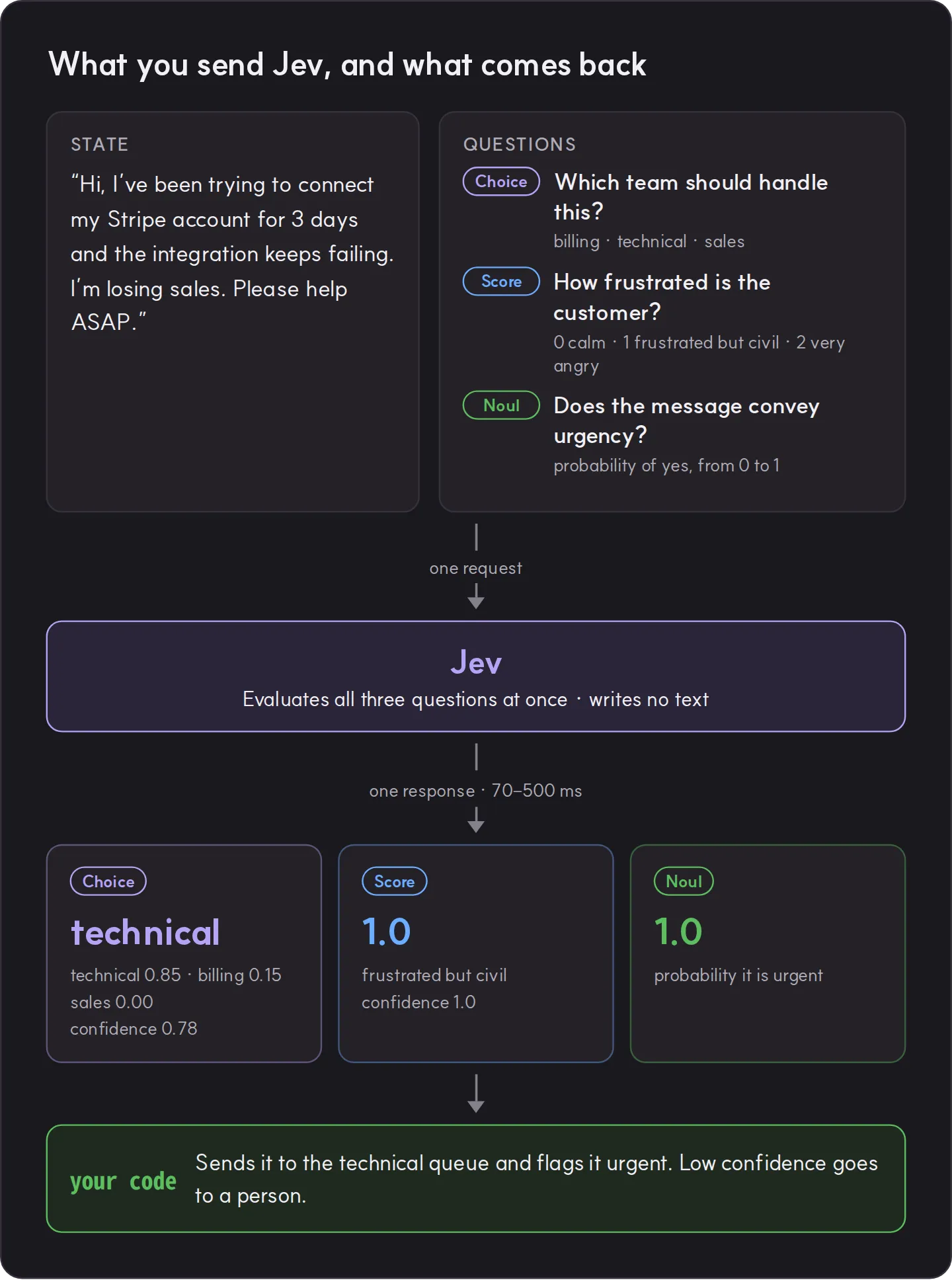
Because the shape of every answer is fixed in advance, Jev cannot return a malformed value. That is what TypeSafe means when it says Jev can’t hallucinate. It can still pick the wrong option, which is why the probabilities and confidence matter. Send low-confidence answers to a person or a larger model.
Jev in numbers
| Item | Value |
|---|---|
| Price | $0.042 per million input tokens, output free |
| Response time | 70 to 500 ms (TypeSafe’s figure, measured on the US West Coast) |
| Request size | 64k tokens in total, 32k for the state plus the longest question |
| Rate limits | 250,000 tokens per second, 1,200 requests per minute (may change with demand) |
| Input | Text only. Turn images, audio and video into text first |
| Language | Most accurate in English. Test other languages on your own data |
TypeSafe published its own evaluation across four workflows, including security alert triage, invoice processing and customer service. Every model answered the same narrow questions.
| Model | Accuracy | Cost per case | Time per case |
|---|---|---|---|
| Jev | 67.8% | $0.0004 | 0.4 s |
| GPT-5.6 Terra | 67.9% | $0.0304 | 10.1 s |
| GPT-5.6 Sol | 74.1% | $0.0836 | 23.3 s |
| Claude Opus 5 | 73.1% | $0.1761 | 37.8 s |
On accuracy alone, Jev trails the largest models by five to six points. Against GPT-5.6 Terra, which scored about the same, it cost a seventy-sixth as much and took a twenty-fifth of the time.
These are TypeSafe’s own measurements. The reference answers are an average of GPT-6 Astra and Claude Fable 5.1, and no large independent reproduction has appeared yet. TypeSafe also says its evaluations were run from laptops on the US West Coast, and that only time can show whether today’s prices are sustainable.
Distance adds network time
TypeSafe’s service currently runs only on the US West Coast. On September 30 we timed unauthenticated requests to the API from Korea: 0.14 to 0.17 seconds round trip, of which the server spent 1 to 3 ms. If your users are far from California, add that to the published response times when you plan.
Use 1: a router in front of your LLMs
“Let Jev answer the easy questions and send only the hard ones to an LLM.” That is the short version of how Jev lowers LLM bills. More precisely, Jev decides where each request should be handled. Writing the answer is a later step.
- Requests that code can handle directly, such as an order lookup, never reach an LLM.
- Common questions get one of your prepared answers, picked with another Choice question.
- Requests that need only a short explanation go to a small LLM.
- Only requests that weigh several conditions or need a long new answer go to a large LLM.
- Low confidence goes to a person.
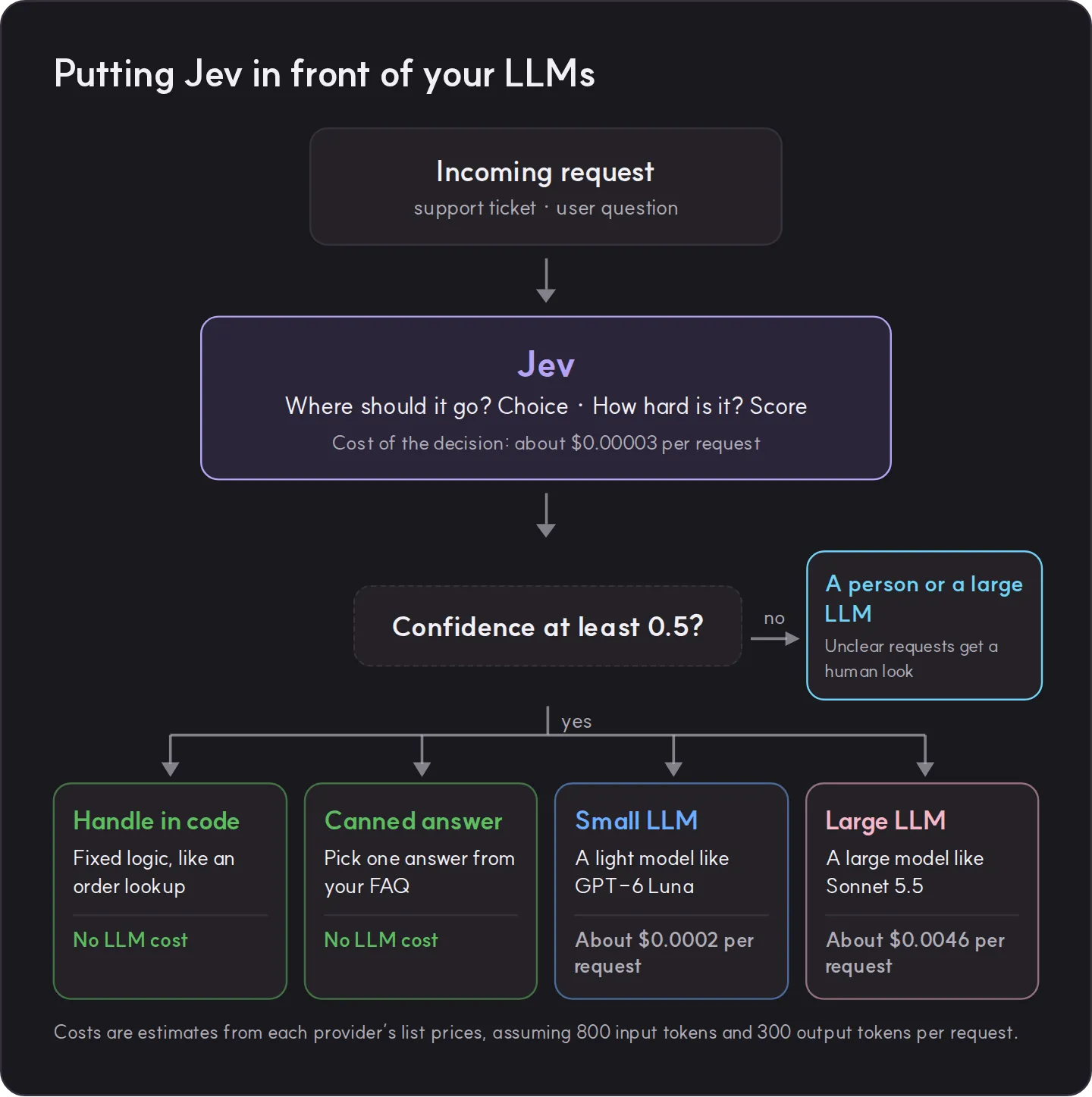
The request looks like this:
{
  "model": "jev-1.13.0",
  "state": { "message": "My bag still hasn't arrived. The order number is A-1042." },
  "questions": {
    "route": {
      "type": "choice",
      "instructions": "Where this request should be handled",
      "criteria": {
        "order_lookup": "Asks about an order or its delivery",
        "faq": "One of our prepared FAQ answers fully covers it",
        "small_llm": "Needs a short explanation, but the judgment is simple",
        "large_llm": "Needs several conditions weighed or a long new answer written",
        "human": "Refund dispute, legal issue, or strong complaint"
      }
    }
  }
}
The code that acts on the answer is short:
const { route } = res.answers;

if (route.confidence < 0.5) return sendToHuman(req); // unclear: a person decides

switch (route.choice) {
  case 'order_lookup': return lookupOrder(req);   // no LLM involved
  case 'faq':          return answerFromFaq(req); // pick a prepared answer
  case 'small_llm':    return askLLM(req, SMALL_MODEL);
  case 'large_llm':    return askLLM(req, LARGE_MODEL);
  default:             return sendToHuman(req);
}
How much it can save
The decision itself costs next to nothing. At 800 input tokens per request it is about $0.00003, or $33.60 for a million requests a month. Handling the same million requests entirely with Claude Sonnet 5.5, assuming 300 output tokens each, costs about $4,600, so the router adds roughly 0.7%.
The savings depend on how many requests finish without the large model. Suppose half end in code or a prepared answer, 35% go to GPT-6 Luna and only 15% reach Sonnet 5.5:
| Setup | Monthly cost (1M requests) |
|---|---|
| Everything on Sonnet 5.5 | about $4,600 |
| Routed by Jev (split above) | about $804 (Jev $34, Luna $81, Sonnet 5.5 $690) |
Your split will differ, so take the method rather than the numbers.
One caution. A request wrongly sent to a small model does not raise an error; the answer is simply worse. Run the router alongside your current setup for the first few weeks and compare the results.
Check the draft, escalate when needed
The order can also be reversed. A cheap model writes the answer first, Jev checks whether the retrieved sources support it, and a large model rewrites only the answers that fail. In an example OpenRouter published, this cascade gave fewer wrong answers than sending all 50 questions to GPT-6 Astra (0 against 2) at about 7% of the cost. Fifty questions is a small sample, so treat it as a sketch.
Use 2: fast reactions for 3D characters and NPCs
Speak to a character in a game or a virtual space and watch it stand frozen for a few seconds, and the moment is gone. If an LLM writes the character’s lines, those gaps are easy to create. This is where Jev’s speed pays off.
The trick is to separate the reaction from the line. The gestures and expressions a character can perform are prepared ahead of time through rigging and animation: a wave, a nod, a surprised face, a step back. Jev picks the reaction that fits the moment from that list. The animation set your rig supports becomes the options of a Choice question. The character plays the chosen reaction right away, and only when it has something to say does an LLM write the line in the background. Jev can also pick that line from ones your writers prepared.
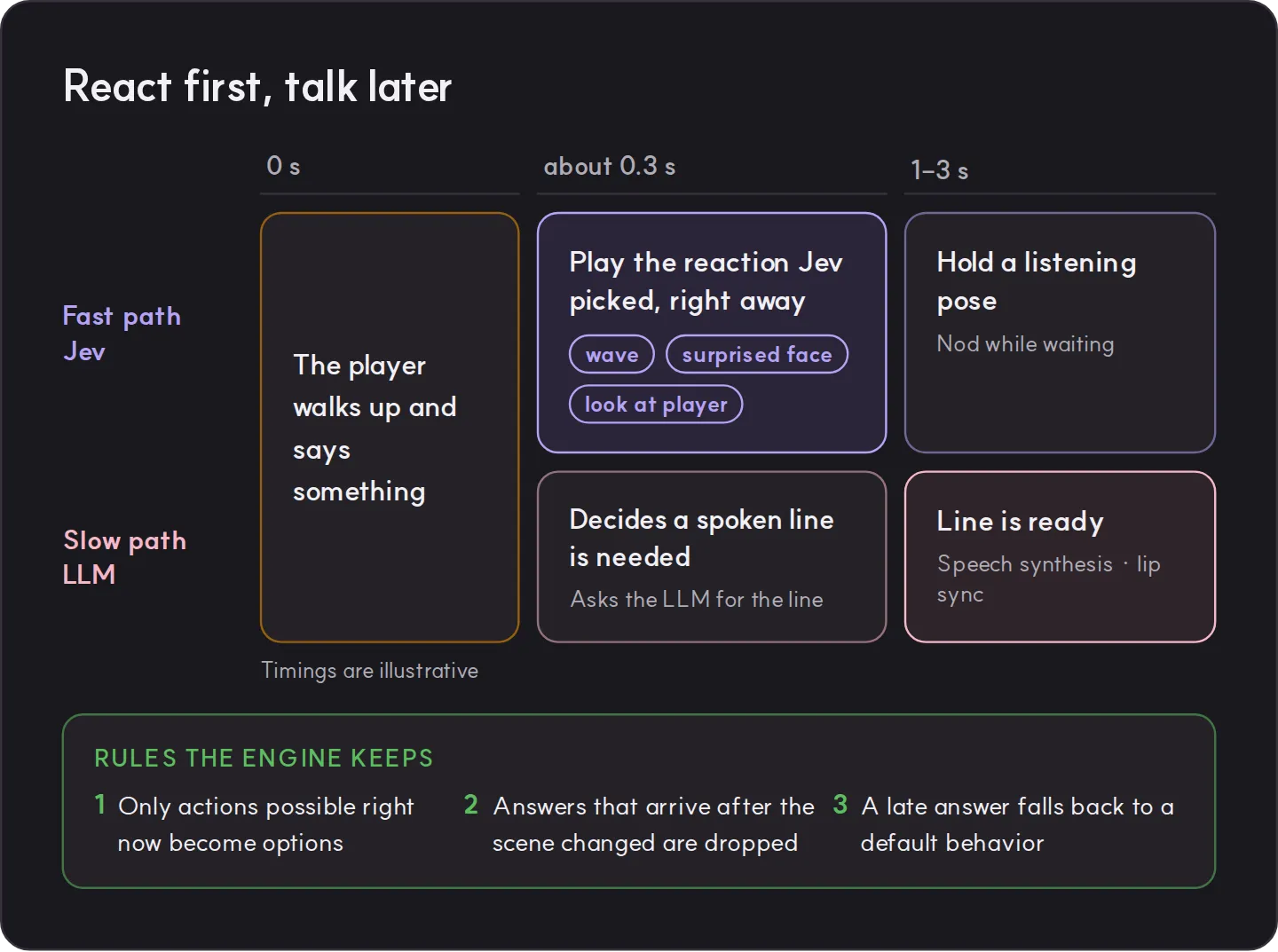
Ask everything in one request. The body gesture, the expression and whether a line is needed all come back together.
{
  "model": "jev-1.13.0",
  "state": {
    "npc": "Hans, the village blacksmith. Gruff but kind.",
    "event": "The player walked up and asked: 'Could you fix my sword?'",
    "npc_is_busy": true,
    "relationship": "friendly"
  },
  "questions": {
    "reaction": {
      "type": "choice",
      "instructions": "Hans's immediate body reaction",
      "criteria": {
        "nod": "Acknowledges and agrees",
        "wave": "Greets the player",
        "keep_working": "Keeps hammering and glances up",
        "step_back": "Is startled or wary"
      }
    },
    "face": {
      "type": "choice",
      "instructions": "Hans's facial expression",
      "criteria": { "smile": "Pleased", "neutral": "Calm", "frown": "Annoyed" }
    },
    "needs_line": {
      "type": "noul",
      "instructions": "The player asked Hans something that needs a spoken answer"
    }
  }
}
A few rules on the engine side keep this reliable. They come from the community projects below and from a game development guide.
- Offer only actions that are possible right now. No key, no “open the door” option. Jev cannot break a game rule it never sees as an option.
- Don’t call it every frame. Call it when something changes: the player speaks, a threat appears, an action ends.
- Drop late answers. Tag each request with a world revision number and ignore any answer that arrives after the number has moved on.
- Never wait frozen. Send the request asynchronously and keep doing the current action. If no answer arrives in time, or confidence is low, fall back to a default behavior.
- Keep the API key out of the game build. The game calls Jev through your own server.
The cost is manageable. With a 1,000-token state a decision costs about 0.004 cents, so one NPC deciding once a second comes to about $0.15 an hour. TypeSafe’s Doom demo made 10 decisions a second for about $7 an hour. The limit of 1,200 requests a minute means a game with many NPCs should batch requests through its server.
People have already built on this pattern:
- doom-jev turns the direction and distance of enemies, health and ammo into text and has Jev choose one of six actions. It made about 8 decisions a second with a median latency of 0.12 seconds, while code handled pathfinding and reflex moves.
- jev-unreal-statetree adds a Jev decision task to StateTree in Unreal Engine 5.8. It sends one request when a state is entered and discards answers that arrive after the world revision has changed.
- WorldKit is an NPC decision runtime. The engine enforces the game’s rules and Jev only chooses among the actions that are currently valid.
- In jev-npc-interaction-prototype, every line the warehouse guard speaks is written in advance. Jev decides the guard’s action and whether the player’s story is credible, and letting the player in takes at least 0.50 action confidence and 0.55 credibility.
What about rigging itself?
Jev cannot build a skeleton or compute skin weights, and it cannot read images. What it can take on are decisions inside the pipeline that have a fixed set of answers.
Mapping bone names from characters made in different tools (mixamorig:LeftForeArm, L_lowerarm and so on) to the standard humanoid slots of your engine can be one Choice question per bone, with code keeping the parts that follow rules, such as left-right checks and hierarchy. Tagging animation clips with their purpose, like greeting, refusal or surprise, works the same way. We have not found public examples of either yet, so measure accuracy on a small sample first.
Use 3: other places worth trying
| Use | What you ask Jev | Reference |
|---|---|---|
| Screening LLM input and output | Is this a jailbreak attempt? How much harm would complying do? | TypeSafe guardrails example |
| Checking agent tool calls | Is this a risky call that should be blocked before it runs? | LangChain harness post |
| Checking citations | Does this quote support the claim? | TypeSafe citation check example |
| Reranking search results | How relevant is this passage to the query? | Legal search example: top-1 accuracy from 5% to 18% |
| Moderating game chat | Is this abuse or harassment? How severe? | TypeSafe use case map |
| Voice agents | Should this turn get a canned reply, a small model or a large one? | Evalgent post: run it while speech recognition detects the end of the turn, so the delay stays hidden |
Limits to know before you start
- It writes nothing and explains nothing. You get probabilities only, so work that must record the reasoning behind a decision needs its own way to keep it.
- It is weak with numbers, dates and counting. TypeSafe’s own documentation says to keep arithmetic and date comparison in code. In a game, pass “near” or “low” instead of raw distances and health.
- It reads literally. Double negatives and questions that need several hops lose accuracy. Keep questions short and direct.
- Long states full of unrelated detail make it less accurate. Send only the fields a question needs.
- One plausible sentence can flip a decision. The JevOut paper, published September 24, added short, natural-looking context and turned 312 of 508 initially correct decisions (61.4%) into different answers. In 229 cases Jev gave the wrong answer a probability of 0.7 or more. Where user input goes straight into the state, double-check decisions that matter.
- Probabilities hold across many answers. A single answer marked 0.9 is not guaranteed to be right.
- The same input does not always give the same answer. There is no deterministic mode yet, which rules it out for multiplayer outcomes every player must see identically.
- It is a hosted service on the US West Coast. If you need offline play or local data residency, look at open models. Kev, released under Apache-2.0, speaks the same API as TypeSafe, and its 27B model reportedly comes within about a point of Jev on unseen data (0.848 against 0.857).
- It is still in early access. There is a waitlist and rate limits can change without notice. An alias like
jev-latestmoves when a new version ships, so once you have tuned thresholds, pin a version such asjev-1.13.0.
How to start
- Pick one recurring decision with a small set of possible answers: ticket routing, an NPC’s reaction, the risk of a tool call.
- Write the options precisely. Give each option one sentence on when to choose it, and add a “none of these” option.
- Score it on past records first. Run 100 to 200 cases where you know the right answer, see how accurate each confidence range is, and set your thresholds.
- Run it alongside your current setup. Compare results for a few weeks and watch for requests wrongly sent to a small model.
- Build the exit for low confidence. A person or a larger model in a service, a default behavior in a game.
And in endue
If you run agents in endue, the same principle carries over to model settings. Set a light, fast model as an agent’s default and switch to a stronger one only for the messages that need it. Pin a model on each routine so scheduled work keeps a steady cost. The settings are covered in Choosing a model, and an order for choosing models is in our previous post.
Sources
- TypeSafe, Introducing System One Models & Jev (September 15, 2026)
- TypeSafe documentation: Models, Quick start, Intent routing, Smart home assistant demo, Jev 1.13 jaggedness
- TypeSafe, workflow evaluations
- Simon Willison, Jev introduces a new shape of LLM (September 21, 2026)
- Latent Space, Jev: System One models for Prod, not God
- The Register, launch coverage (September 16, 2026)
- OpenRouter, Cut LLM cost with a Jev-verified cascade
- GuardingPear Software, How to use Jev in game development
- Zixiang Xu, JevOut: Natural Context Can Flip Decision Models (arXiv, September 24, 2026)