endue Live on your own site
Register your site, paste one line of code, and a chat window with your agent opens right on your own pages. You can shape the endue.live page too.
 endue
endueOne line of code opens an endue Live chat window inside your own site, and the endue.live page is yours to shape. One endue API key now calls models straight from the OpenAI and Anthropic SDKs or Claude Code, paid from your credits. Studio shows usage per agent. Artifacts are now Outputs and Abilities are now Resources. Dream tidies memory while an agent rests, and answers start sooner.
Register your site, paste one line of code, and a chat window with your agent opens right on your own pages. You can shape the endue.live page too.
Call models directly with an endue API key. It takes OpenAI and Anthropic requests as they are, so you only swap the base URL and the key, and each call comes out of your credits.
The Usage tab on the canvas shows the conversations one agent took over channels, Live and the API, and the credits each path used.
Everything an agent makes sits in one Outputs list, and everything you give an agent sits in one Resources panel. You can also pick the format you want back, like slides or Excel.
Your agent tidies its memory while it rests. It merges duplicates and fixes stale facts, and you set its sleeping hours on a round clock.
The checks before a run starts are fewer and run together. The first words of a new conversation arrive sooner.
The last release gave your agent an endue.live/@handle address. Anyone with the link could talk
to it, but they had to come to endue.live to do it. Now the agent comes to your site.
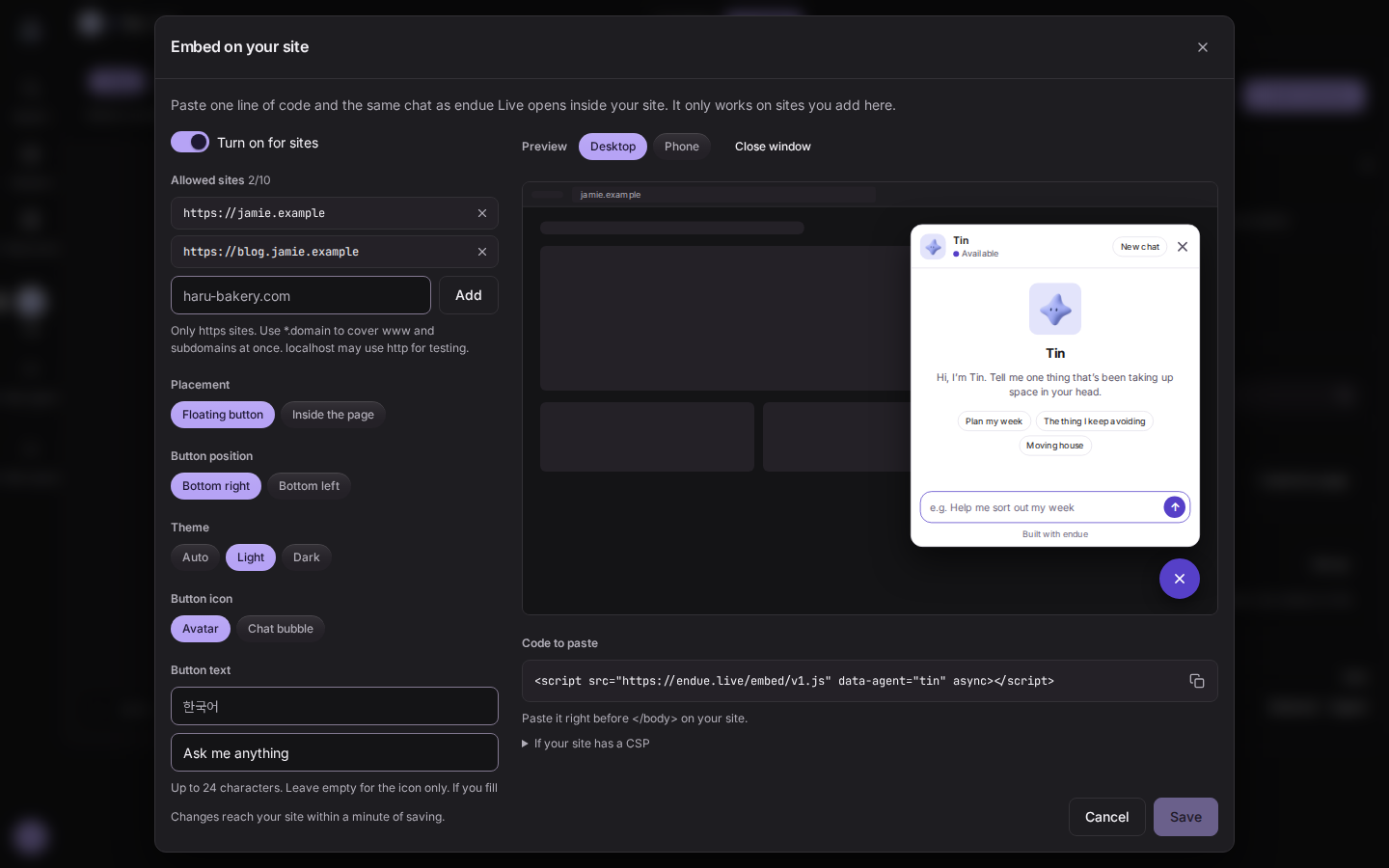
In the Live panel in Studio, open Embed on your site, register your site’s address, and paste the
one line of code it gives you just before </body>. A button appears in the corner of your site,
and clicking it opens the same chat window as endue Live, right there. You can also place the
window inside a page with no button. The button’s position, icon and text and the window’s theme
are all settings, and a preview shows how it looks on a desktop and on a phone. The window only
opens on sites you registered. Pasting the code anywhere else does nothing. Saved changes reach
your site within a minute.
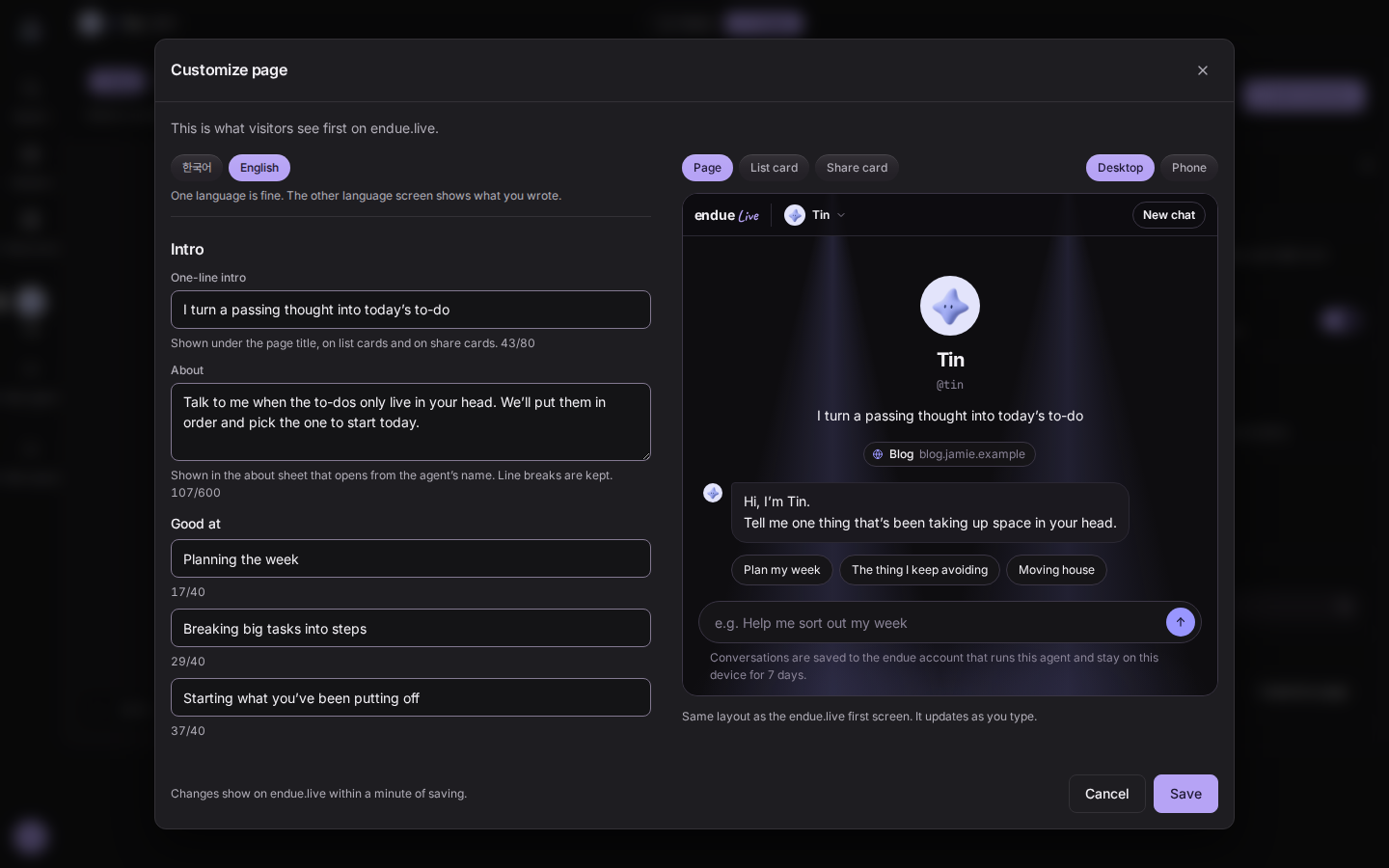
The endue.live page is yours to shape. In Customize page you set a one-line intro, a welcome message, questions visitors can tap to get started, links, an accent color and a background. You can write Korean and English separately, and the preview changes as you type.
Conversations on endue.live changed too. In the last release the agent showed its answer in one piece once it was done. Now the answer streams in as it is written, one line shows what the agent is doing, and visitors can stop it midway. In the Live settings you also choose whether the agent answers in the visitor’s language or always in the one you set.
Until now, using a model on endue meant going through an agent. Some jobs need an agent with a prompt, memory and tools. In your own code, one model call is often all you want.
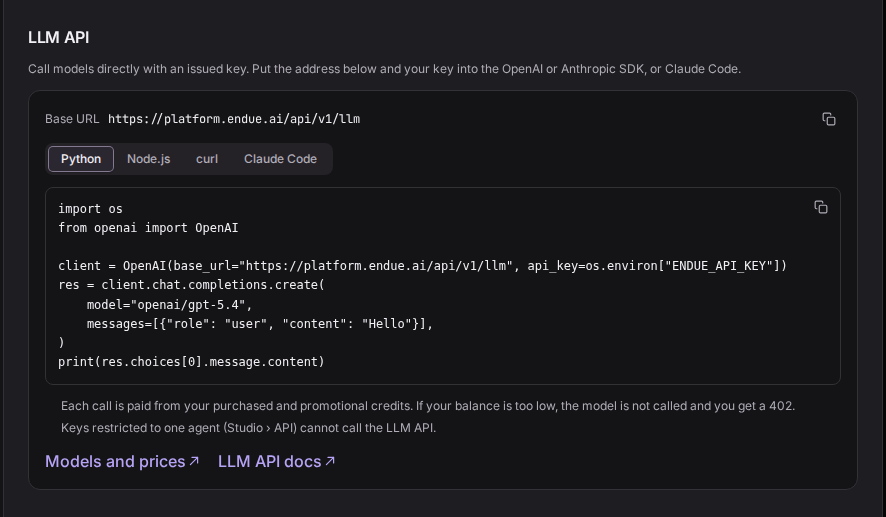
You can now call models directly with an endue API key. Requests use the OpenAI Chat Completions
and Anthropic Messages formats as they are. If your code already uses the OpenAI or Anthropic SDK,
set the base URL to https://platform.endue.ai/api/v1/llm and the key to your endue key. Claude
Code connects with two environment variables. Settings › Account › LLM API has the address and
examples for Python, Node.js, curl and Claude Code, ready to copy.
Calls are paid from your credits. Before the model is called, endue holds the most that call
could cost. When it finishes, only what it used is charged and the rest goes back. If your balance
is too low, the model is not called and you get a 402. The amount charged comes back in the
response as usage.cost. The models you can call and their per-token prices are on the
models page and at GET /llm/models. One credit is US$1.
The LLM API draws only on credits you bought or received in a promotion. Your plan’s allowance is for agents and is not used here. Use an account-wide key from Settings › Account › API keys. A key restricted to one agent cannot call models directly.
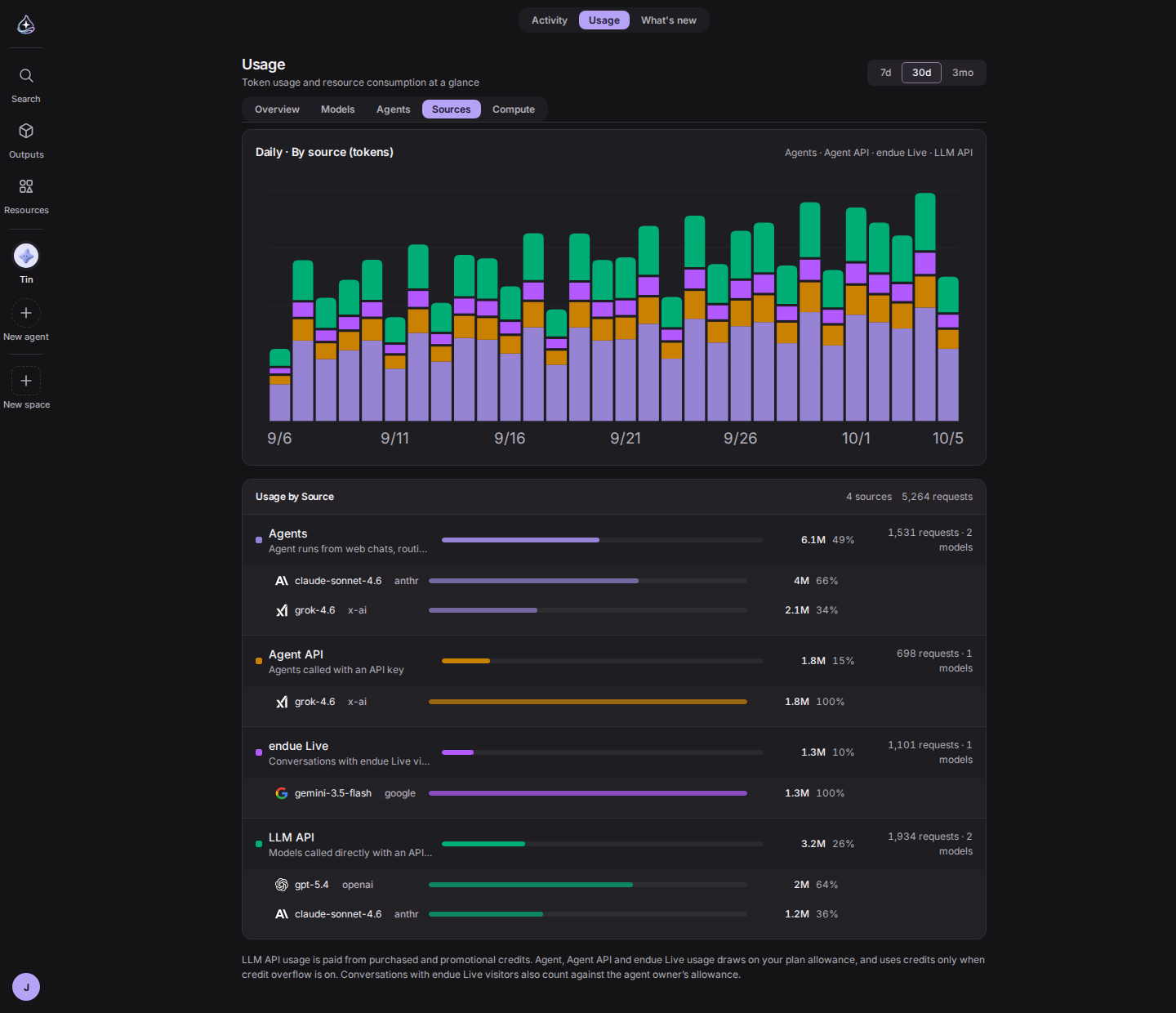
What you spend shows up in the Sources tab in Usage. There are four sources: Agents, Agent API, endue Live and LLM API, each with the models it used. Request formats and error codes are in the LLM API docs.
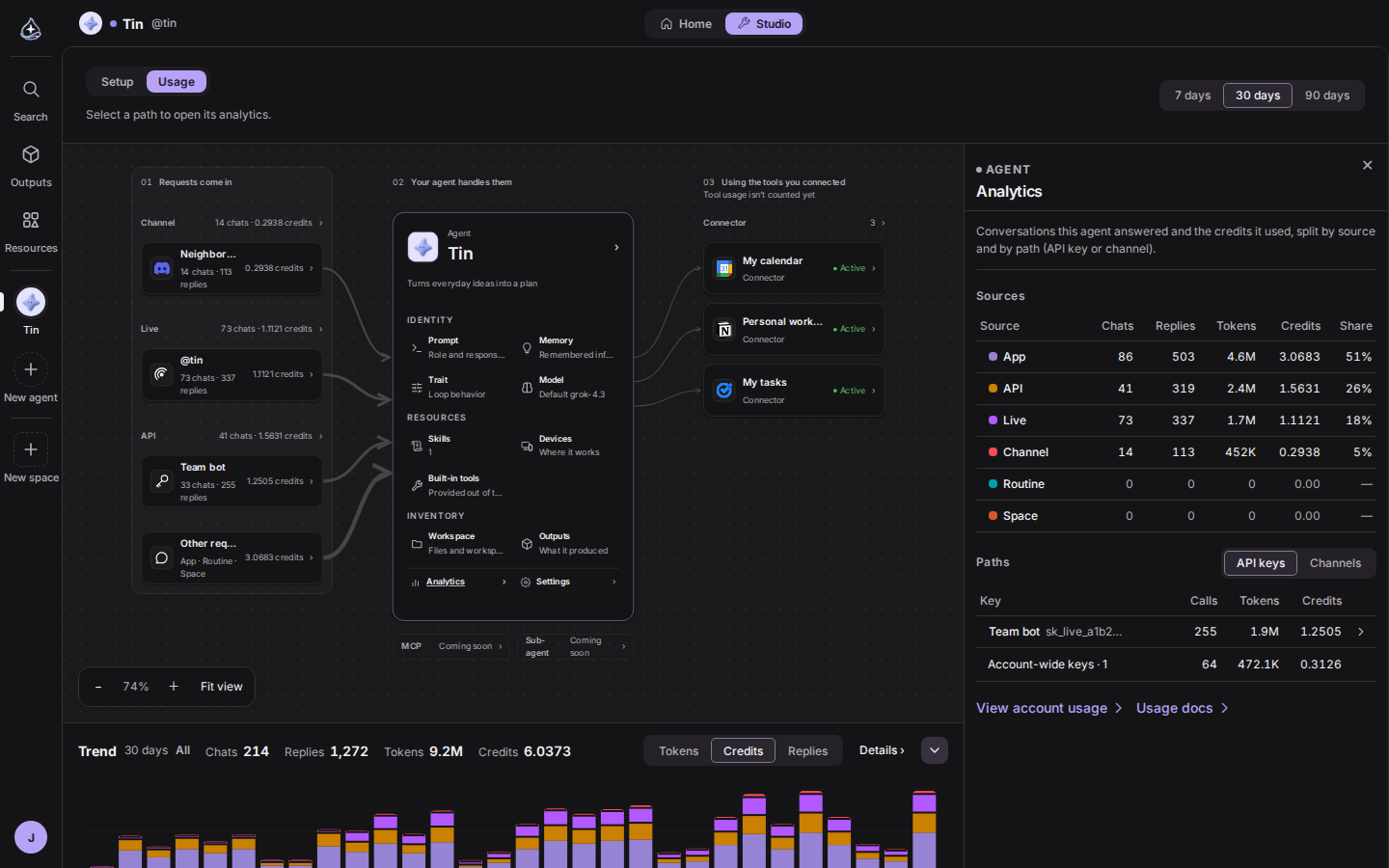
Usage already showed what your whole account spent. There was no place to see what one agent spent and on which requests: how many credits visitor conversations take once Live is on, or which API key calls the most among the services you connected.
The Studio canvas now has a Usage tab. It is the same canvas you see in Setup, with numbers on every path a request comes in by. Channel connections, the Live address and API keys show their conversations, replies and credits, and the lines into the agent get thicker with use. Pick 7, 30 or 90 days.
Click a node and the Analytics panel opens on the right. A table lists conversations, replies, tokens and credits for six sources (App, API, Live, Channel, Routine and Space), and another breaks them down by API key and channel connection. The chart under the canvas stacks each day by source, and it can show just the path you clicked. Only the agent’s owner sees the Usage tab.
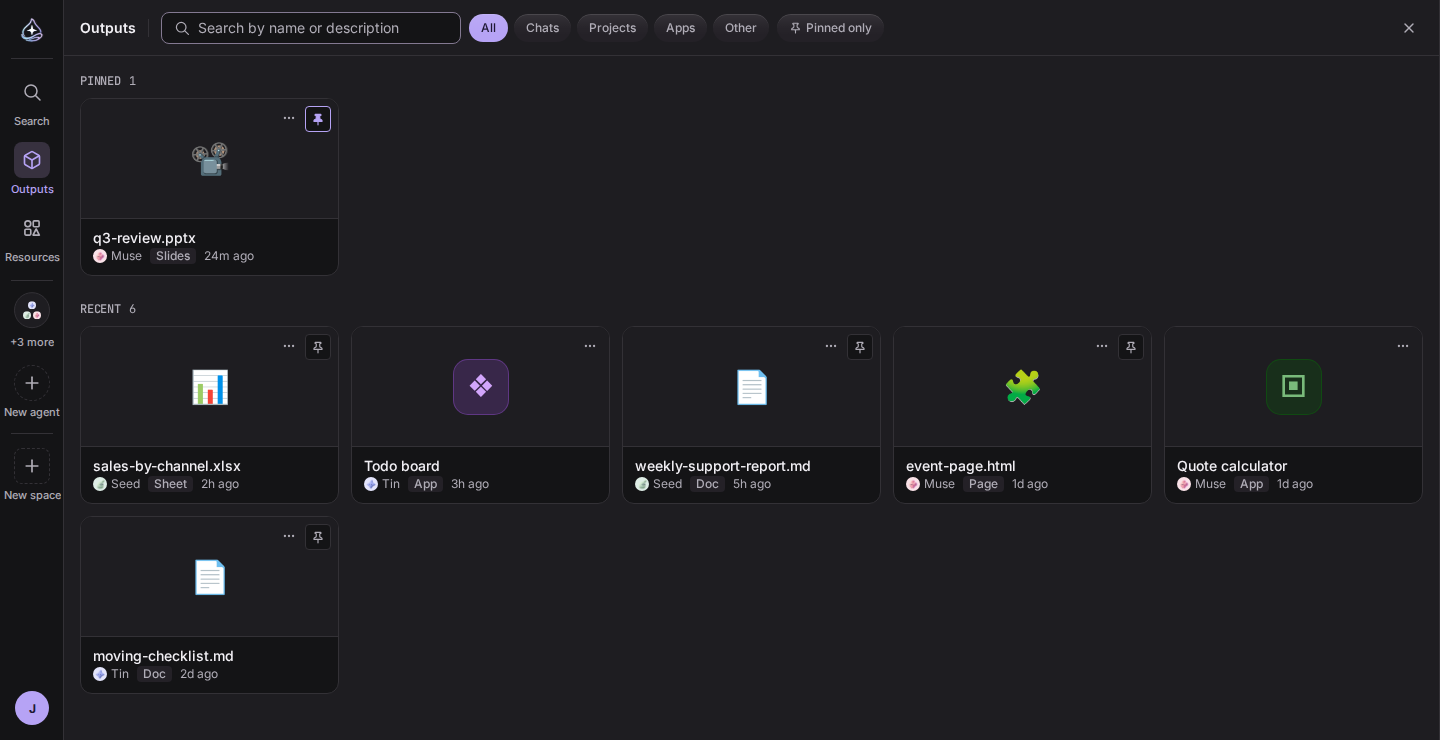
The things your agents made lived in two places. Documents and files were artifacts, and anything built from several files was an app. To find something you first had to remember which kind it was, and the word artifact needed explaining every time.
Both are Outputs now. Open Outputs in the left rail and files and apps sit in one list, ordered
by when they last changed, each card labeled doc, sheet, slides, page or app. One search covers
both. The outputs list beside a conversation and the ⌘K palette use the same list. Old /artifacts
and /apps links still open.
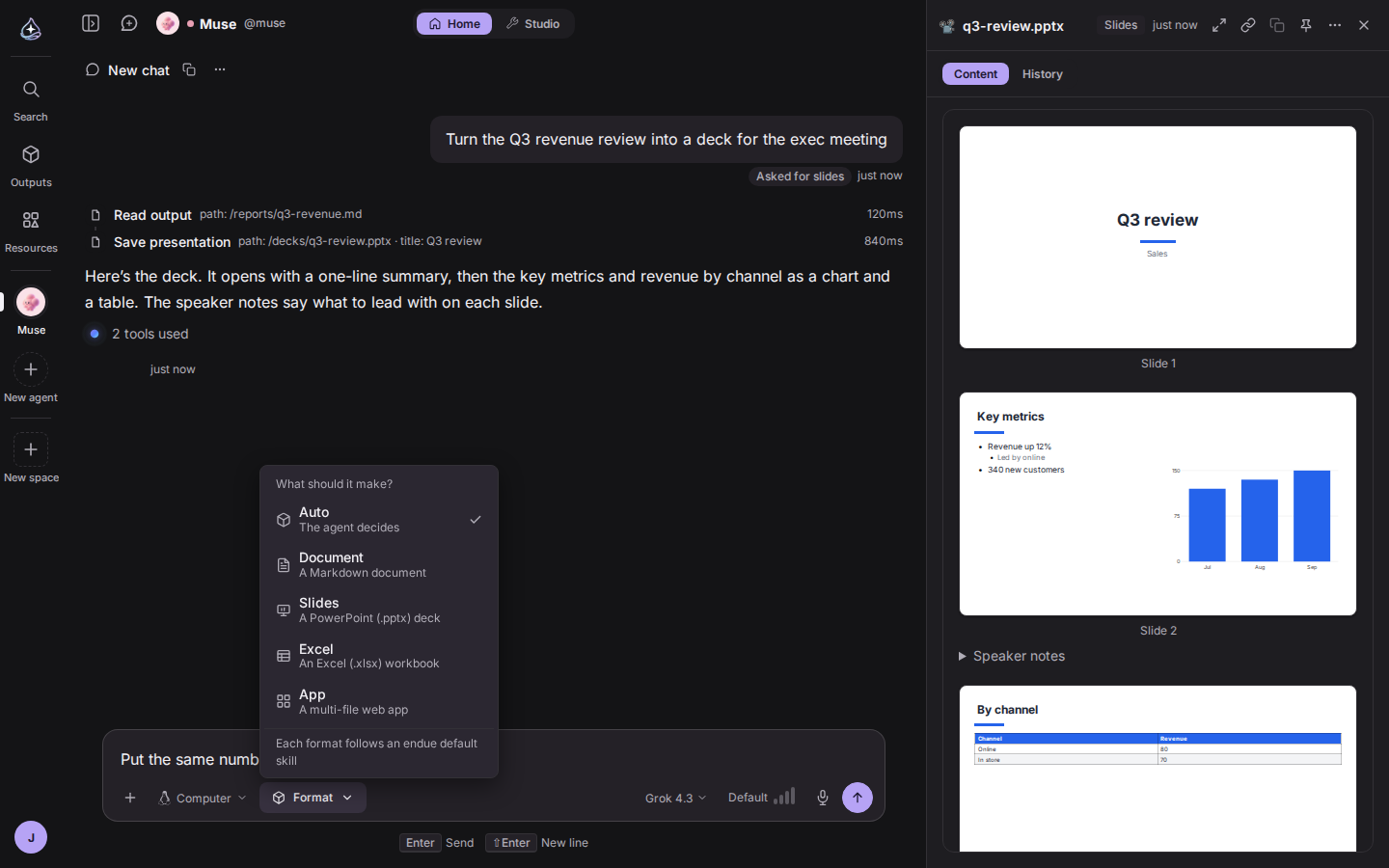
You can also pick the format you want back. Choose Document, Slides, Excel or App from the format
chip in the composer, send your request, and the agent makes it in that format. Slides are saved
as a .pptx file and Excel as .xlsx, and both preview in the browser without a download. Leave
it on Auto and the agent decides. The choice applies to that one request.
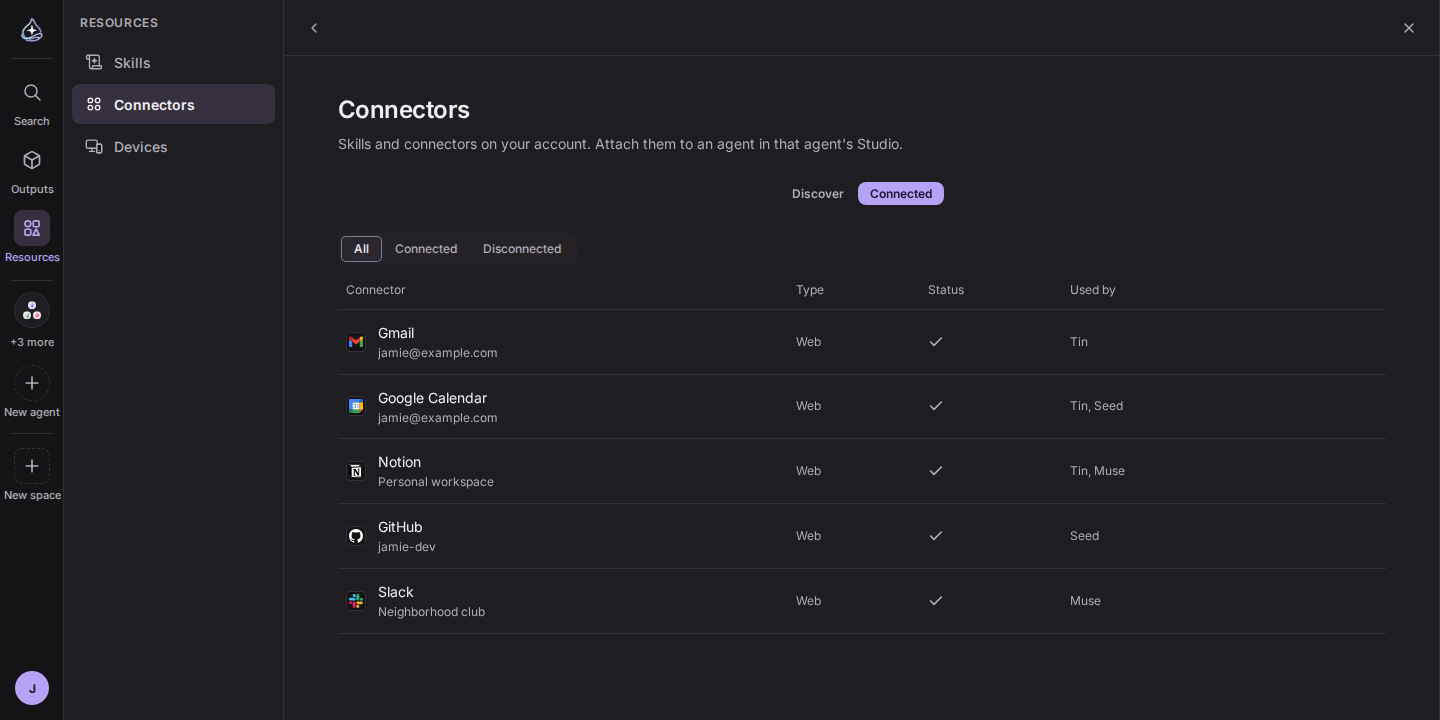
Skills and connectors used to be grouped as Abilities, meaning what an agent can do. Then the computers, browsers and phones an agent works on moved into the same place, and the name stopped fitting. A device is hard to call an ability.
So the name is now Resources: everything you can give an agent, in one place. The Resources panel in the left rail has three areas, Skills, Connectors and Devices. Skills and connectors each split into a Discover tab and the ones you have. Devices groups Computer, Chrome, Android and Desktop by product, and what used to be called Computer and Chrome separately are all devices here. The agent card in Studio uses the same words, in three groups: Identity, Resources and Inventory.
Old /abilities addresses lead to the same place under Resources.
An agent you use for a long time piles up memories. The same thing gets written twice, a fact that changed stays in its old form, and a commitment that is done stays open. Until now the cleanup was a routine attached to the Self-evolving trait.
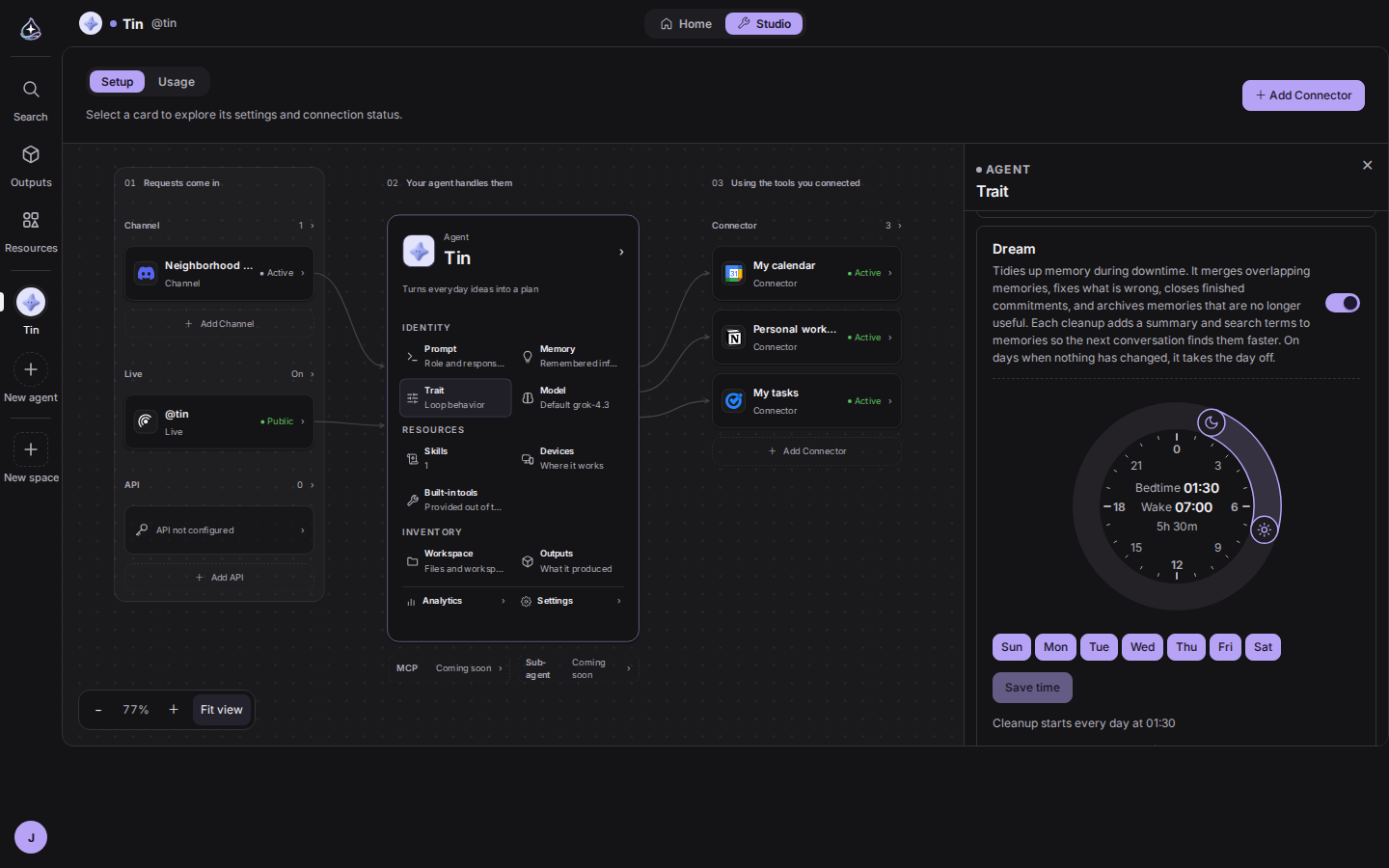
That cleanup is now a trait of its own, called Dream. Turn it on and the agent tidies its memory while it rests. It merges overlapping memories, fixes stale facts, closes finished commitments and archives what is no longer useful. Then it adds a one-line summary and search terms to each memory so the next conversation finds the right one faster. Archived memories are kept under Archived in Memory, where you can restore them. Pinned memories are never changed or archived.
You set the sleeping hours on a round clock. Its two handles are bedtime and wake time. Cleanup starts at bedtime, and once wake time has passed it will not start that day. Pick the days below the clock. On a day with no changed memories and no new conversations since the last cleanup, Dream skips the run and uses nothing. After each cleanup a report of what it merged, fixed and archived is saved to Outputs.
Self-evolving now covers what the agent learns during a conversation. Teach it a report format or a sequence of steps and it saves a skill and follows it from the next conversation. It also keeps a list of the files it made so it can open the right one. Skills and files are only learned in conversations with the owner. The skills it learned are listed in the trait settings, newest first, and you can revert any of them.
Most of the wait between sending a question and seeing the first words was being spent outside the model. Before a run started, the conversation, permissions, skills and connectors were checked one after another, and the run itself happened far from the data.
Checks that read the same thing twice are gone, and checks that do not depend on each other now run together. New conversations run close to the data. When an answer ends, the run reports done first and leaves cleanup such as naming the conversation for afterwards. Measured in our development environment, the stretch from receiving a request to calling the model went from about 6.5 seconds to between 1 and 2, and a short question gets its first words in about 3 seconds. Existing conversations keep running where they were, so new conversations see the biggest difference.
Effort in the composer now starts at the model’s default in a new conversation. It used to start at Medium every time, which made the model think longer than its default. Choosing None now turns reasoning off.
API keys and tokens that appear in a conversation are masked by default. The prefix stays and the rest turns into dots, and copying the masked text still copies the real value.
How far memory reaches now depends on who the agent is talking to. endue Live visitors and callers who reach the agent through the API read only the agent’s shared memory. They cannot see the owner’s personal memories or save new ones. When someone in a channel says “remember this”, it is saved as that person’s memory only.
The LLM API accepts account-wide keys only. Someone holding a key restricted to one agent cannot use it to call models directly.
endue.live pages cannot be framed by other sites. Only the embedded window opens elsewhere, and only on sites the owner registered.