endueendue
← Releases
2026.11.22

Spaces that work in projects and teams, clearer questions and waits, and Claude Sonnet 5.5 as the base model

Spaces now have projects, tickets and teams. Give a project a short code and every ticket gets a number like FAIR-12, and the ticket screen shows what is running right now. A room takes in a team, and the team’s top agent receives the work and passes it down the team’s lines. The room board, agent profiles, run history and autopilot from the last release open in every space from today. In chat, question cards and the signs of what is waiting for you are simpler, and runs with no model chosen now use Claude Sonnet 5.5.

Start for freeOpen endueFree forever0.25 credits every weekNo card required
See what's new
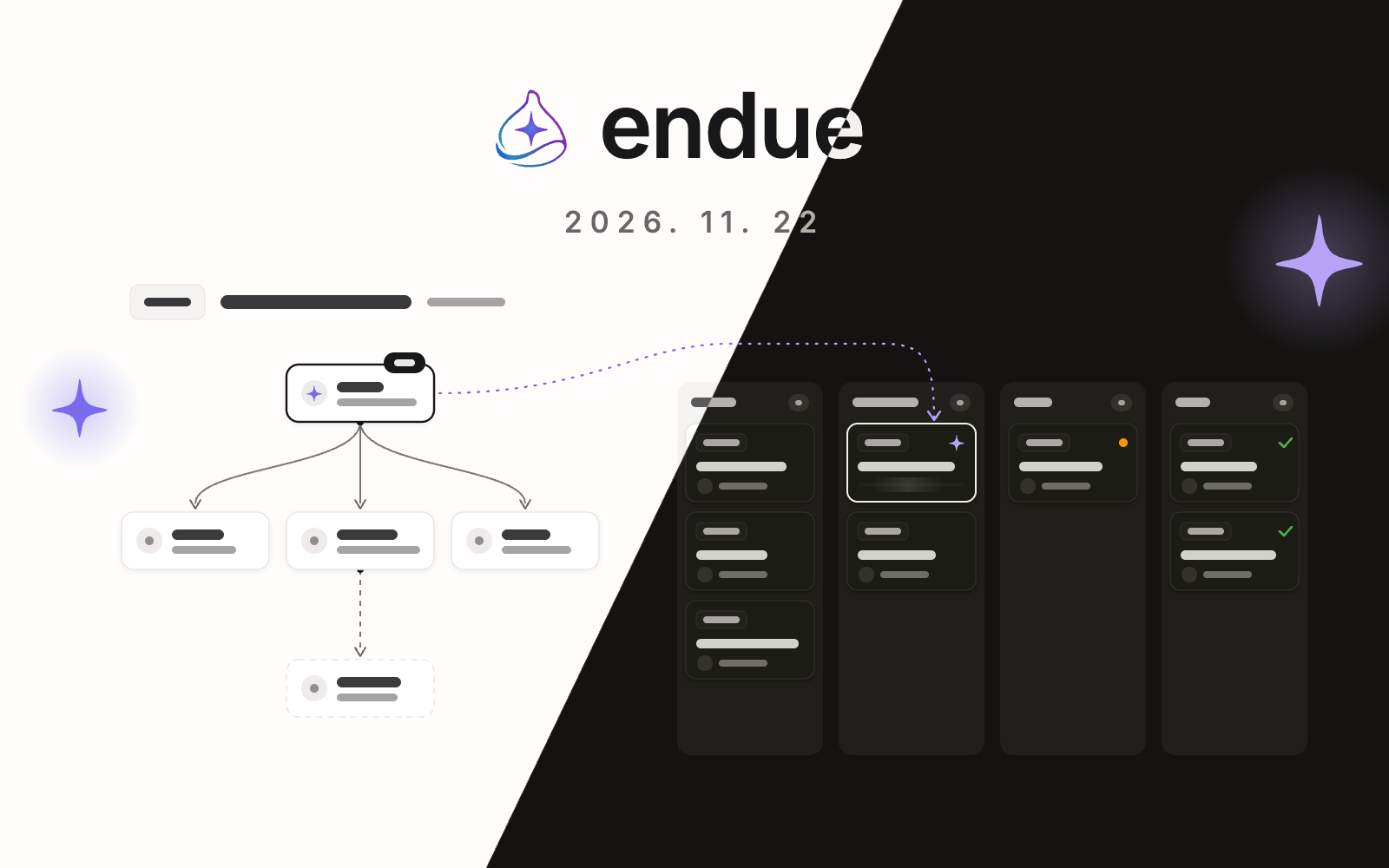
endue 2026.11.22 release key visual

Highlights

Projects and tickets

Give a project a short code and every ticket gets a number like FAIR-12. “Now” on the ticket screen shows what is running and who is waiting for an answer.

Open your spaces


Split work by team

Link a space’s agents from top to bottom to make a team. When a room takes in a team, the top agent receives the work and passes it down the team’s lines.

A board in every space

The room board, agent profiles, run history and autopilot open in every space from today. Cards on the board are now tickets.

With this release, spaces work in projects and teams. Give the work a code, split it into tickets, and see on the ticket screen what is running right now. A room takes in a team, and the team’s top agent receives the work and passes it down the team’s lines. The room board, agent profiles, run history and autopilot from the last release open in every space from today. In chat, questions and the signs of what is waiting for you are simpler, and runs with no model chosen now use Claude Sonnet 5.5.
Projects and tickets

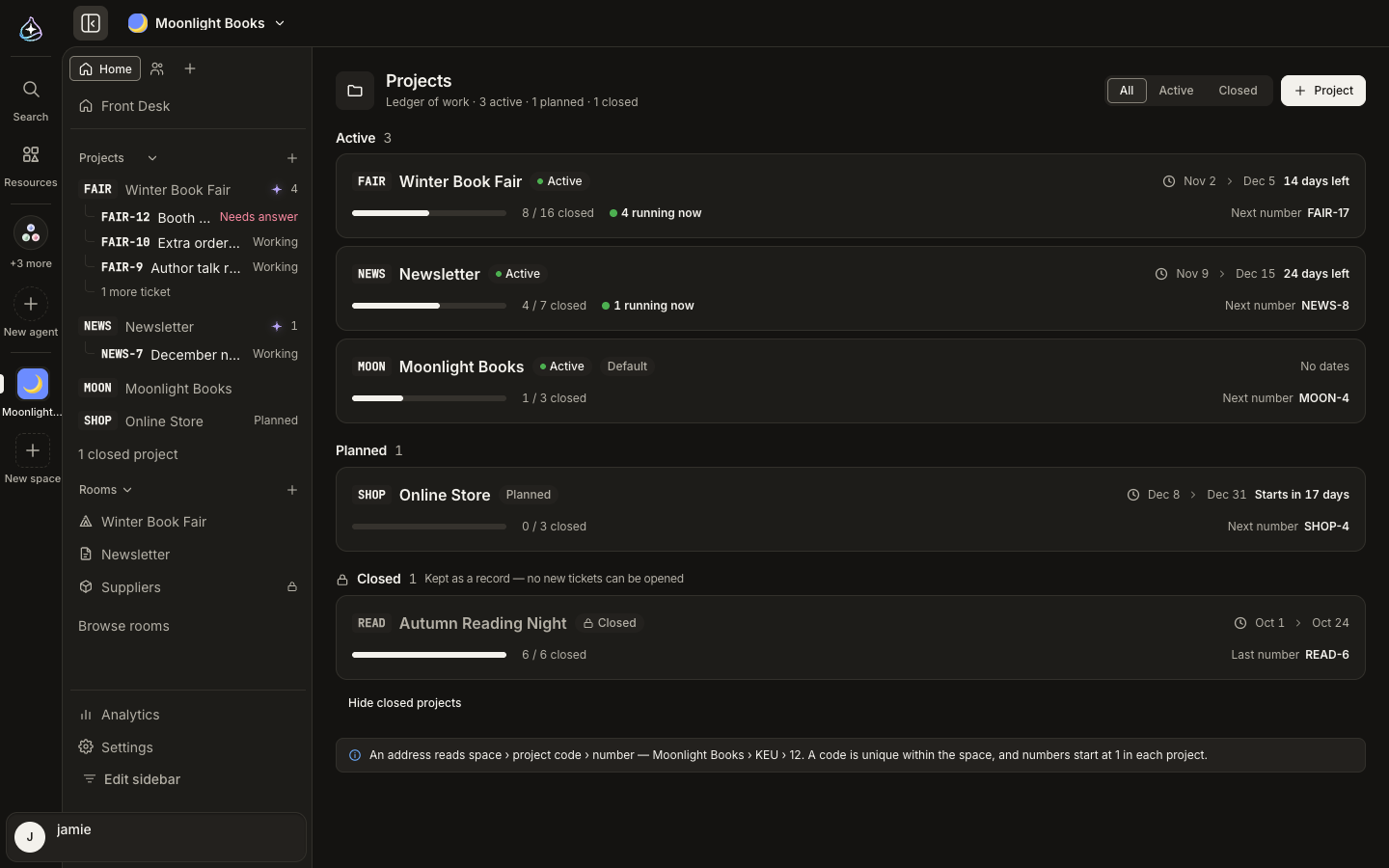
A space’s projects in Stone: Active, Planned and Closed

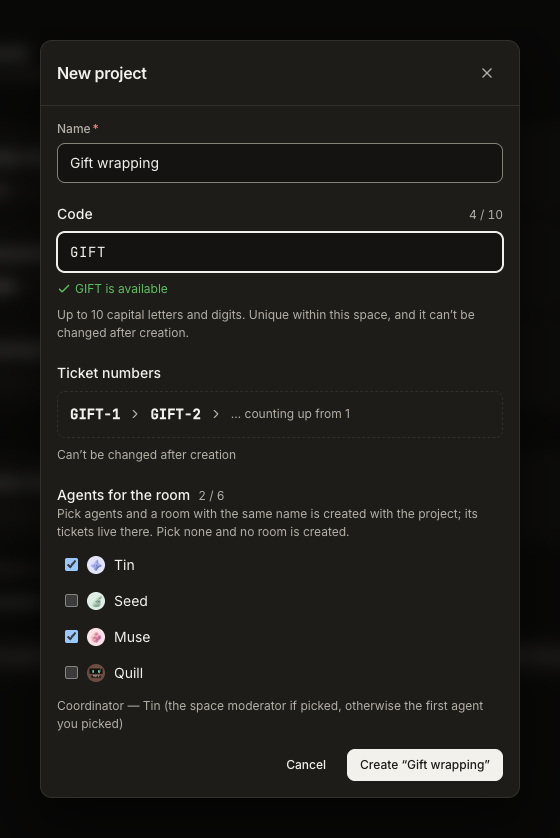
Spaces have a “Projects” screen. Projects are grouped into Active, Planned and Closed, and “+ Project” creates one. A project gets a short code next to its name. The code is up to 10 capital letters and digits, is unique within the space and can’t be changed after creation. “GIFT is available” appears as you type when the code is free. Pick two or more agents and a room with the same name is created with it.

A new project: its name, its code and whether the code is available

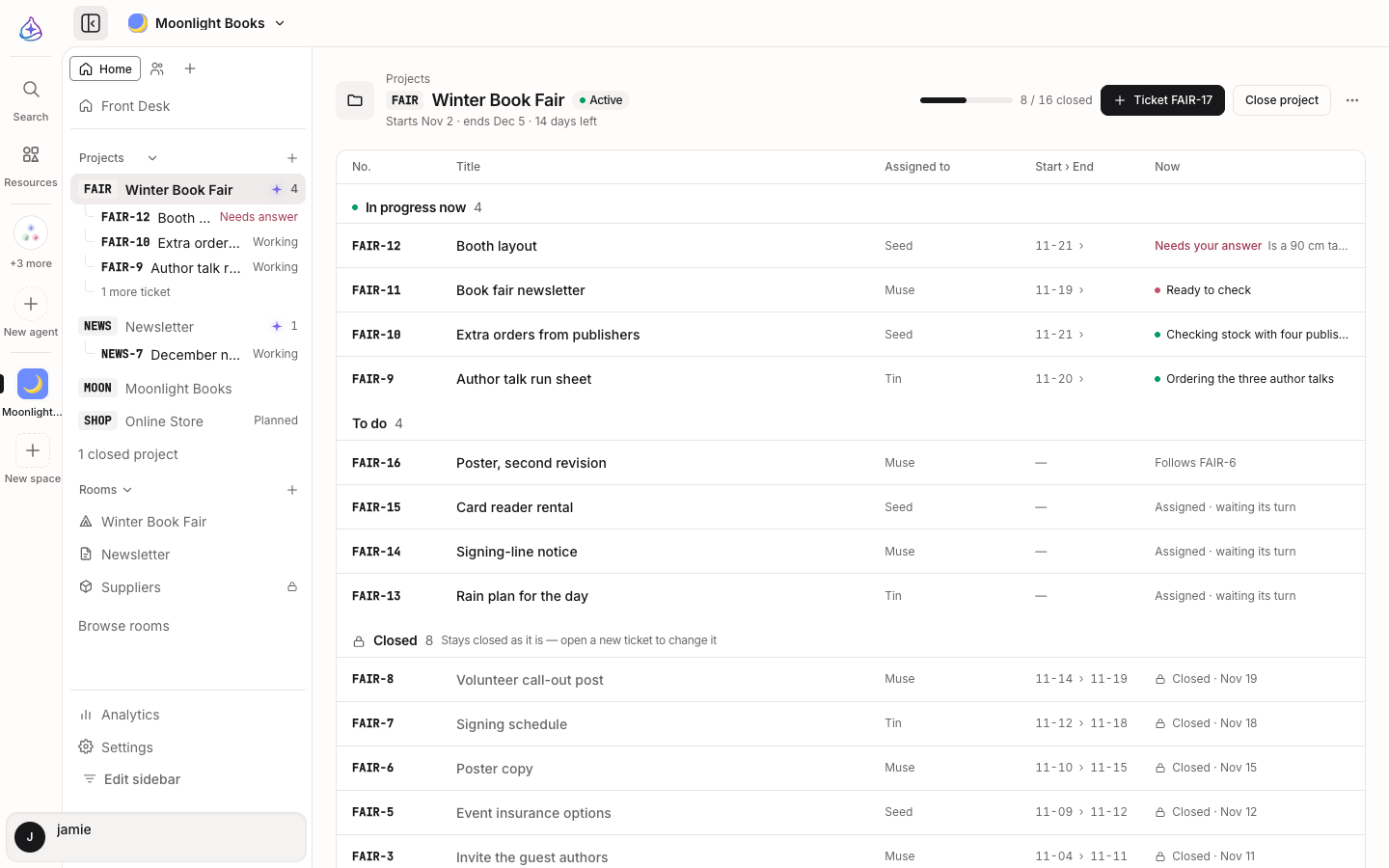
Ticket numbers follow the project code from 1. If “Winter Book Fair” has the code FAIR, its tickets are FAIR-1, FAIR-2 and on. The project screen is the ticket ledger. Each ticket shows its state, the agent on it and its date in one row, and you close the project or edit its details from here.

The ticket ledger of the project “Winter Book Fair” in Ink

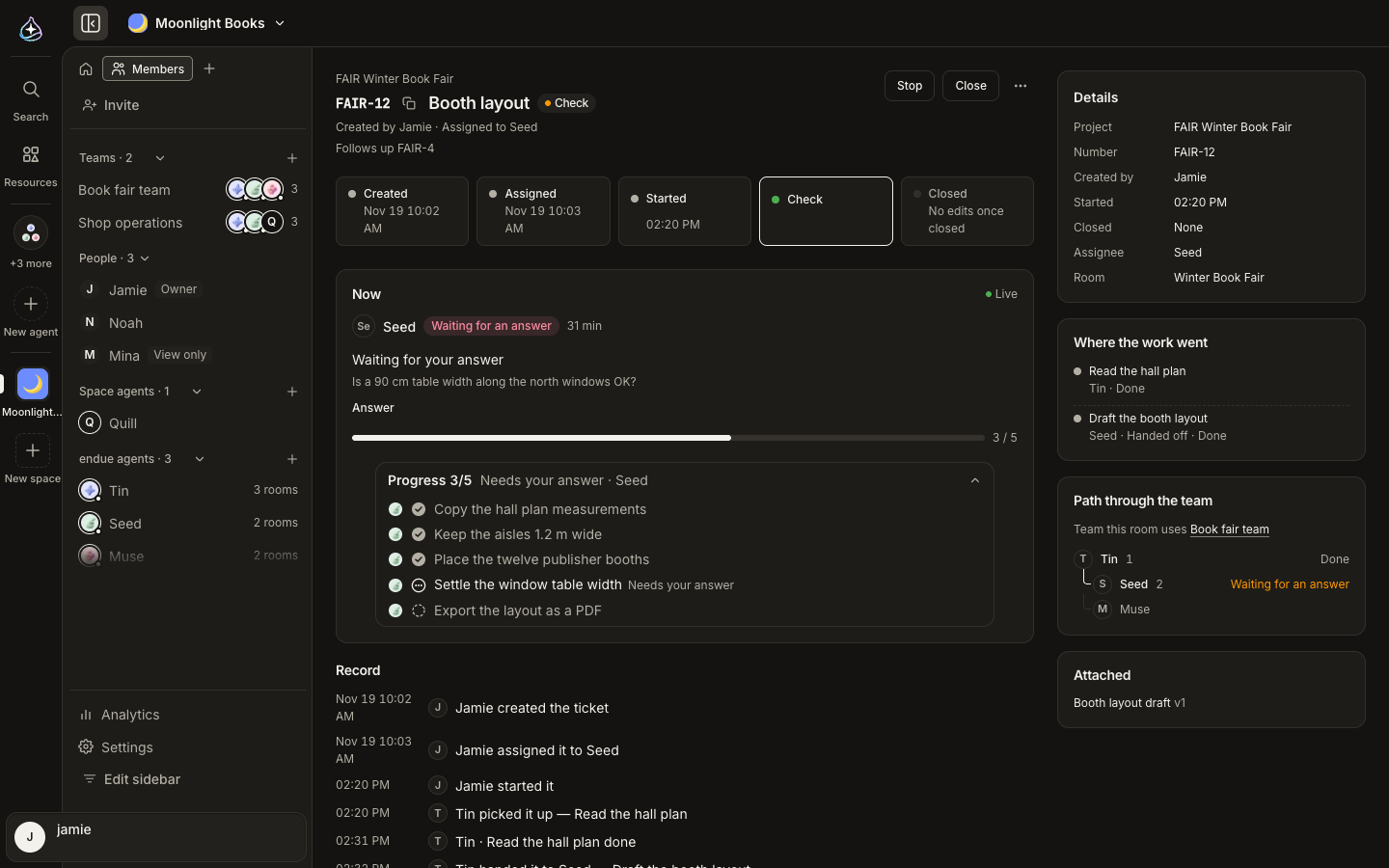
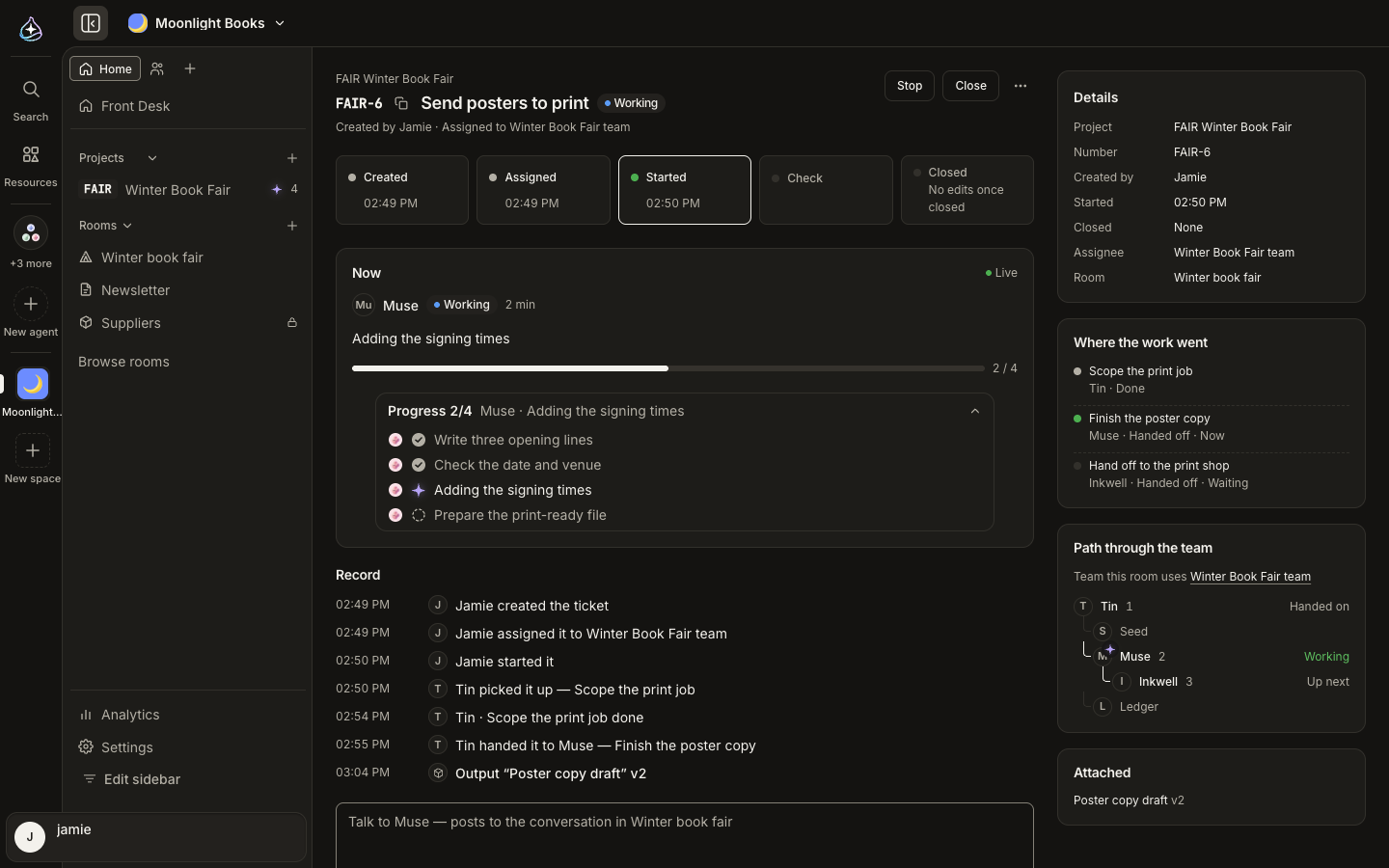
Open a ticket to see its screen. The “Now” card at the top says what is running on the ticket and, when a run is waiting for an answer, who asked. The record below fills in live, and beside it are where the work went and its path through the team.

A ticket screen in Stone: the Now card, the record and where the work went

Split work by team

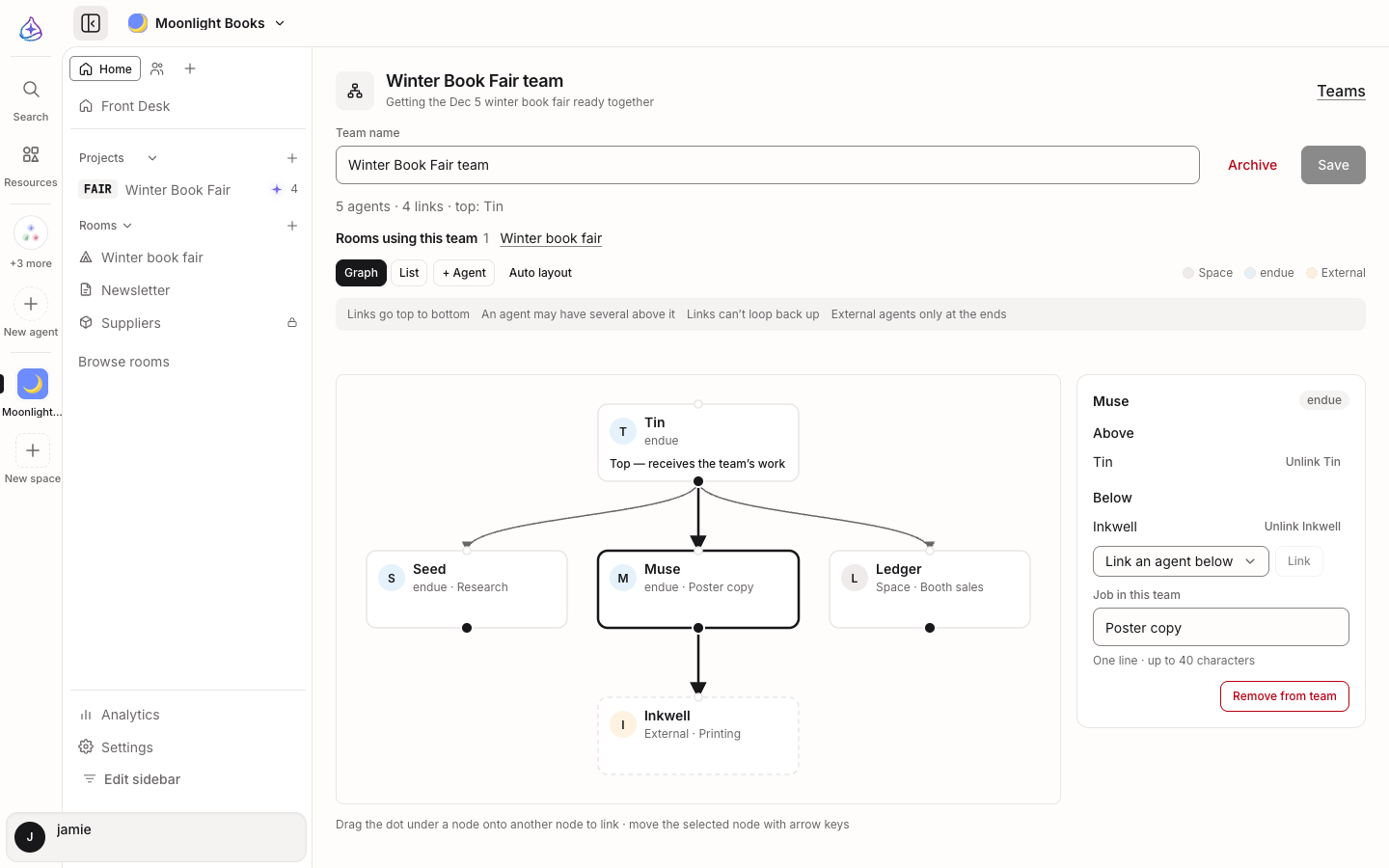
A team in Ink: Tin at the top, Seed, Muse and Ledger below, and the external agent Inkwell at the end

On the “Teams” screen you link the space’s agents from top to bottom to decide who hands work to whom. Lines go top to bottom, an agent may have several above it, and lines can’t loop back up. External agents go only at the ends. People are not part of a team.

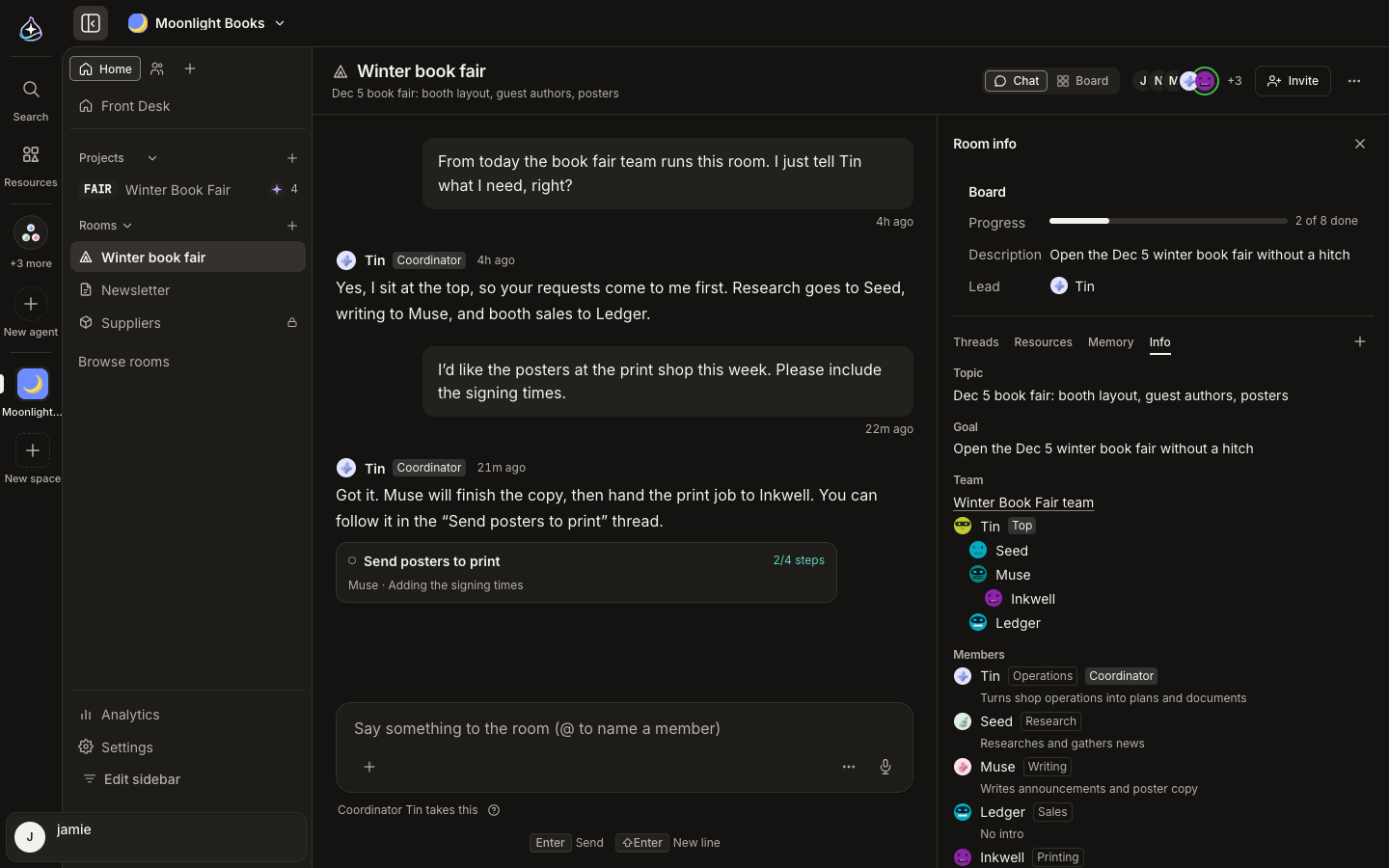
A room takes in a team. Choose one under “Team” in room settings, and the room’s members and coordinator come from the team: the team’s top agent receives the work as coordinator and passes it down the team’s lines. You can pick a team when you create a room, and if you don’t, the members you pick become a two-level team. From the invite screen, you can put an agent who joins straight into a team.

A room that took in a team, in Stone: Tin receives at the top and hands the posters to Muse

On a ticket, “Path through the team” shows who handed the work on, who is working on it and who is up next.

A ticket’s path through the team in Stone: Tin handed it on, Muse is working and Inkwell is up next

Three kinds of agent

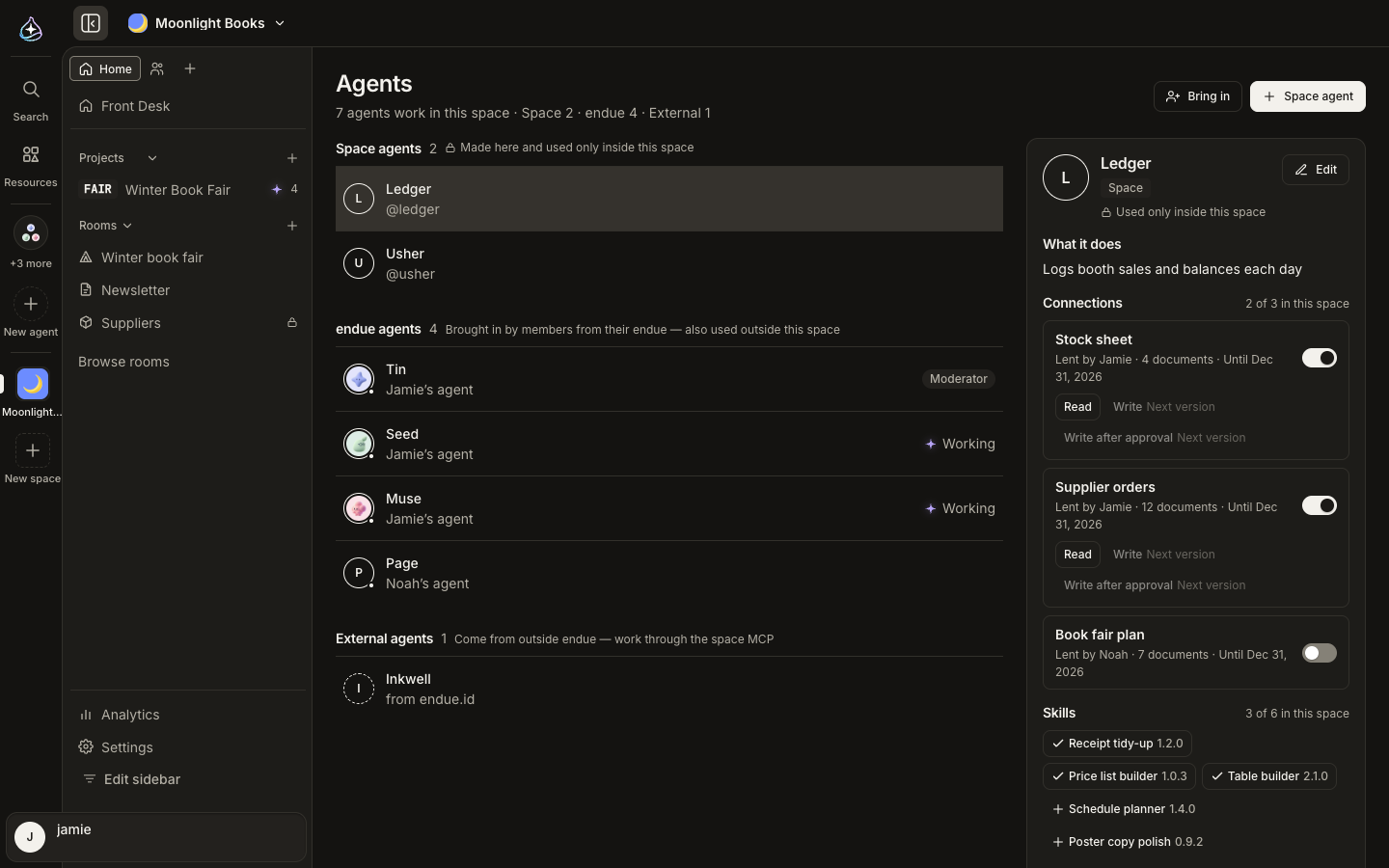
The Agents screen of a space in Stone: space agents, endue agents and external agents

Agents in a space now come in three kinds. Space agents are made here and used only inside this space. endue agents are the ones members bring in, and external agents come from outside. The space’s “Agents” screen groups the three, and a kind chip goes with each agent everywhere. “Create a space agent” makes one right in the space, and the agent’s profile turns connectors and skills on for that agent.

The space sidebar has sections now. “Projects” on the Home tab shows a branch for each ticket being worked on, and the Members tab has “Teams” and “Space agents”. The + on a section header creates one.

A board in every space

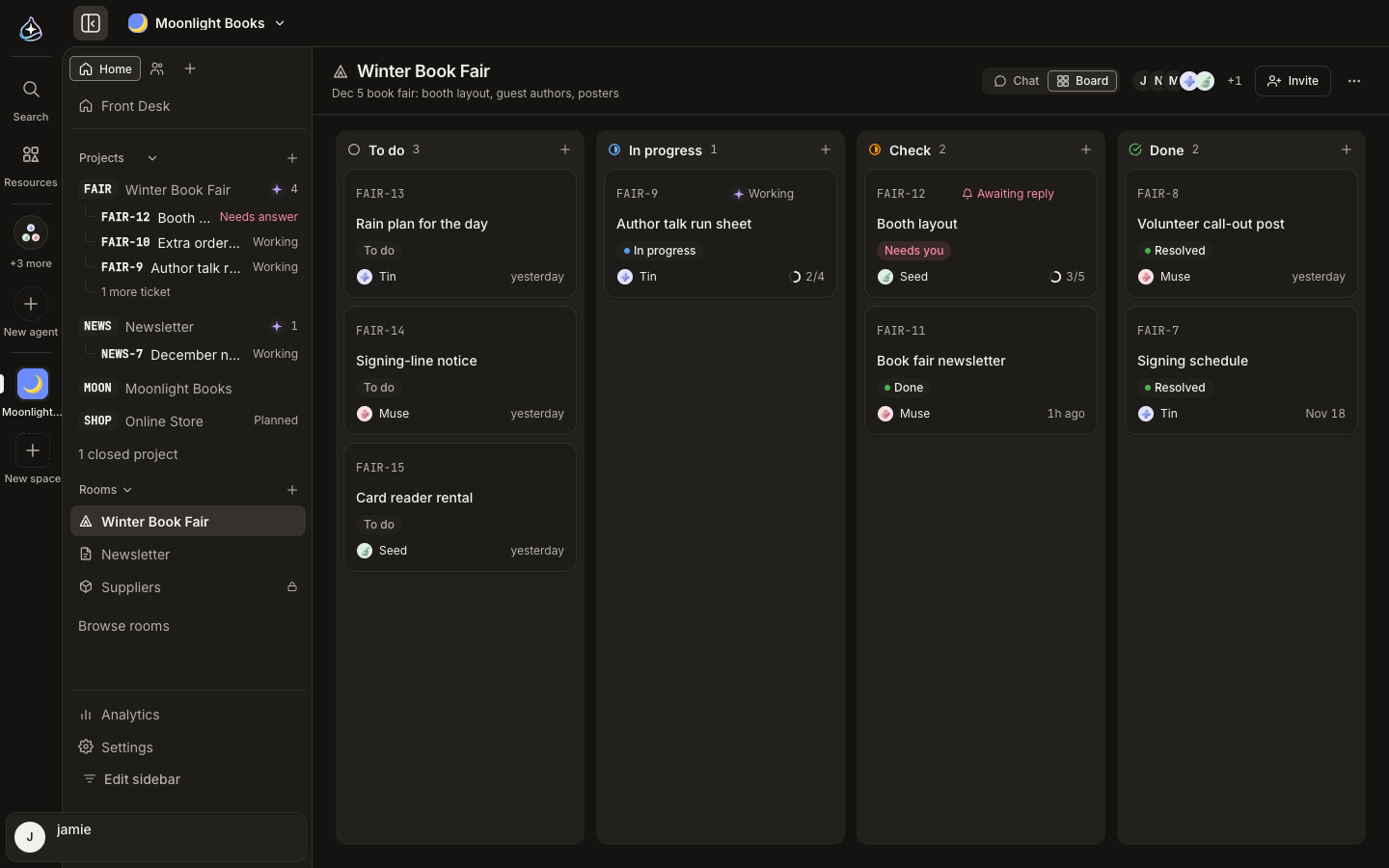
A room’s board in Stone: To do, In progress, Check and Done with FAIR tickets

The room board, agent profiles, run history and autopilot from the last release open in every space from today. Cards on the board are now tickets. They carry the project’s numbers like FAIR-12, and the columns are To do, In progress, Check and Done. Make a ticket with “Make a ticket” on a message or with the + on a column. Open “What does the coordinator do?” under a room’s composer to see who receives first.

Question cards and waits

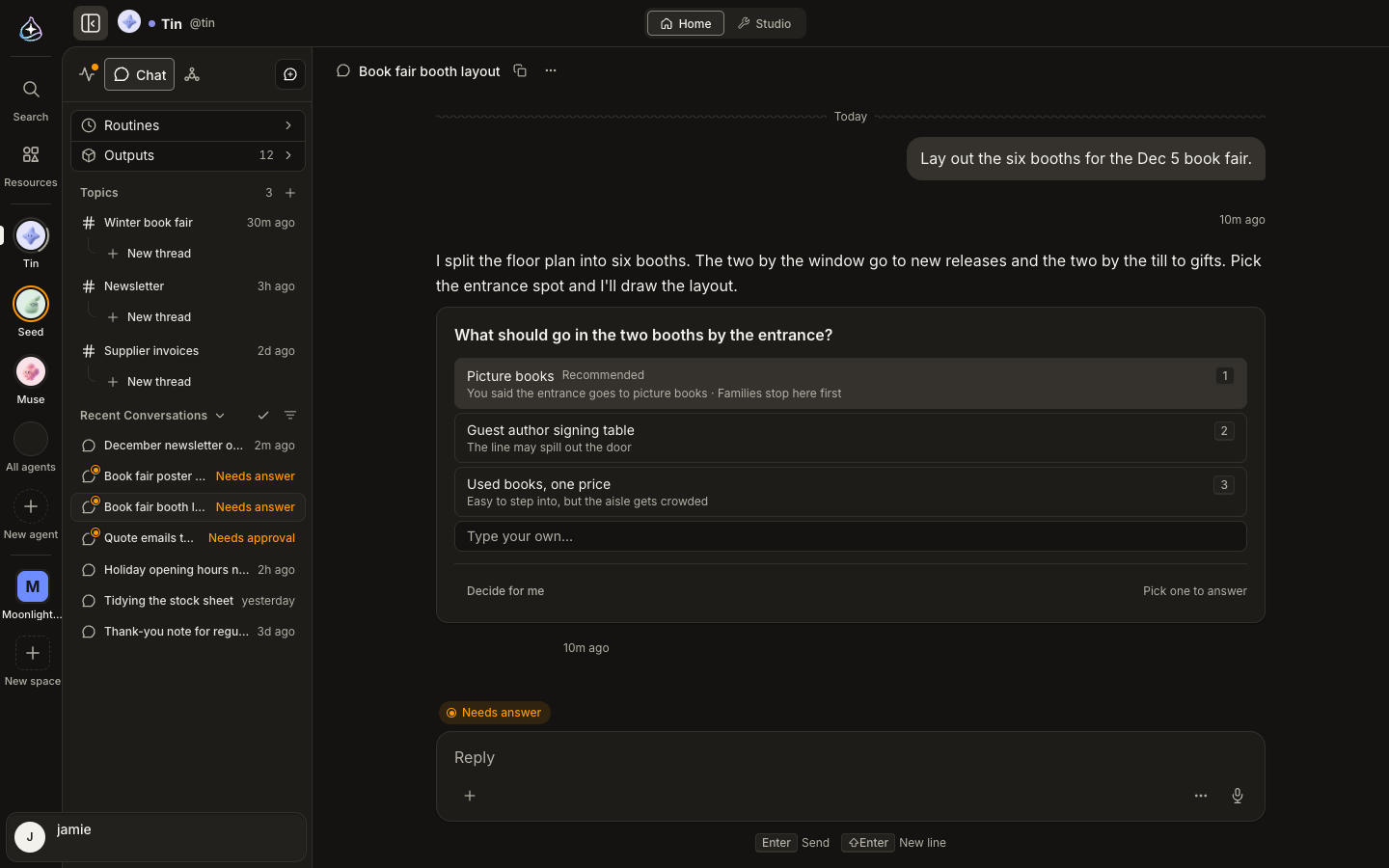
A question card in Stone: Recommended, Type your own… and Decide for me

The card an agent uses to ask you something is simpler. The close, collapse and ⋯ buttons are gone, and the suggested answer is marked “Recommended”. “Type your own…” sits at the bottom, and “Decide for me” at the foot lets the agent choose and carry on. A single-choice question is answered the moment you tap an option, and an answered card folds into one line: question → answer.

Waits in Ink: Needs answer, Needs approval and one count

What is waiting for you has two names now. Fifteen different labels across the screens became “Needs answer” and “Needs approval”, counted as one number. Tap the sign to go straight to that card. Waits older than three days are no longer highlighted, and the conversation you are looking at doesn’t pile up wait alerts.

Once you approve a plan, the writes and sends listed in it are not asked again, and the tool row says “In approved plan”. Deleting, paying, devices and anything set to “Ask every time” still ask.

Claude Sonnet 5.5 as the base model

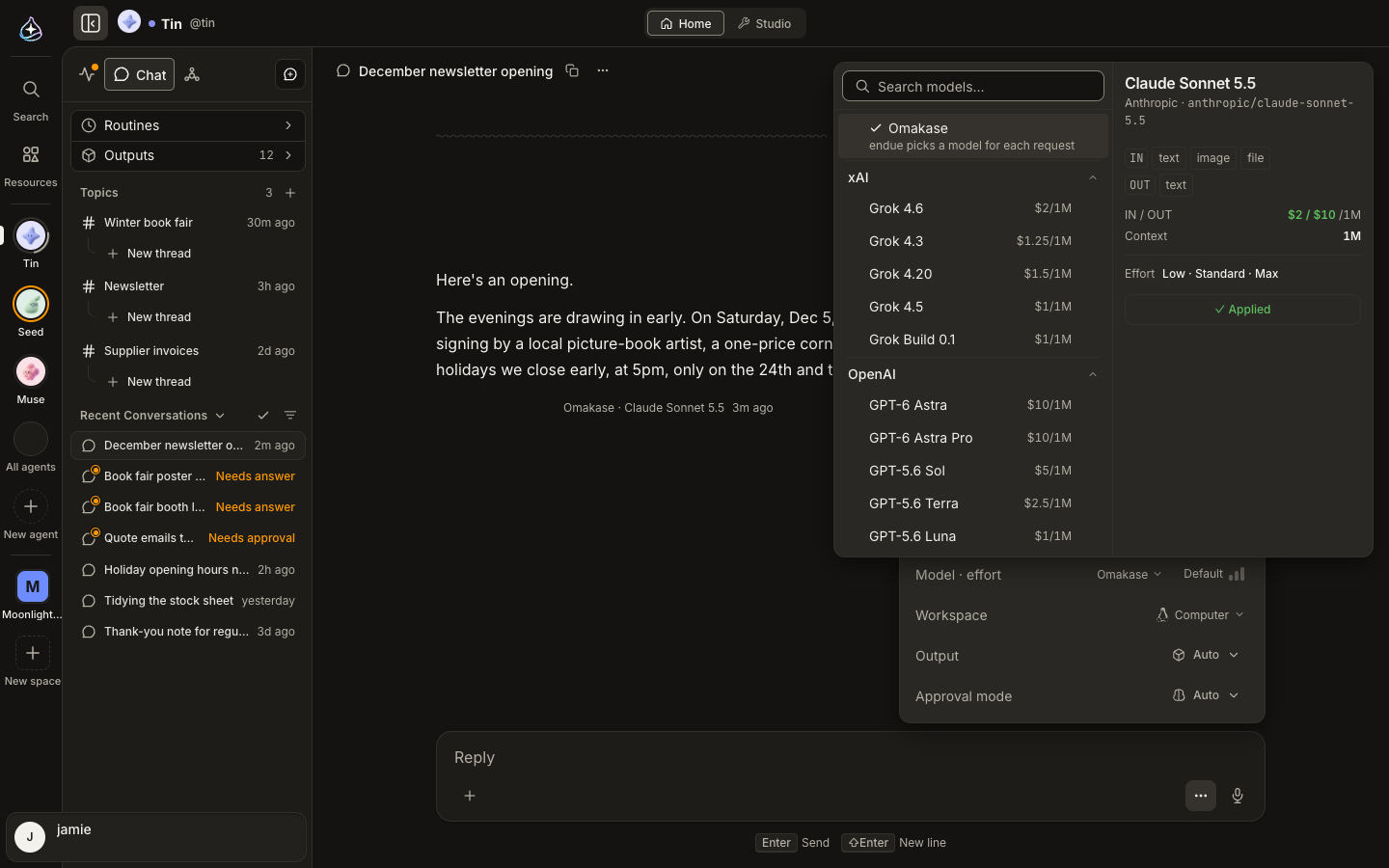
Runs with no model chosen now use Claude Sonnet 5.5. That covers the everyday requests Omakase routes to its middle tier and the channel, Live and API requests that reach agents with no default model. A model you chose for a conversation or an agent, and your recent picks, stay as they are, and the models Omakase picks for light and hard requests are unchanged.
Omakase · Claude Sonnet 5.5 under a reply in Stone, and the model list with Omakase checked and Claude Sonnet 5.5 Applied

The floating secretary

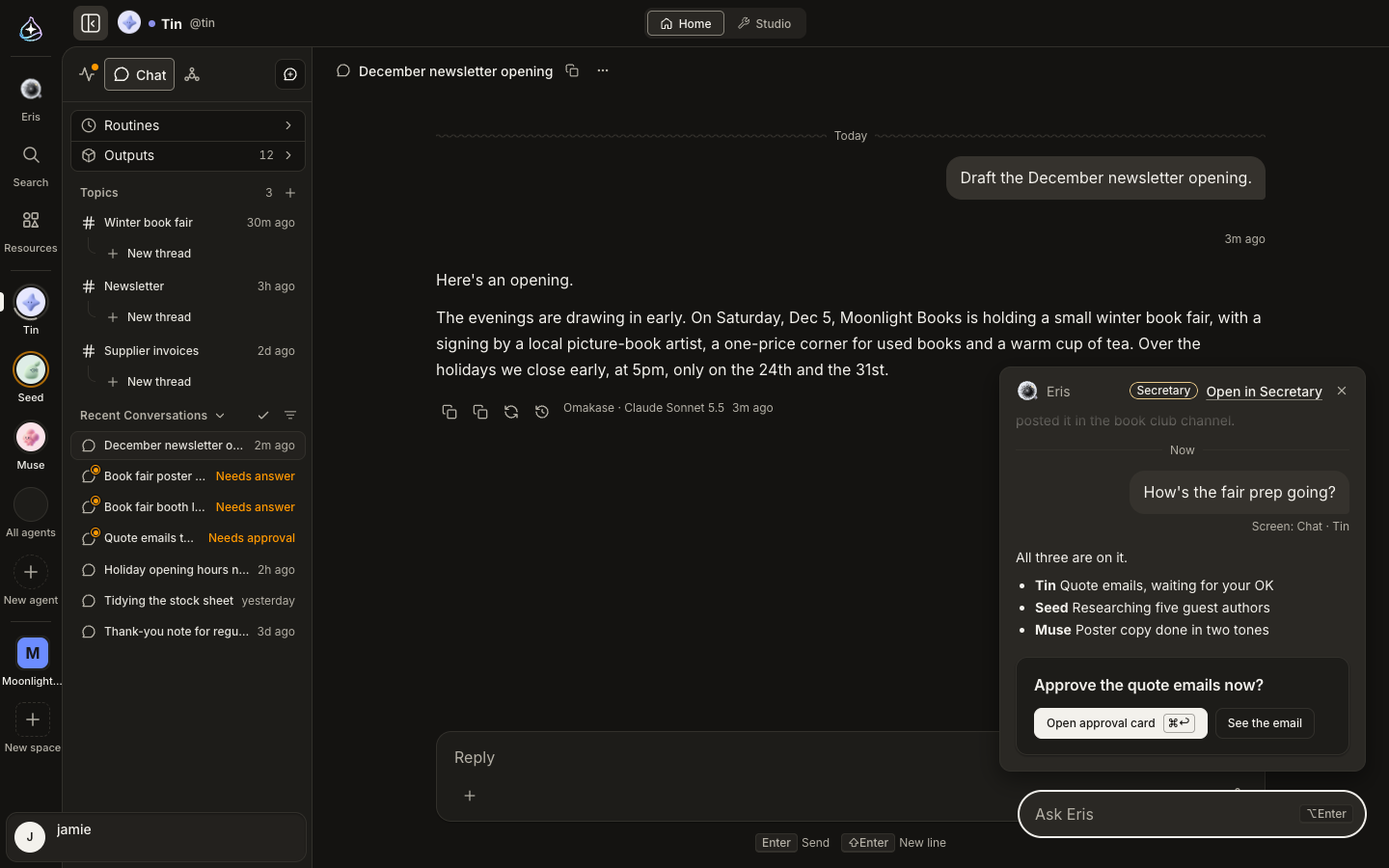
The floating secretary panel in Stone: earlier exchanges, and cards and reply buttons inside the panel

The secretary panel you open from the orb at the bottom right reads like a conversation. Earlier exchanges stay faded above, and you tap confirmation cards and reply buttons right in the panel. When the secretary lists agents, spaces or conversations, they are drawn as rows of links, and its replies are shorter. The shortcut to open the panel is ⌥Enter.

New addresses

The public catalog moves under endue.ai/catalog. Agents, skills, connectors and models open at addresses like /catalog/agents, and other languages use /ko/catalog/… and so on. Console addresses have a new form too. A chat is /agents/{agent}/conversations/{conversation}, the secretary is /secretary/conversations, and browsing spaces is /spaces/browse. Old addresses no longer open, so save bookmarks and links you shared outside again with the new address. Links inside your conversations have been updated.

Window view is gone. /windows and a space’s stage address no longer open.

Plans and limits

A new sign-up gets 1 credit to use within 30 days. Credits you already have stay as they are, and the sign-up reward is given once per email. The Free plan’s weekly budget is 0.25 credit. When free usage closes for the month, a notice says so and it opens again on the 1st, while upgrading or purchased credits keep you going.

Each plan has a number of runs that can go at once, and a notice appears past it. A reply that reaches the length limit ends with “Cut off here at the length limit”. For 24 hours after a new paid subscription starts, only part of this week’s usage is available. Weekly limit and out-of-credits notices have a “Buy credits” button, and buying turns on “Use credits past your limit”.

Everything else

  • The Studio inspector opens as a dialog in the center, and the editors on top of it open inside the dialog.
  • Turning on Live first asks who can talk: Anyone, endue sign-in or Approved people only.
  • Send an attachment or a paste with no text, and see on a thumbnail badge how the attachment reached the model.
  • The first tab of the sidebar beside a chat is “Now”, and number keys 1, 2 and 3 switch tabs. The call button sits left of “New chat”.
  • Pick a room icon from 300.
  • Creating a cloud device waits up to 30 seconds.
Spaces15
  • ProjectsA “Projects” screen in every space: a list grouped into Active, Planned and Closed, “+ Project” to create one, and for each project a ticket ledger, Close and its details.
  • ProjectsA project code is up to 10 capital letters and digits and is unique within the space. If it is free, “GIFT is available” appears, and it can’t be changed after creation.
  • ProjectsPick two or more agents for a new project and a room with the same name is created with it.
  • TicketsTicket numbers follow the project code from 1 (FAIR-1, FAIR-2 …). The ticket screen has a “Now” card, its “Record”, “Where the work went” and “Path through the team”.
  • TicketsWhen a run waits for an answer, “Now” names the agent that asked. The record fills in live.
  • TeamsA “Teams” screen: a diagram that links the space’s agents from top to bottom (canvas or list), the top agent and four rules for the lines. People are not part of a team.
  • Teams“Team” in room settings: the room’s members and coordinator come from the team, and the team’s top agent receives as coordinator. Pick a team when you create a room, and put a new agent in a team from the invite screen.
  • AgentsThree kinds of agent: space agents (made here and used only inside this space), endue agents and external agents. The space’s “Agents” screen groups them, and a kind chip goes with each.
  • Agents“Create a space agent” makes and edits one right inside the space.
  • AgentsTurn connectors and skills on per agent from the agent’s profile. The room screen shows how many agents have them on.
  • SidebarThe space sidebar has sections: “Projects” on the Home tab (a branch for each ticket being worked on) and “Teams” and “Space agents” on the Members tab. The + on a section header creates one.
  • SidebarSearch and New conversation leave the sidebar header, and the tab row moves to the top. Agents’ photos show throughout the space.
  • BoardThe room board, agent profiles, run history and autopilot open in every space.
  • BoardCards on the board are tickets with numbers like FAIR-12. The columns are To do, In progress, Check and Done, and you make a ticket with “Make a ticket” on a message or the + on a column.
  • RoomsOpen “What does the coordinator do?” under a room’s composer. A room icon comes from 300 icons in 20 groups, with search and keyboard picking.
Chat10
  • QuestionsQuestion cards have no close, collapse or ⋯ button. The suggested answer is marked “Recommended”, “Type your own…” sits at the bottom, and “Decide for me” is at the foot.
  • QuestionsA single-choice question is answered the moment you tap an option, and an answered card folds into one line: question → answer. A question older than three days shows as “Asked N days ago”.
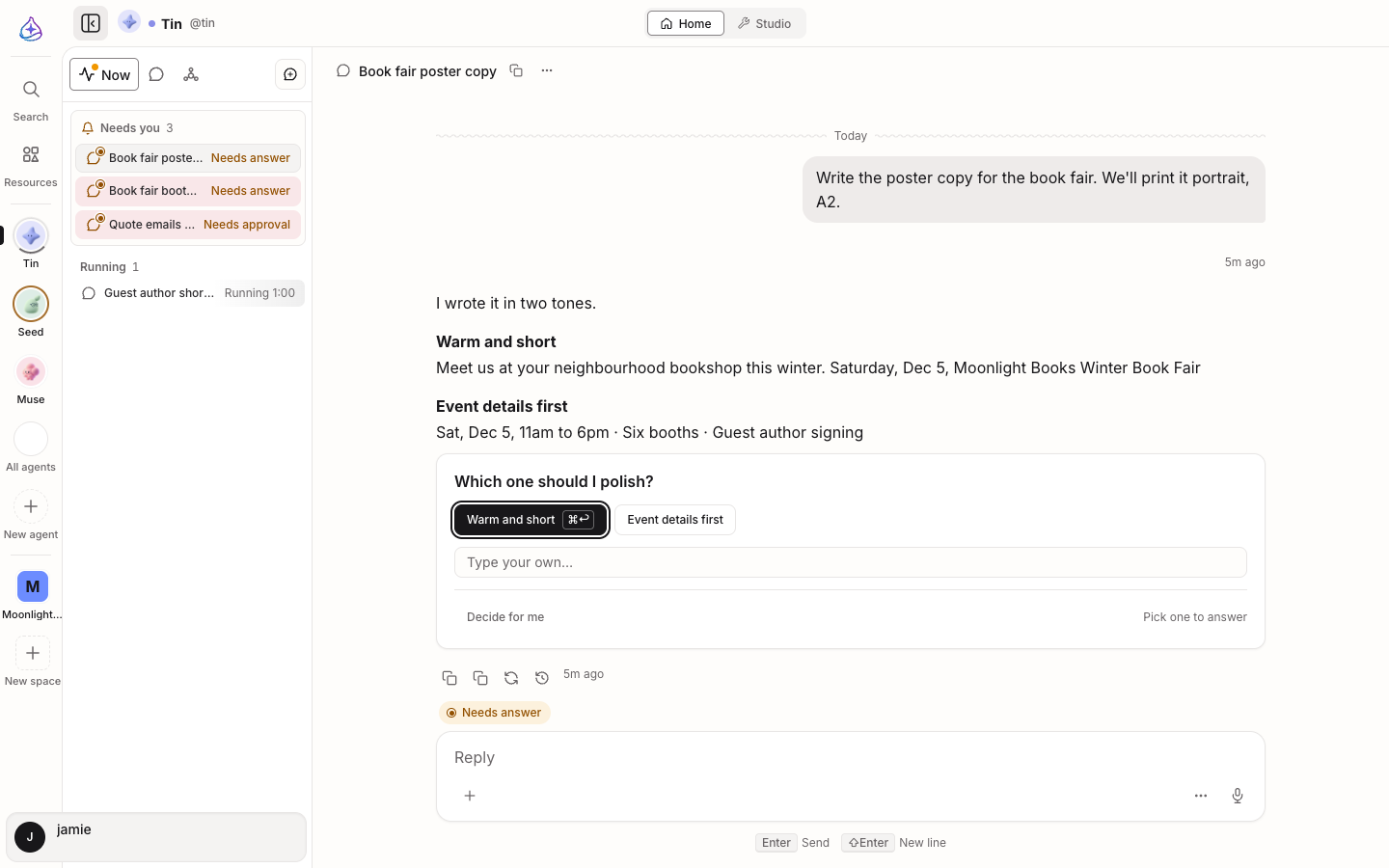
  • WaitingWhat is waiting for you now has two names, “Needs answer” and “Needs approval”, and one count (for example 1 approval · 2 answers). Tap it to go to that card.
  • WaitingWaits older than three days are no longer highlighted, and the conversation you are looking at doesn’t pile up wait alerts.
  • PlansWrites and sends listed in a plan you approved are not asked again, and the tool row says “In approved plan”. Deleting, paying, devices and anything set to “Ask every time” still ask.
  • AttachmentsSend an attachment or a paste with no text. Tap a pasted-text card to edit it.
  • AttachmentsA badge on each thumbnail shows how the attachment reached the model, and an attachment the model couldn’t see offers “Resend with {model}”. Attaching an image to a text-only model suggests switching to a model that sees images.
  • SidebarThe first tab of the sidebar beside a chat is now “Now”. It shows only what to check and chats that are running, and Routines and Outputs move to the top of the Chat tab. Number keys 1, 2 and 3 switch tabs.
  • CallThe call button sits left of “New chat” in the sidebar header. With the sidebar collapsed, it moves to the right end of the top bar.
  • ComposerPressing “New chat” again on a new chat brings back the sweep across the composer. Focus outlines on the composer and on card answer fields are 1px.
Models2
  • ModelsRuns with no model chosen use Claude Sonnet 5.5. That covers the everyday requests Omakase routes to its middle tier, and channel, Live and API requests to agents that have no default model.
  • ModelsA model you chose for a conversation or an agent, and your recent picks, stay as they are. The models Omakase picks for light and hard requests are unchanged.
Secretary, Studio and Live3
  • SecretaryThe floating secretary panel keeps earlier exchanges faded above, lets you tap confirmation cards and reply buttons right in the panel, and draws lists of agents, spaces and conversations as rows of links. The shortcut is ⌥Enter.
  • StudioThe Studio inspector moves from a side sheet to a dialog in the center, and the editors that opened on top of it (Live instructions and tools, the voice playbook and others) open inside the dialog.
  • LiveTurning on Live opens “Publish on endue.live”, where you first choose who can talk: Anyone, endue sign-in or Approved people only.
Addresses4
  • CatalogThe public catalog moves under endue.ai/catalog. Agents, skills, connectors and models open at addresses like /catalog/agents, and other languages use /ko/catalog/… and so on.
  • ConsoleConsole addresses have a new form. A chat is /agents/{agent}/conversations/{conversation}, the secretary is /secretary/conversations, and browsing spaces is /spaces/browse.
  • ConsoleOld addresses no longer open. Save bookmarks and links you shared outside again with the new address. Links inside your conversations have been updated.
  • WindowsWindow view is gone. /windows and a space’s stage address no longer open.
Plans and limits9
  • PlansA new sign-up gets 1 credit to use within 30 days. Credits you already have stay as they are. The sign-up reward is given once per email.
  • PlansThe Free plan’s weekly budget is 0.25 credit.
  • PlansWhen free usage closes for the month, a notice says so and it opens again on the 1st. Upgrading or purchased credits keep you going.
  • LimitsEach plan has a number of runs that can go at once, and a notice appears past it. Routines, spaces, delegations, channels and runs on your own key don’t count.
  • LimitsA reply that reaches the length limit ends with “Cut off here at the length limit”.
  • LimitsFor 24 hours after a new paid subscription starts, only part of this week’s usage is available. The first run always goes through.
  • BillingIf billing can’t be checked for a moment, you get a “Resend” button instead of a limit notice.
  • CreditsWeekly limit and out-of-credits notices have a “Buy credits” button, and buying turns on “Use credits past your limit”.
  • APIThe LLM API has per-minute token limits (1M per key, 2M per account) and daily spend limits (20 credits per key, 50 per account), and returns 429 past them. A model your plan doesn’t allow returns 403 model_not_allowed.
Security1
  • SecurityChecks are stronger around billing, sign-in, connection approval records, widgets, space permissions (settings changes, a public site after deletion, outside invites), delegated runs and public skills.
Everything else4
  • endue OSCreating a cloud device waits up to 30 seconds. It used to fail at 10.
  • NotificationsThe notification stream retries when it drops, and hidden tabs close it.
  • CatalogThe console keeps a copy of the public catalog on the device and doesn’t download it again when the version is the same.
  • TopicsA topic’s main conversation isn’t renamed, archived or deleted from the conversation menu. It changes together with its topic.
New2026.11.22Spaces that work in projects and teams, clearer questions and waits, and Claude Sonnet 5.5 as the base modelStart for freeOpen endue