
Serve your agent to many people with endue Live
Give the agent you built an address so other people can use it. What visitors ask is collected in your account, and you decide how far the agent can go when it talks to them. This guide covers opening it up, reading visitor conversations, permissions and cost.
Say you have built an agent that knows your work well. It might be a teaching assistant that answers student questions, or a front desk for the customers of your shop. Now you want other people to use it too. You can’t create an account for each of them, and asking everyone to install an app is a hard sell.
endue Live solves this with one address. Turn on a switch in Studio and your agent gets an endue.live/@handle address. Anyone who opens it can start talking without signing up, and when several people come in at once, each of them gets a separate conversation.
Trying it is faster than reading about it. The three addresses below are agents the endue team keeps Live. Open one and say hello.
- endue.live/@tin Tin, who helps you plan everyday things
- endue.live/@seed Seed, who finds and organizes material
- endue.live/@muse Muse, who helps with writing and ideas
What you get when you go Live
- A front door for many people. One address, and anyone can talk to your agent. The same address works on a desktop and on a phone.
- A record that tells you about your customers. What visitors asked and how the agent answered is collected in your account.
- Permissions that you set. You decide whether the agent is public and how far it can go in a visitor conversation.
- A page in your own style. You choose the intro, the welcome message, the starter buttons and the colors.
The sections below go through them one by one.
What visitors see
Opening the address shows the agent’s page. It has the agent’s name, a one-line intro, starter buttons to tap, and a message box at the bottom. Nobody is asked to sign up or log in.
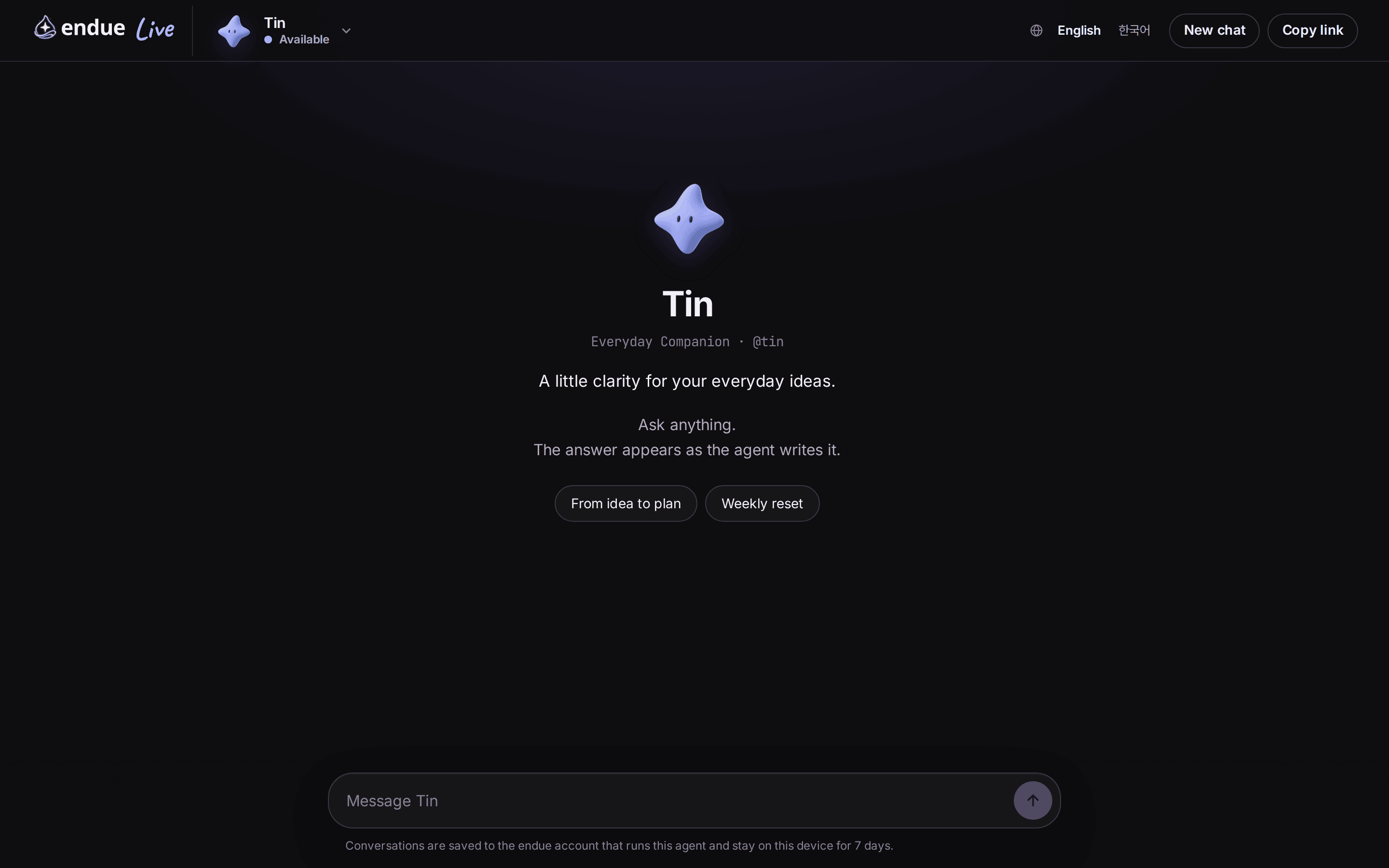
When a visitor sends a question, the answer appears on screen as it is written. A long answer can be stopped midway. Below is a real conversation from endue.live/@tin. The left side is a desktop browser, and the right side is the same address opened on a phone.
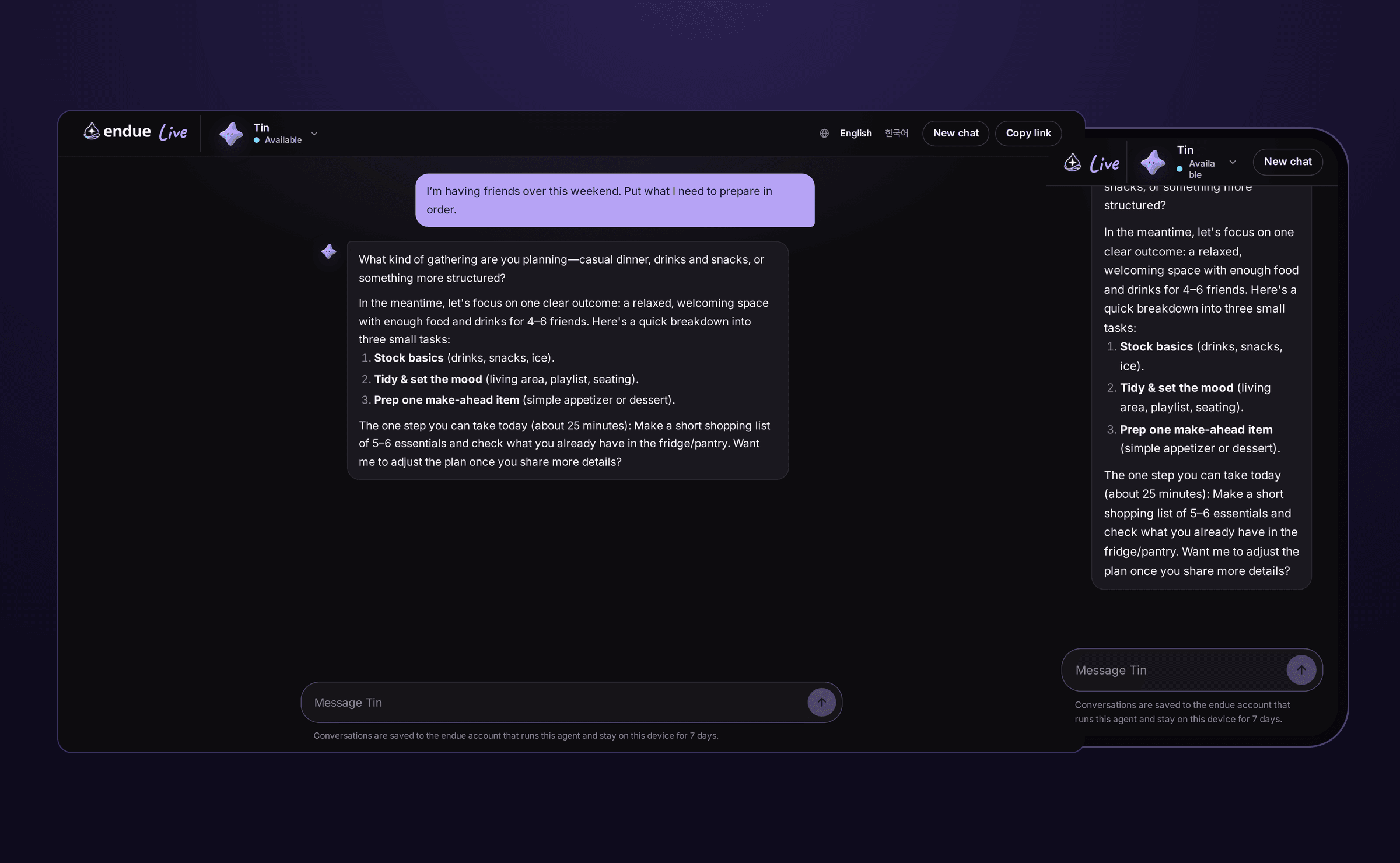
There isn’t much a visitor needs to know.
- Every visitor gets a separate conversation. Nobody sees another person’s questions or answers.
- Coming back on the same device within 7 days picks up the earlier conversation.
- The page text follows the visitor’s browser setting and shows in English or Korean.
How to open it up
It takes three steps.
1. Turn on Live in Studio
Open your agent and switch to Studio at the top. In the “01 Requests come in” column on the left, click Live and a panel opens on the right. Turn on Publish on endue.live. It saves right away and the address appears.
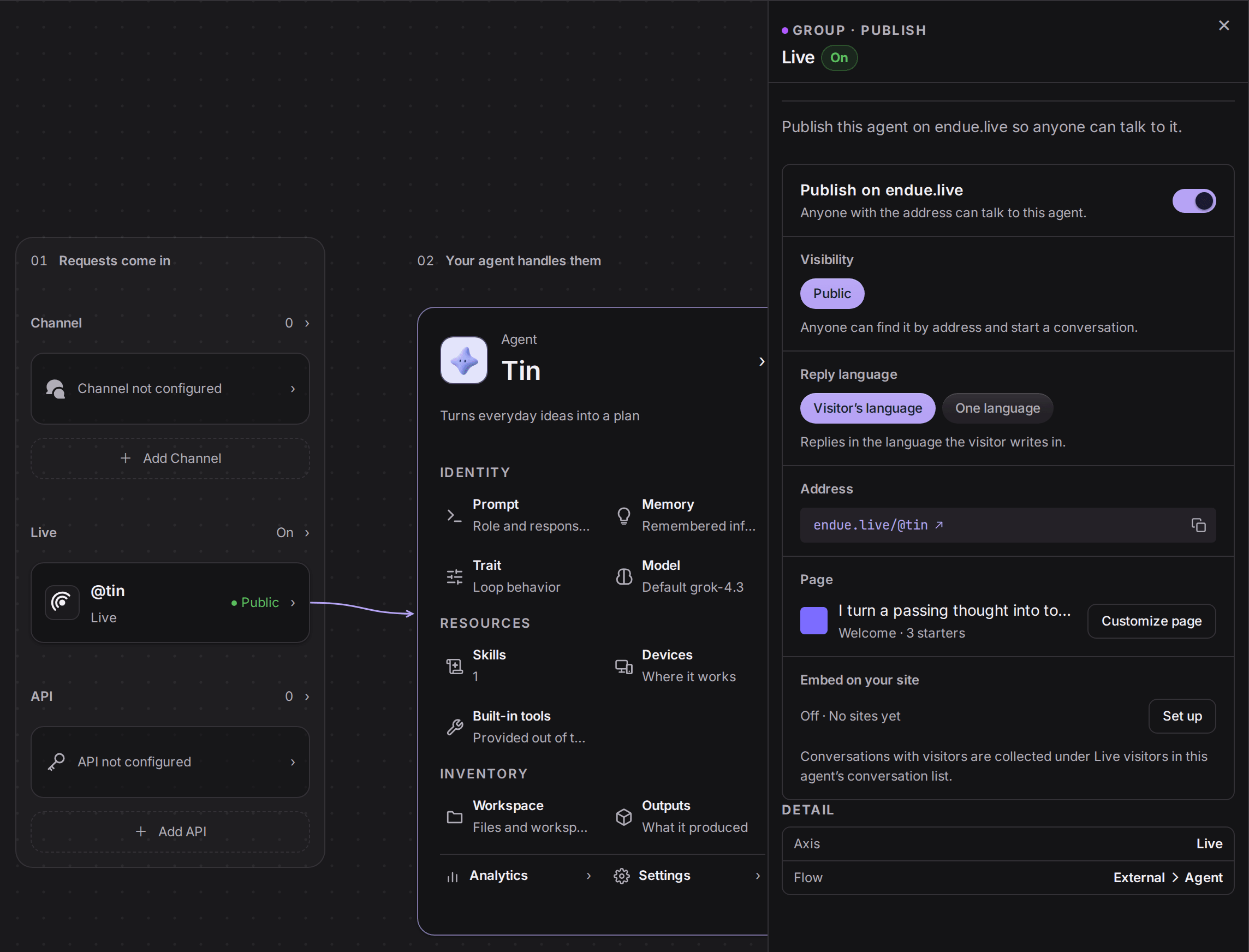
The same panel has Reply language. With “Visitor’s language”, the agent replies in the language the visitor writes in. With “One language”, it always replies in the language you picked, whatever the visitor writes in.
2. Customize the page
Click Customize page in the panel to edit the first screen visitors see. You can set a one-line intro, a welcome message, conversation starters, an accent color, a background and links. English and Korean can be written separately. The preview on the right updates as you type, and changes show on endue.live within a minute of saving.
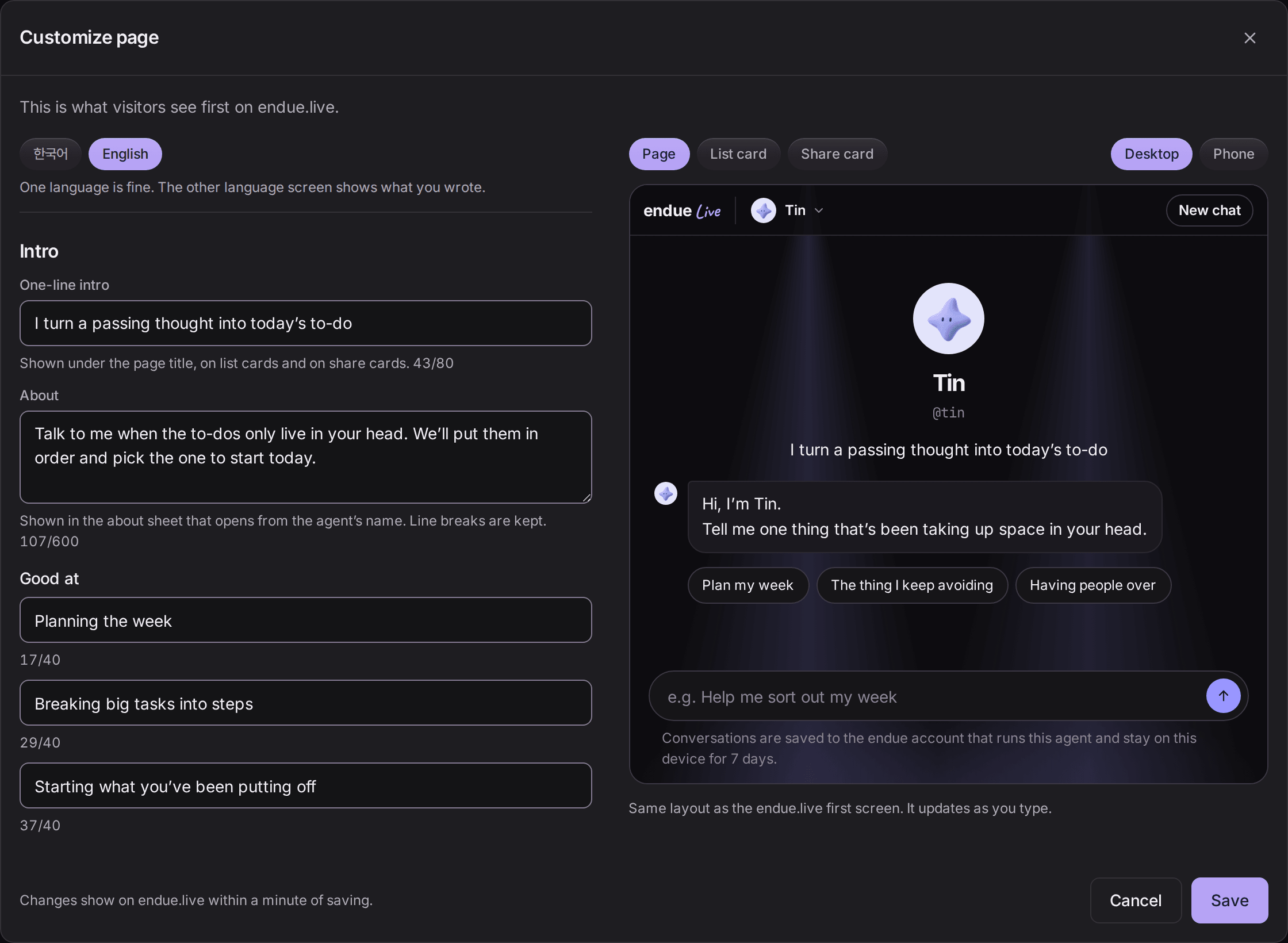
Don’t leave the starters empty. A first-time visitor doesn’t know what to ask. One button does the job of the first question.
3. Share the address
The address is one line: https://endue.live/@handle. Send it in a message, put it in your social profile, or print it as a QR code on a card. If you have a website, you can also put the chat window inside your own pages.
For a screen-by-screen walkthrough of turning Live on, see Share your agent with anyone through one endue Live link.
Get to know your customers
While Live is on, every conversation with a visitor is kept in your account. A group called Live visitors appears in the agent’s conversation list, and each visitor conversation is added as one row. They stay apart from your own conversations with the agent.
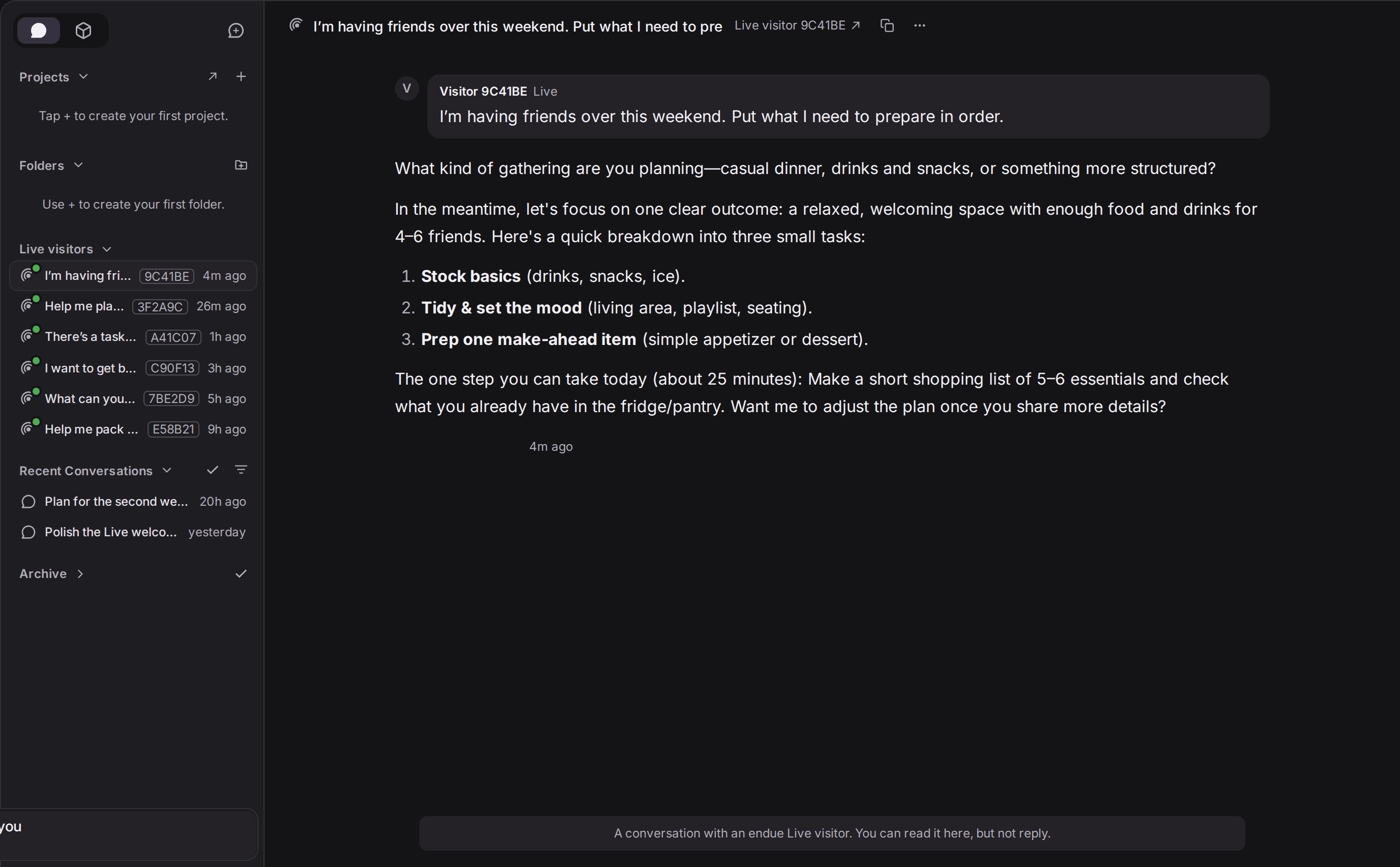
Each conversation carries a six-character alias such as 9C41BE. A visitor’s name, contact details and IP address are not shown, even to the owner. The conversations are read-only.
Reading this list shows you who your customers are.
- What they want to know. Write the answers to frequent questions into the instructions, and turn those questions into starter buttons.
- Where they get stuck. Find a conversation the agent handled badly, fix the instructions, and send the same question again.
- The words they use. Use your customers’ own wording in the intro and the welcome message, and new visitors find it easier to start.
For how much the agent is used, look at the numbers. The Usage tab in Studio shows the conversations this agent answered and the credits it used, split by source. Your own use in the app and the use by Live visitors are counted separately, and you can switch the period between 7, 30 and 90 days.
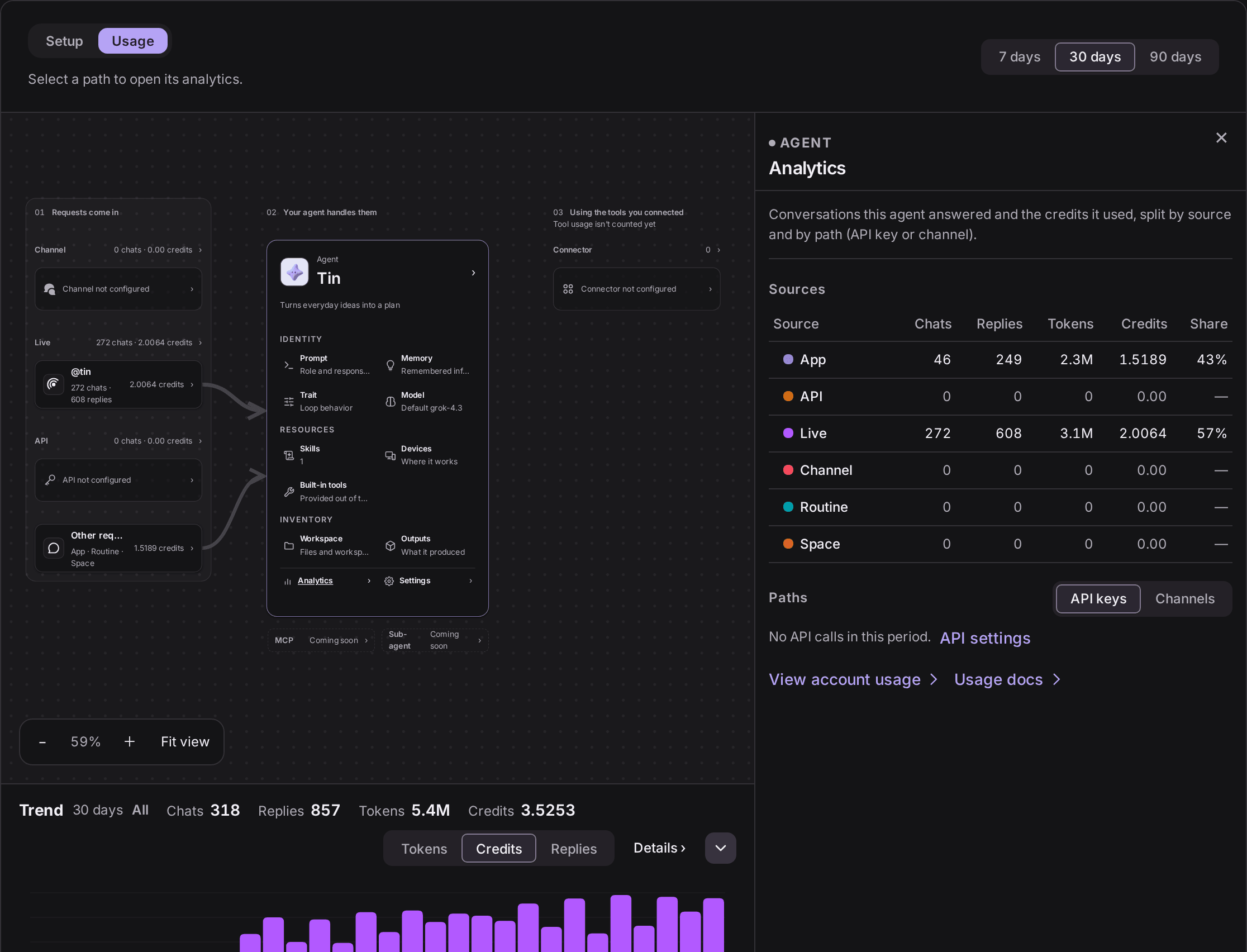
In the screen above, there were 46 conversations in the app and 272 on Live over 30 days. Visitors used the agent almost six times as much as its owner. The total for your whole account is on the Sources tab of the Usage page.
You set the permissions
Opening a door to everyone comes with worries. What if a visitor gets the agent to send email from my account? What if someone digs out my personal information? Live draws a line around visitor conversations.
- On and off. Only the agent’s owner can change the publish switch. Turning it off blocks new messages from that moment and takes the agent off the endue.live list. Turning it back on restores the same address.
- Tools. In a visitor conversation the agent can still look things up with its connected tools. Actions that need approval, such as sending email or deleting something, do not run in visitor conversations. The owner isn’t there to approve them.
- Memory. In a visitor conversation the agent reads only its shared memory. It can’t see the owner’s personal memory, and nothing from the conversation is saved as a new memory.
- Model and cost. Visitors can’t choose a model and don’t pay. The model set on the agent answers, and the usage comes out of the owner’s plan allowance.
- Sending speed. There is a limit on how many messages one visitor can send per minute.
- Other sites. An endue.live page can’t be loaded inside a frame on another site. When you embed the agent on your own site, the window opens only on the sites you registered.
Visibility has one option for now, Public. Anyone who knows the address can come in, and Live agents are also listed on the endue.live home page. There is no setting yet that limits access to specific people.
So check one thing yourself before turning it on: the tools the agent can read from. If a tool that reads your calendar or documents is connected, that content can end up in an answer to a visitor’s question. Connect only tools you are comfortable showing to anyone.
Things to keep an eye on
- Skim the Live visitors conversations once a week. Ten minutes is enough to find the next thing to fix.
- Turn frequent questions into conversation starters.
- In a week when you spread the address widely, check the Usage tab once more. More visitors use more of your allowance.
- If you need a break, turn the switch off. The visitor conversations collected so far stay where they are.
Frequently asked questions
Do visitors need an endue account?
No. They open the address and start talking.
What happens when several people come in at once?
Each visitor gets a separate conversation. All of the usage comes out of the owner’s allowance.
Can I step into a visitor conversation and reply?
For now you can only read them.
Can I tell who a visitor is?
You see a six-character alias only. Names, contact details and IP addresses are not shown, even to the owner.
What if a visitor writes in another language?
With Reply language set to “Visitor’s language”, the agent replies in the language the visitor writes in.
Get started
Turn on the switch in Studio and send the address to one person first. The first conversation they leave will tell you what to fix next.
- Try it as a visitor first: endue.live/@tin
- Put it on your site: Add an agent to your website without building a chat UI