Let your personal assistant hand work to endue agents
Grok Bot, Muse, dots and Claude Duet stay with you all day. Some jobs need a team set up for that one job. How the endue MCP server lets an assistant hand work to endue agents, what stays private, and which assistants can connect today.
On this page
This autumn, always-on personal assistants arrived from almost every lab: Grok Bot from SpaceXAI (formerly xAI), Meta’s Muse, dots in ChatGPT, and Anthropic’s Claude Duet. They stay with you all day, keep track of your plans and take care of small things.
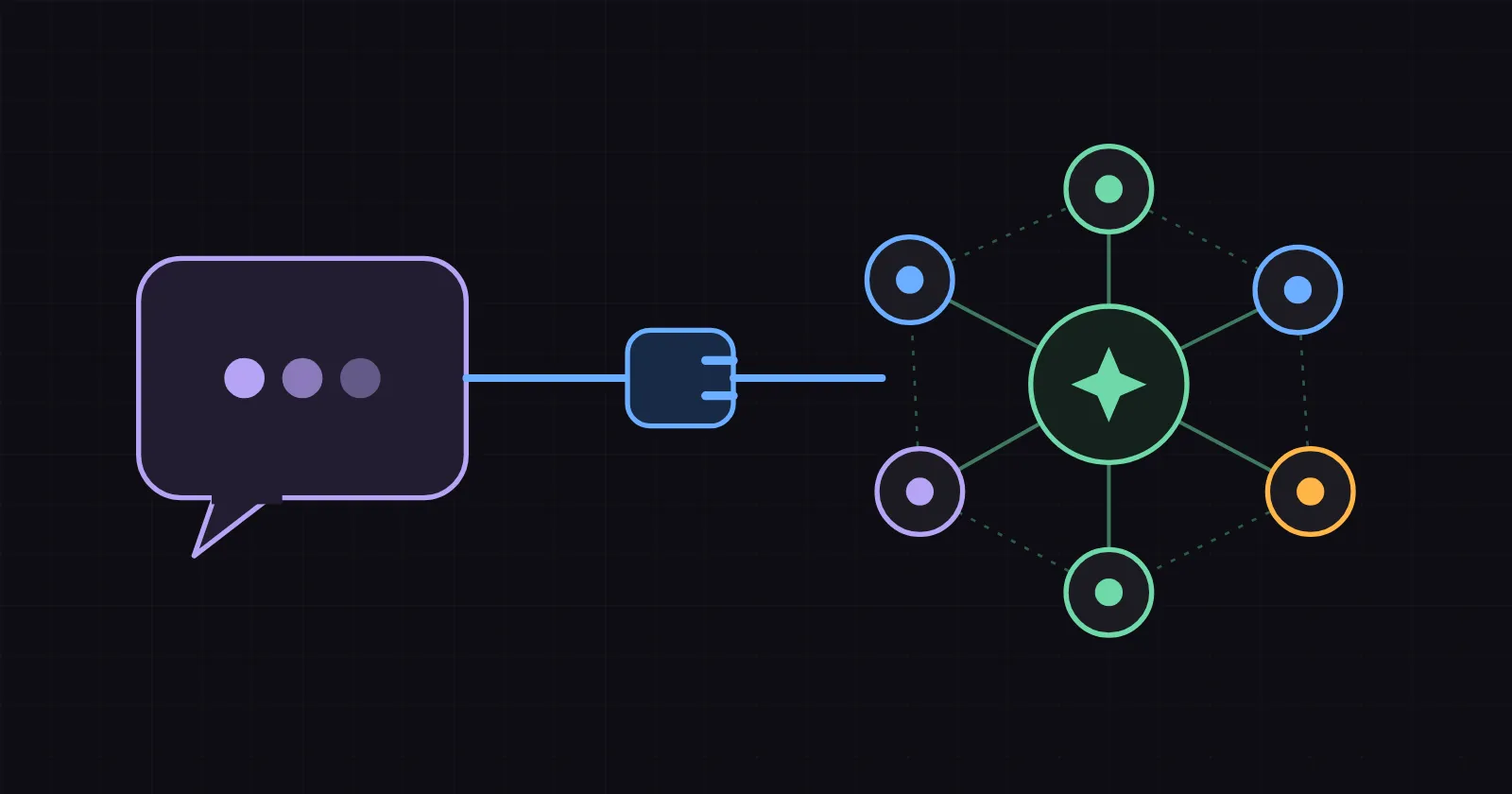
Some jobs need more than a generalist. A weekly market brief wants a researcher who knows your sources, a writer who knows your house style and a reviewer with your checklist. You can build that team once in endue and let your assistant call it when the job comes up. MCP is the plug between the two.
The short version
- Your assistant stays the front door. It knows your day and decides when a job needs specialists.
- endue agents are the specialists. Each one is set up for one job, with its own instructions, model, skills and connectors.
- The plug is the endue MCP server: one URL and one key.
- The inside stays yours. Prompts, memory and connected accounts stay in endue, and sending or deleting still waits for your yes.
1. A front door and a team

In the example, the assistant does what it is good at. It understands the request and decides who does which part. Each endue agent handles one part.
Two details matter in practice. A job that takes longer than about 50 seconds returns a session id first, and the assistant collects the answer later. When the writer wants to send the brief, the request comes to you, and the run waits for your answer.
2. What you build on the endue side
This is where you shape the work.
- Each agent is assembled from parts you choose: instructions with a revision history, a model, skills you write or import from GitHub or GitLab, connectors, and your own MCP or HTTP servers through direct connections.
- What an agent learns builds up. Its memory keeps what it picked up and tidies it over time, and projects give several conversations the same context.
- How the work gets done is yours to decide. Instructions and skills set the method, and schedules let an agent run on its own.
- Room to grow. From the Pro plan the number of agents is unlimited, and from Max, API and skill calls are unlimited too (pricing).
3. What crosses the line
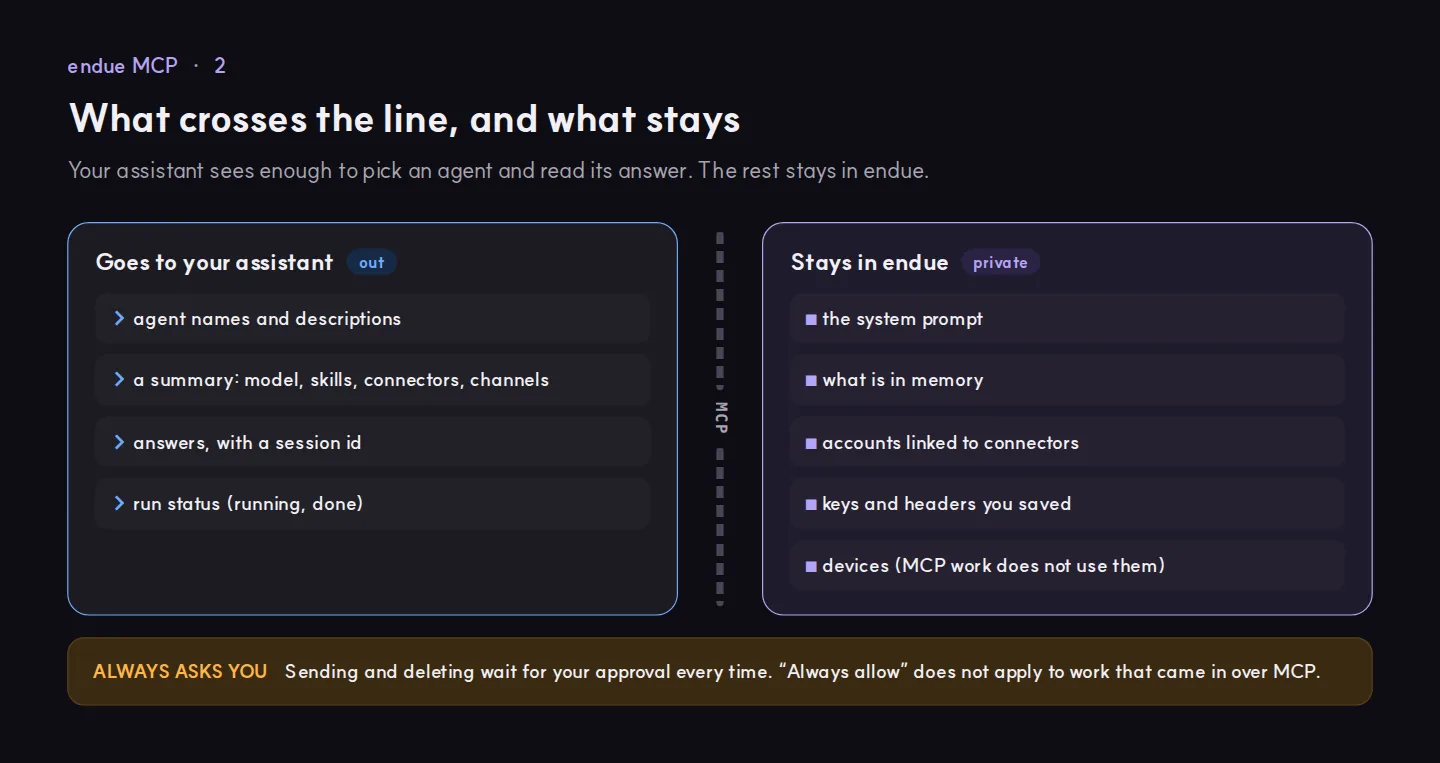
Each agent has two switches in the MCP section of Agent Builder, and both start off:
- Run this agent over MCP. Without it, the agent can be listed but not run.
- Also allow connectors and outputs. Without it, work that comes in over MCP uses neither.
The outside caller cannot pick the model, change the number of steps or write to memory. Work that arrives over MCP never uses devices. Every MCP conversation shows up under that agent in the sidebar, with the key and the client that made the call.
4. Connecting

In Claude Code it is one command:
claude mcp add --transport http endue https://platform.endue.ai/mcp --header "Authorization: Bearer sk_..."In Cursor it goes in ~/.cursor/mcp.json:
{
  "mcpServers": {
    "endue": {
      "url": "https://platform.endue.ai/mcp",
      "headers": { "Authorization": "Bearer sk_..." }
    }
  }
}
Your assistant then has four tools:
| Tool | What it does |
|---|---|
list_agents |
Lists your agents, up to 50, and whether each can run over MCP |
get_agent |
Summarises one agent: model, skills, connectors, channels |
invoke_agent |
Gives an agent a job and returns its answer with a session id |
get_session |
Collects the answer of a job that is still running |
The full reference is in the MCP server docs.
Which assistants can connect today
The endue MCP server takes a key in a header. A client that can only connect through OAuth cannot use it yet. Here is where things stand on October 29, 2026.
| Client | Today | Why |
|---|---|---|
| Claude Code, Cursor, VS Code | Works | Named in the docs. Add the URL and the header. |
| Grok Bot (SpaceXAI) | Try it first | A Bot can add an MCP server by URL. The official docs describe signing in with OAuth and do not cover a key header. |
| Muse (Meta) | Try it first | There is no menu for adding an MCP server. Muse builds a custom connector when you ask in chat and keeps the credentials in a secure store (Meta help). |
| Claude Duet (Anthropic) | Where header auth is on | Duet uses your Claude connectors. A custom connector with a header is in beta for some organizations (Anthropic). |
| dots (ChatGPT) | Not yet | ChatGPT’s custom MCP connections accept OAuth, no authentication or mTLS, and cannot present a custom API key (OpenAI). |
Build and test the team from a client that is sure to work, such as Claude Code or Cursor. Then try your assistant. If it can add a server URL with a header, it connects the same way.
So what should you do?
- Pick one job your assistant handles poorly today. Something with a clear result, like a weekly brief or first replies to support mail.
- Build one or more endue agents for it. Give each one a single part of the job.
- Turn on Run this agent over MCP. Leave connectors and outputs off until the answers look right.
- Create a connection and test it from Claude Code or Cursor. Ask it to list your agents and run one.
- Add the same URL and key to your assistant, if it accepts a header.
- Watch the first runs in the sidebar. Approvals for sending and deleting come to you.
Build the team once. After that, one sentence to your assistant is enough to put it to work.
Try it in endue
Make an agent from one goal
Help me set up an agent that sends me a short briefing on my field every morning at 8.
Free foreverNo card requiredNothing runs until you press Send