

One manager agent, dozens of agents: how to stop being the bottleneck
Adding agents is easy. Checking on them all lands on you. A manager agent routes, splits, escalates and collects, so you talk to one agent. How far that stretches, what stays with people, and how to set it up in endue today.

On this page
Adding an agent takes minutes. Working with forty of them takes your whole day, because each one still needs someone to pick it, brief it and check its work. That someone is you.
A manager agent takes most of that off your desk. You talk to one agent, and it works with the rest. Our flywheel example ended its year with 17 agents and one person. This post is about how one person gets there.
The short version
- Past a handful of agents, the bottleneck is your attention.
- A manager agent has four jobs: route the work, split it, escalate what needs you, and collect the results.
- One manager handles about eight agents at a time. Layers could stretch that to hundreds on paper. They multiply cost and mistakes along with it.
- Budgets, actions that cannot be undone and the manager’s own rules stay with you.
- In endue today, you can use the secretary or connect your own manager over MCP. The pieces hold up to about 50 agents. We have not verified hundreds, and the last section says why.
1. The bottleneck moves to you
Every agent you add brings small jobs with it: choosing it for the right task, writing the brief, reading the result, answering its questions. Each takes a minute or two.
With five agents, that is your first coffee. With forty, in this example, it is the whole day. Agents run in parallel and you do not, so the team starts waiting on you just as it gets bigger.
The fix is one more agent, whose job is to read all of that and pass on only what needs a person.
2. Four jobs of a manager agent
- Route. The manager reads what each agent does and chooses who fits. It can only do this as well as your agents are described.
- Split. One request becomes separate pieces, and each agent gets its own brief. Agents do not see each other’s conversations, so the brief has to carry the goal, the context and what finished looks like.
- Escalate. The manager answers what it can and passes the rest to you: a choice only you can make, a failure that keeps coming back, anything about money.
- Collect. The results come back as one answer, and you read once.
A good manager does little of the work itself. Once it starts writing the press release, nobody is watching the other seven.
3. How far one manager stretches
Managers of people tend to top out at around eight direct reports. Agents hit a similar limit for their own reason: every result a manager reads takes up room in its context, and past a point it loses track. Eight at a time is a good place to start.
Eight at a time leaves room for a much longer roster. A manager can know forty agents and call on three of them for one request. You need another layer when one manager can no longer follow the work in progress. A long roster alone does not call for one.
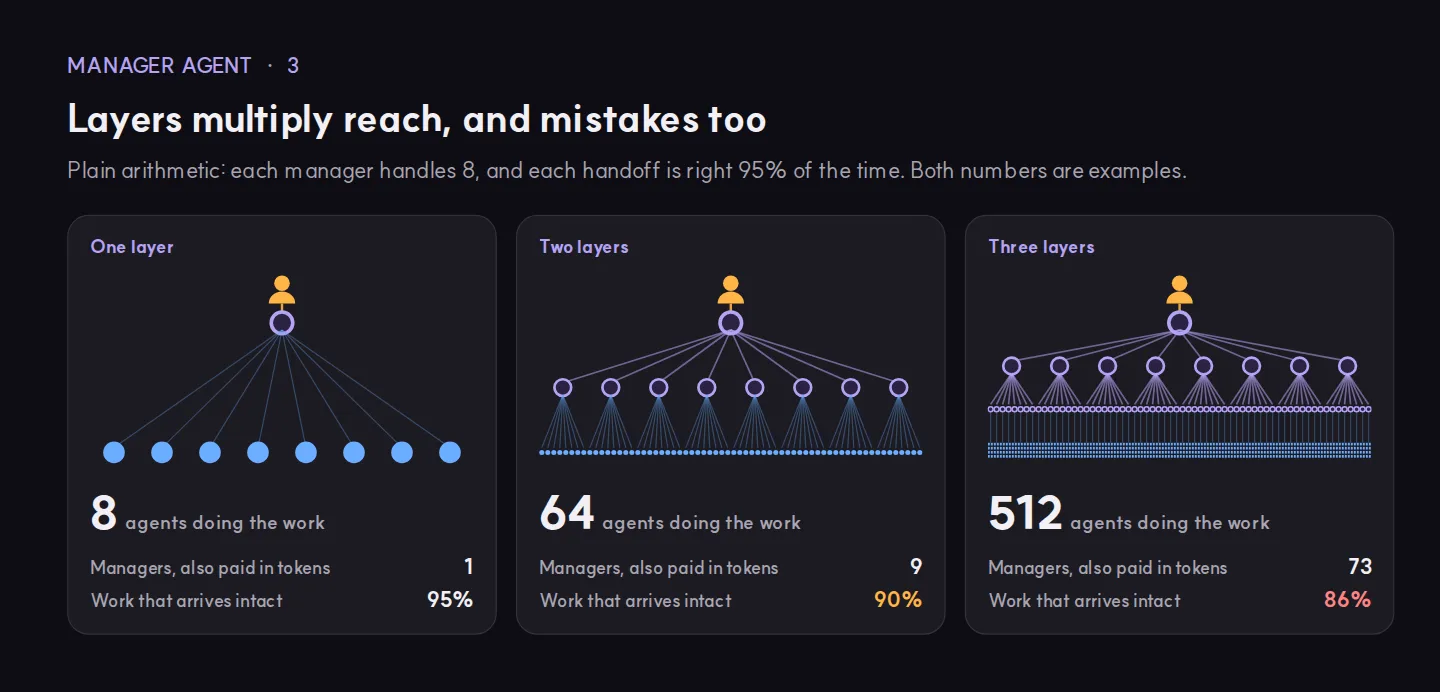
The arithmetic looks generous: 8, then 64, then 512. Two costs come with it.
- Managers use tokens too. In this example, 512 agents need 73 managers.
- Mistakes multiply. If each handoff is right 95% of the time, work that passes through three handoffs arrives intact 86% of the time.
So stay flat for as long as you can.
4. What stays with you
- The budget. A manager can spend quickly. How much a team may use is a person’s decision.
- What cannot be undone. Sending to customers, deleting data, moving money. Approve these yourself, or decide ahead of time which ones may go through.
- The manager’s rules. What it may decide alone, and what it must bring to you.
- Spot checks. Read a few results the manager marked as fine. A manager grading its own team can get the grade wrong.
So what should you do?
- Give each agent one job, and describe it in a sentence. The manager routes on those descriptions. A vague one means wrong picks.
- Start with eight agents or fewer. Add one when you see a gap in the work.
- Write down what must reach you. For example: anything that goes to a customer, anything over a spending line, the same failure twice.
- Put the whole context in every handoff: the goal, what is done so far, what finished looks like.
- Track three numbers each week: how many things reached you, how many results were sent back, and what one finished job cost. If the first number climbs as you add agents, fix the rules before you add more.
Where endue fits
endue has no setting called “Manager Agent”. Two setups get you the same thing today: the secretary, and your own manager over MCP.
The secretary: ready to use
Every account has one. “Use the secretary” in Settings › General › Secretary turns it on and off. Press ⌥Space on any screen and say what you need.
It picks from your agents using their names, descriptions, skill names and connection types. It can hand one request to up to 8 agents, then gather the results into one summary. When an agent needs you, that shows up in the conversation. Agents you want to keep out go on the “Don’t hand to the secretary” list. The release notes have the details.

You can set its name and tone. It takes no instructions of your own, and it works only while you are talking to it, with no schedule or API.
Your own manager over MCP: your rules
If you want a manager that follows rules you write, connect Claude Code, Cursor or VS Code to endue over MCP. Create a connection in Settings › Account › MCP connection, then turn on “Run this agent over MCP” for each agent it may call. The setup guide has the steps, and this post explains the idea.
Your client can now list your agents, read one, run one and check on a run. Give it rules like these:
You manage my endue agents.
- Use list_agents and pick by description. Never guess an id.
- Give each agent the goal, the context and what finished looks like.
  It cannot see this conversation.
- If a run comes back as running or awaiting_approval, check it with
  get_session. Do not start it again.
- Bring me approvals, repeated failures and anything going to a customer.
- When everything is finished, give me one summary with links.
There is also a smaller option in a space: an agent at Front Desk takes requests and starts the work, and an @mention hands a piece to one agent in the room.
Keeping an eye on the manager
The manager reports to you. These screens let you check the manager.

Activity shows waiting, running, failed and finished work by agent, with Stop and Retry. Notifications bring what needs you to one list. Usage shows which agents spend your credits.
What is not there yet
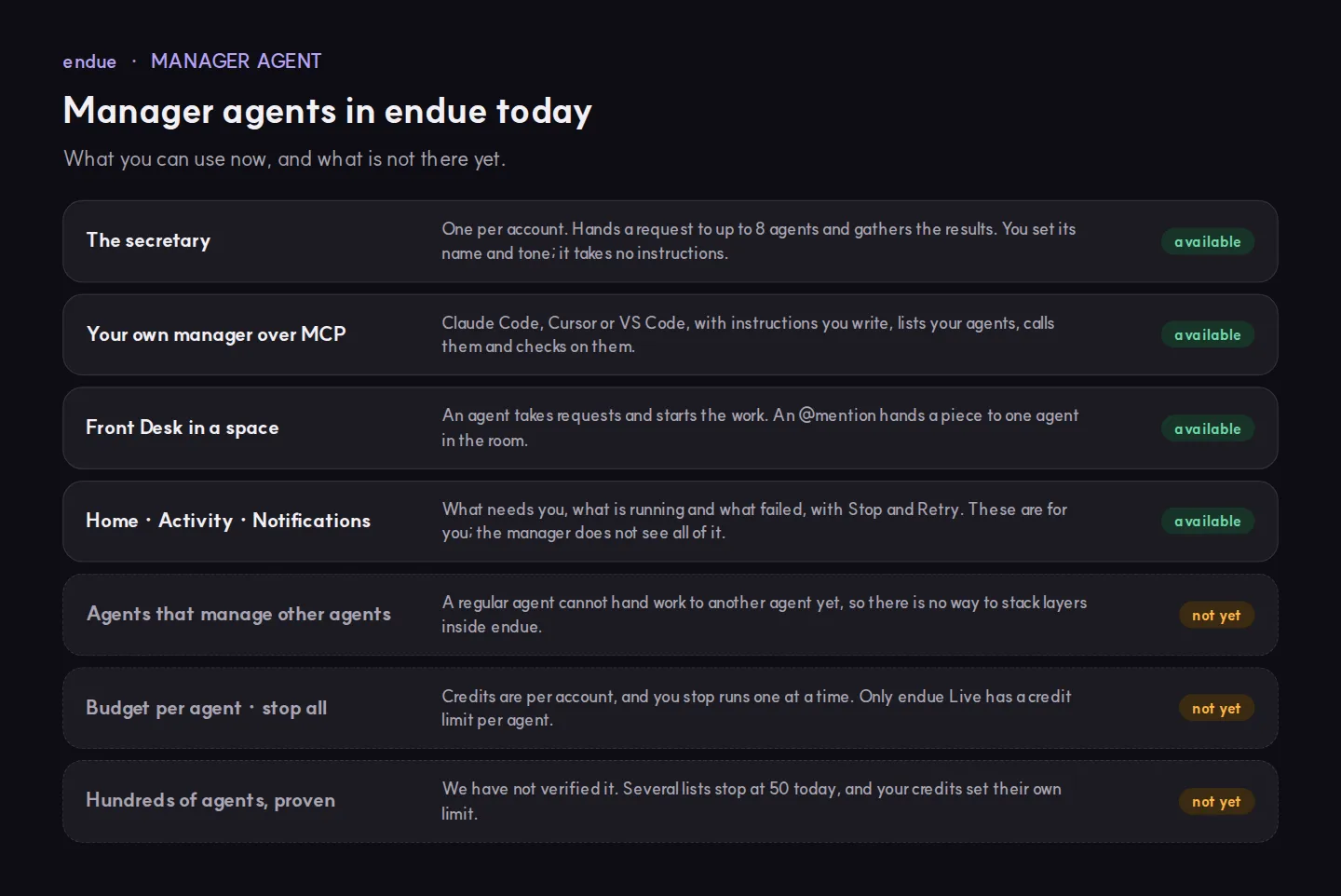
- Layers. A regular agent cannot hand work to another agent yet, so the layers in section 3 are not something you can build inside endue.
- A budget per agent, and a switch to stop everything. Credits are per account, and you stop runs one at a time. Only endue Live has a credit limit per agent. A key of its own per agent at least keeps costs apart.
- Hundreds of agents. We have not verified that size. Several lists stop at 50 today:
list_agents, the candidates the secretary considers on its own, and the agent list in the console. Your plan’s credits set their own limit.
Start with the secretary and a team of eight. Count what reaches you in a week. If that number stays low as the team grows, you have a manager.
Try it in endue
Make an agent from one goal
Help me set up an agent that sends me a short briefing on my field every morning at 8.
Free foreverNo card requiredNothing runs until you press Send