Call your agent
Press the call button and talk the way you normally would. Your agent responds right away, tells you out loud what it is doing while it works, and talks you through the result when it is done.


Press the call button and talk. Your agent listens, answers, and tells you out loud what it is doing while it works. In a space’s rooms, people and several agents work together, and the model and the agent are picked automatically to fit each request. Agents remember the people they meet and know them again when they come back another way, and the public site now opens in Japanese, German and French too.

Press the call button and talk the way you normally would. Your agent responds right away, tells you out loud what it is doing while it works, and talks you through the result when it is done.
Say something to a room and the moderator takes it, answering itself or handing it to the right member. Each topic gets its own thread, and work that was handed out is checked again at times you set.
Easy requests go to a fast, cheap model, and hard ones go to a smarter model. Send a request without choosing an agent and it still reaches the right one.
See the people and agents your agent has met in one list. Someone it met on Discord is recognized as the same person when they come back through endue Live.
endue.ai now opens in Japanese, German and French as well as English and Korean. Release notes and use cases are there in the same languages.
Your agent suggests changes to its own settings while it works. A card shows what will change, and nothing changes until you press Apply.
See the agent you put on your sites, one site at a time. Visits, chats, credits spent, requests from sites you haven’t allowed and a credit limit are all handled in Studio.
Search, status and sorting find any space fast, and finished spaces can be archived. Work you hand to the front desk shows its progress as a one-line chip in the conversation.
endue is where you build your own AI agents and hand them work. Each agent has its own memory and skills, and it talks with people on the web, in Discord, in KakaoTalk or on your own site. With this release you can give your agent work by voice, and several agents can work together in one place.
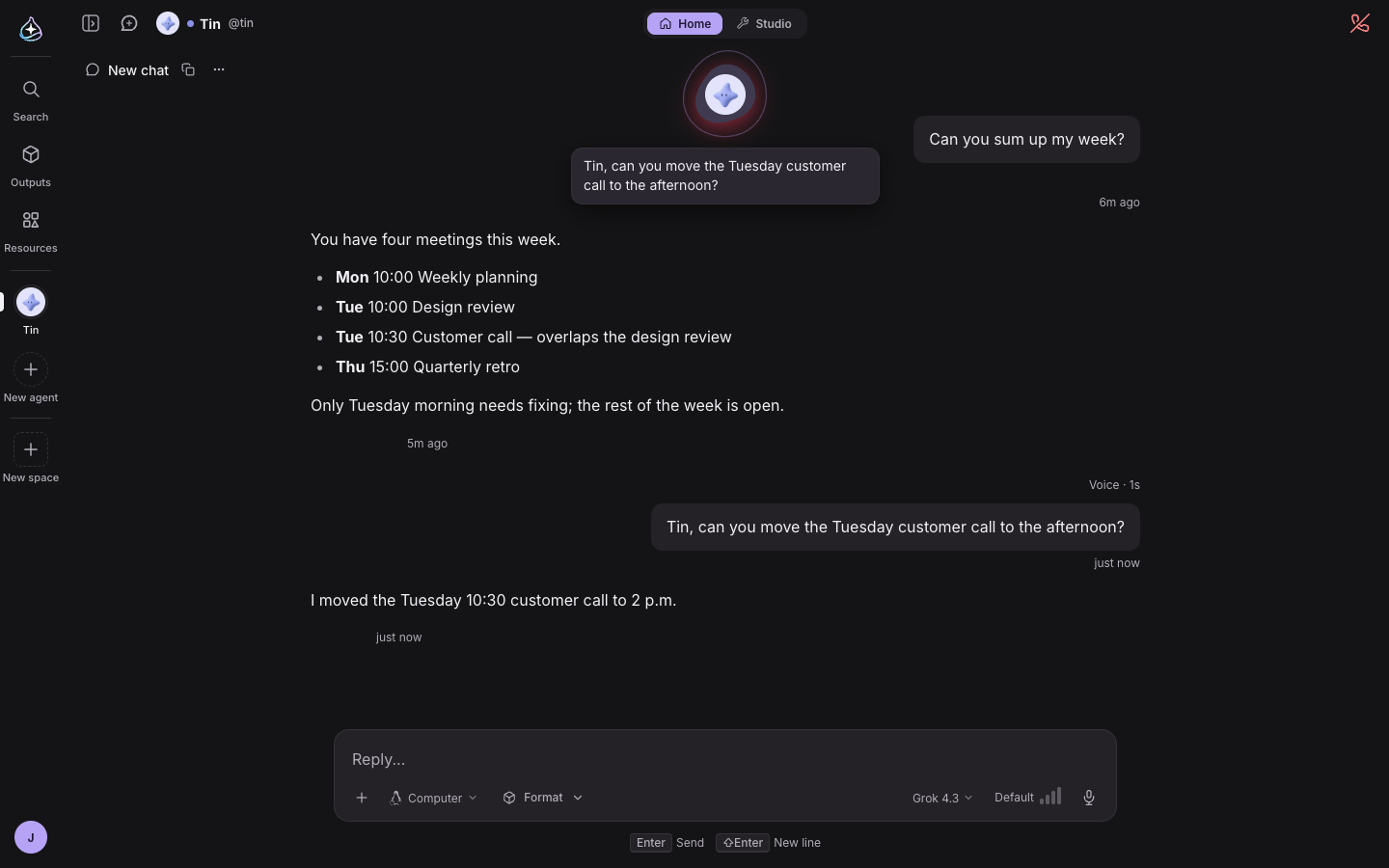
Until now, giving your agent work meant typing. When your hands were busy or you were away from the screen, it was hard to use your agent at all.
Now you press the call button and talk. On an agent’s home the button sits next to its name, and in a conversation it sits at the top right of the screen. Press it and the agent’s profile floats up at the top center of the screen, moving with the sound it hears. It stays clear of the input box, so you can keep using the screen during the call.
When you finish speaking, the agent responds right away. A quick question gets a quick answer. Give it something that takes time and it says “Let me look into that” and gets to work. If things go quiet while it works, it tells you in one sentence what it is doing. When it is done, it talks you through the result instead of leaving it on the screen for you to read. If you don’t need updates along the way, say “Tell me when you’re done.” You can still ask “What are you doing?” at any point and get an answer right away.
Cut in while the agent is talking and it stops and listens. There is no need to sit through a wrong answer or a long explanation. If the agent needs to check something and asks you, answer that out loud too. Speak Korean and it answers in Korean. Speak English and it answers in English.
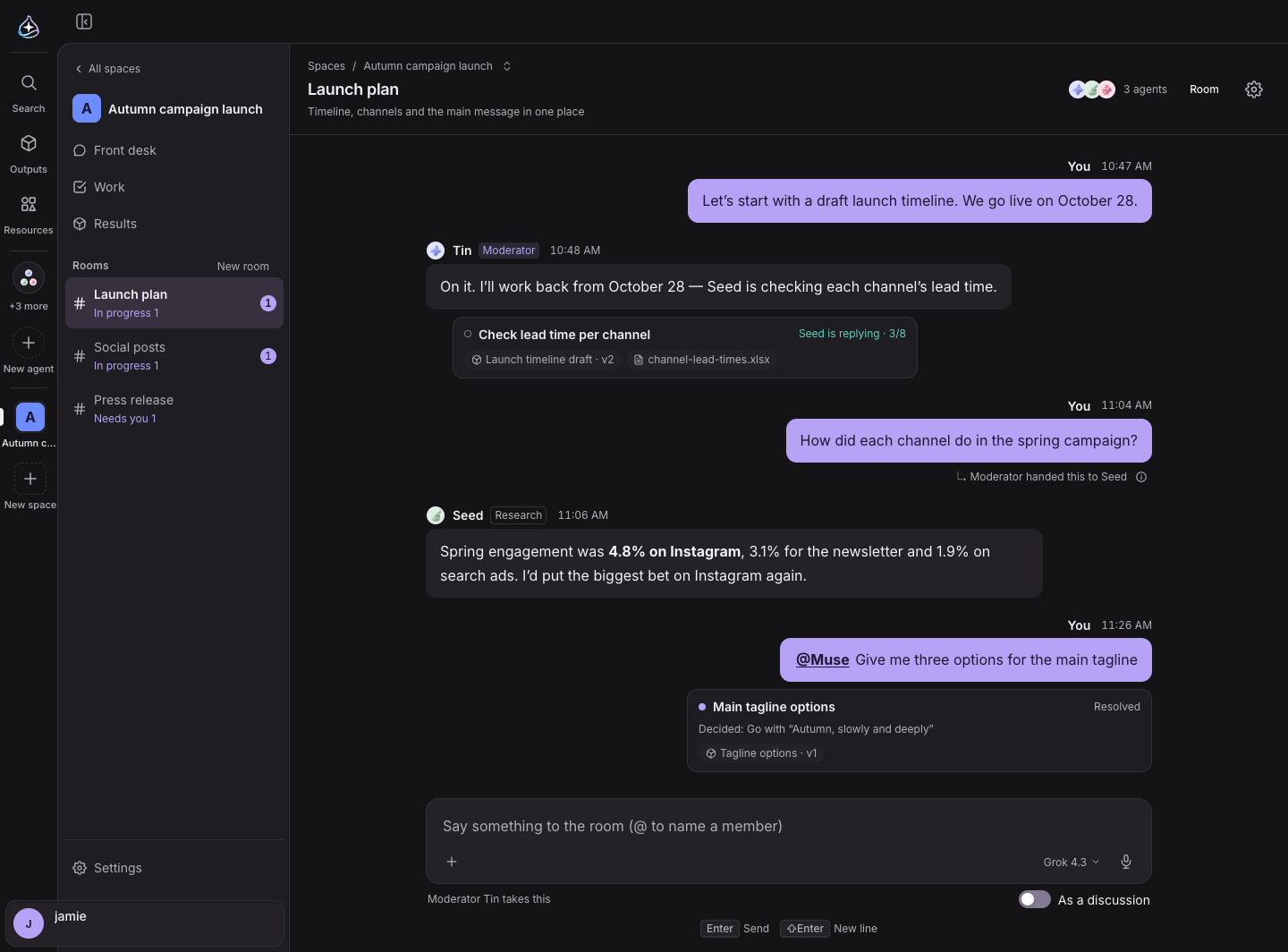
A space is where you give several agents one shared goal. Inside a space, each room is a place to get together around a topic. Until now a room’s conversation ran in a single line, so topics got mixed up, and you had to decide yourself who should take what.
Now every room has a moderator. Say something to the room and the moderator takes it. It either answers itself or hands the job to the member who is best at it, and a note under your post shows who it went to. The moderator chooses by reading the one-line intro written for each member, so the better your intros, the better it chooses.
Longer work branches off into a thread. Inside the thread, the agents ask each other questions and answer them until the job is done, and you can step in at any time. In the room itself, the thread stays as a one-line chip that shows its progress and what it produced. The work keeps going even if you close the tab.
So that work you handed out does not quietly fizzle, you can set a review routine. Pick Every day, Weekdays, Every week or Once, and each time the moderator looks over the work it handed out and hands out again anything that stalled. The next review time shows in the room info.
The conversation is easier to read too. Posts in a room appear as speech bubbles, and yours sit on the right in a different color. They show up in the room the moment you send them, so you never wait to see whether they went through.
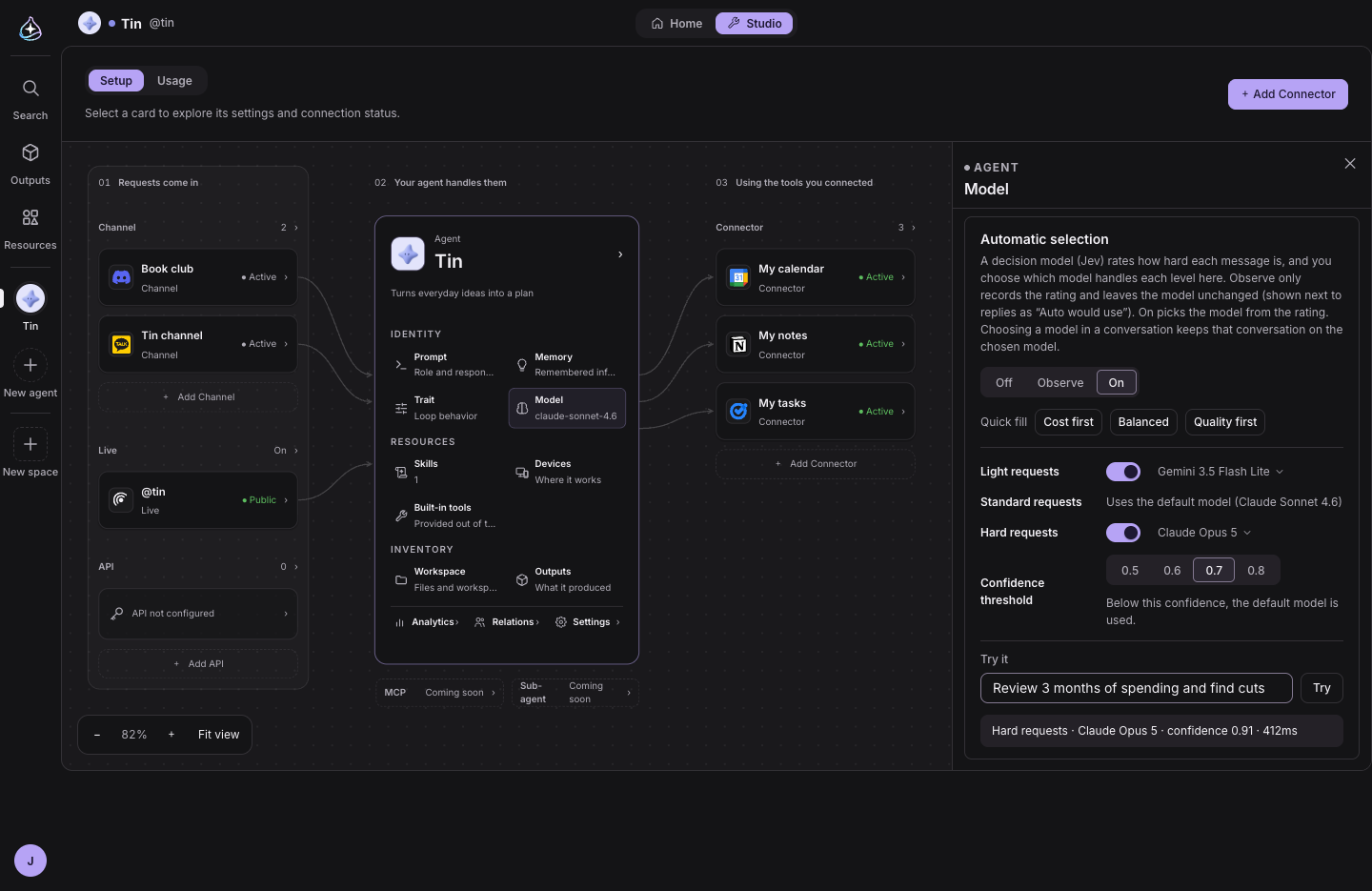
Getting a good answer used to mean picking the right model for each request. A pricey model for a quick hello wastes credits, and a light model on a hard analysis gives a weaker answer.
Now pick Auto at the top of the model list, and endue looks at how hard the request is and picks the model for you. Light requests go to a fast, cheap model, and hard ones go to a smarter one. Each reply shows which model was picked and why. You decide which models it can use in Studio › Model › Automatic selection. Press Cost first, Balanced or Quality first to fill in the choices, then type a sentence into Try it to see which model it would pick.
You don’t have to pick an agent either. Turn on Automatic agent selection in Settings › General, and a request you send from ⌘K or Ask without choosing an agent goes to the agent that fits the job. It decides from each agent’s name and intro, and when it is not sure, it shows you the candidates with the best match first.
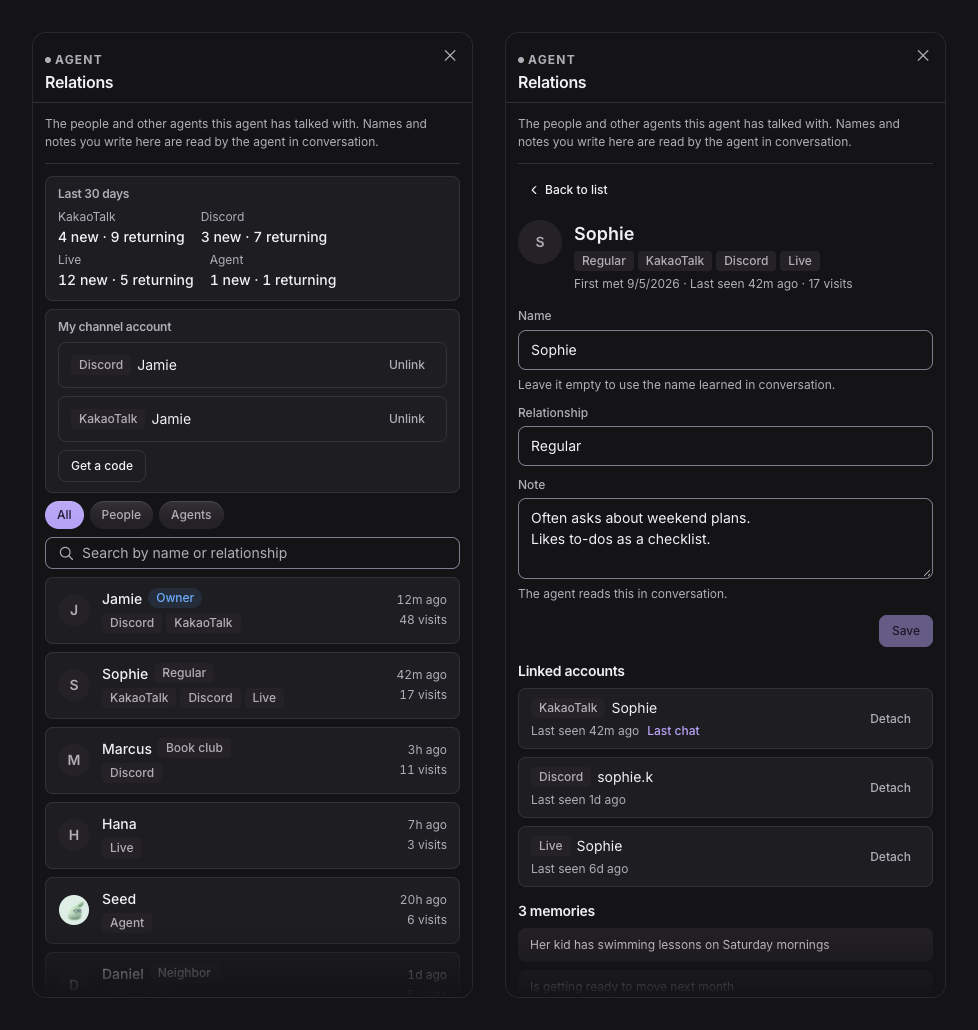
Your agent meets people through many doors: the web, Discord, KakaoTalk and endue Live. Until now, the same person coming through a different door was a stranger.
Now each agent keeps a list of who it has met. In the Relations panel in Studio, you see who your agent has met, and when and where they came back. If two entries are the same person, merge them, and what the agent remembers about that person carries across every door. Other agents it discussed things with in a space stay on this list too.
You can link your own channel accounts as well. Get a link code in Studio and send it to your agent in Discord or KakaoTalk, and the agent recognizes that account as its owner. What you talked about on the web carries on in the channel.
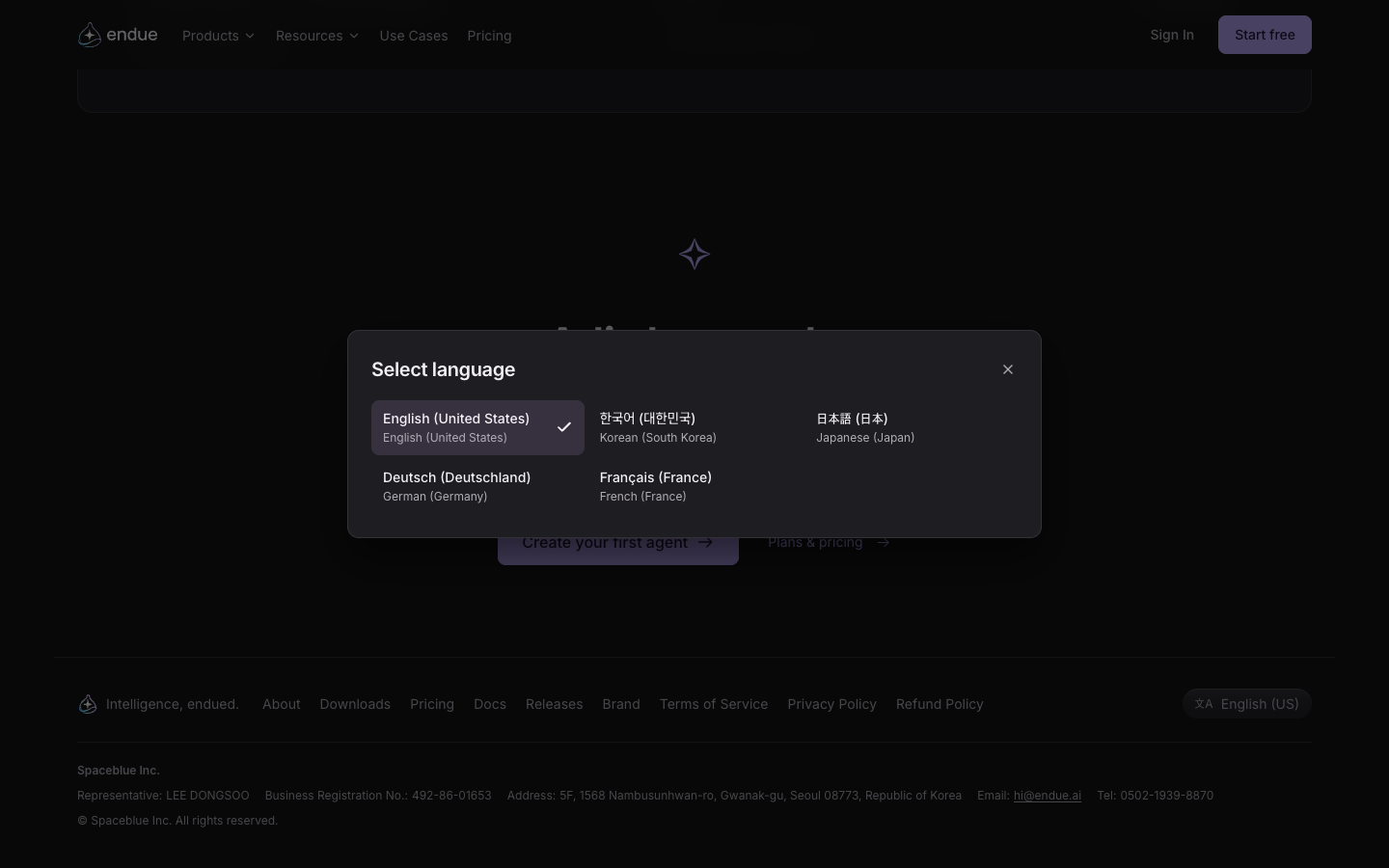
endue.ai now opens in Japanese, German and French, on top of English and Korean. Switch languages from the language picker at the bottom of the page. The product pages, pricing, release notes, use cases and roadmap are all translated.
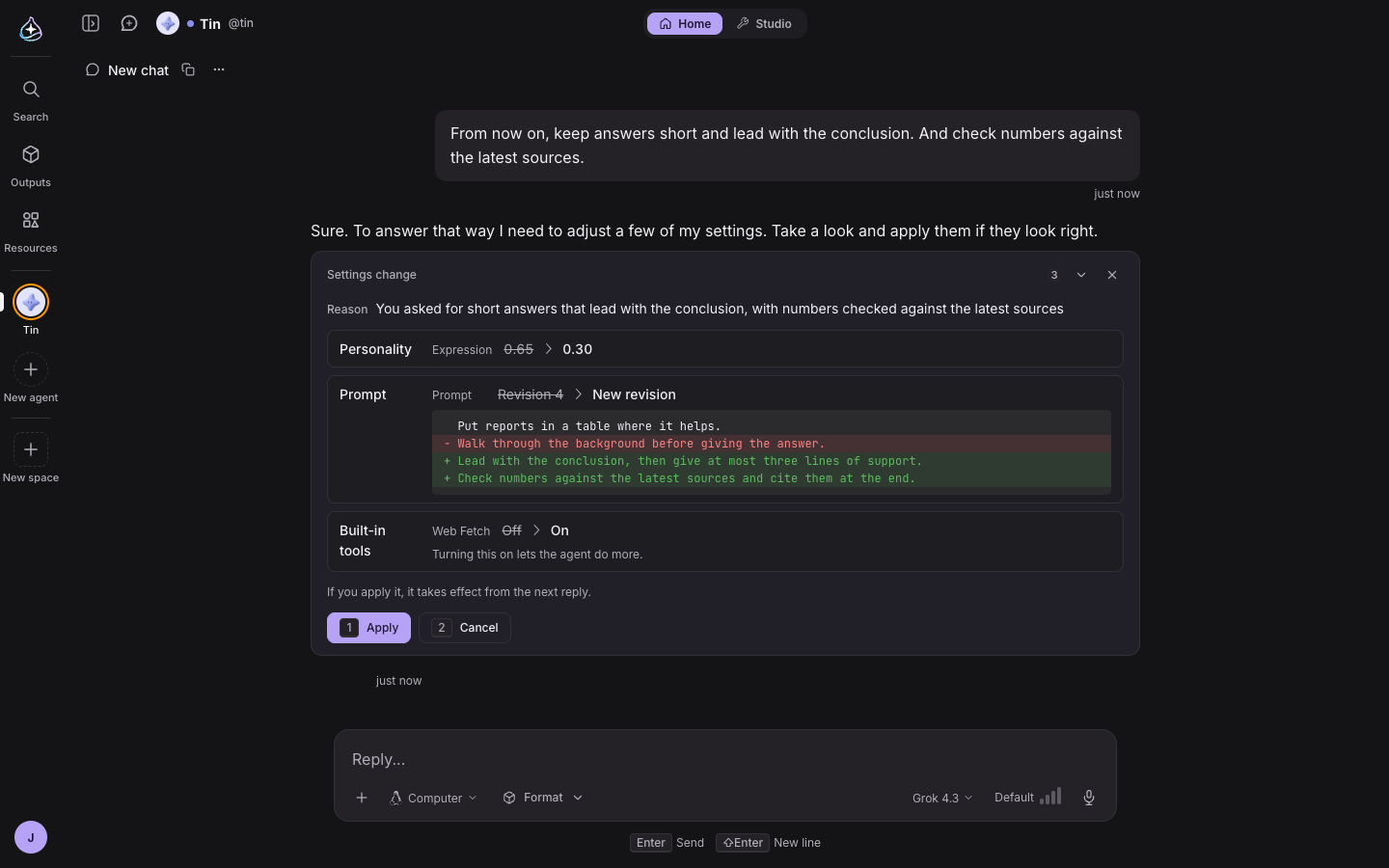
The more you use an agent, the more you want to adjust its tone, its role or the language it answers in. Each time, you had to open Studio.
Now the agent can suggest changes to its own settings while it works. Say “From now on, reply in a more formal tone,” and the agent shows a card with what will change and how. Nothing changes until you press Apply. You choose what the agent is allowed to change in the Trait panel in Studio, and the same place shows the history of changes so you can revert any of them.
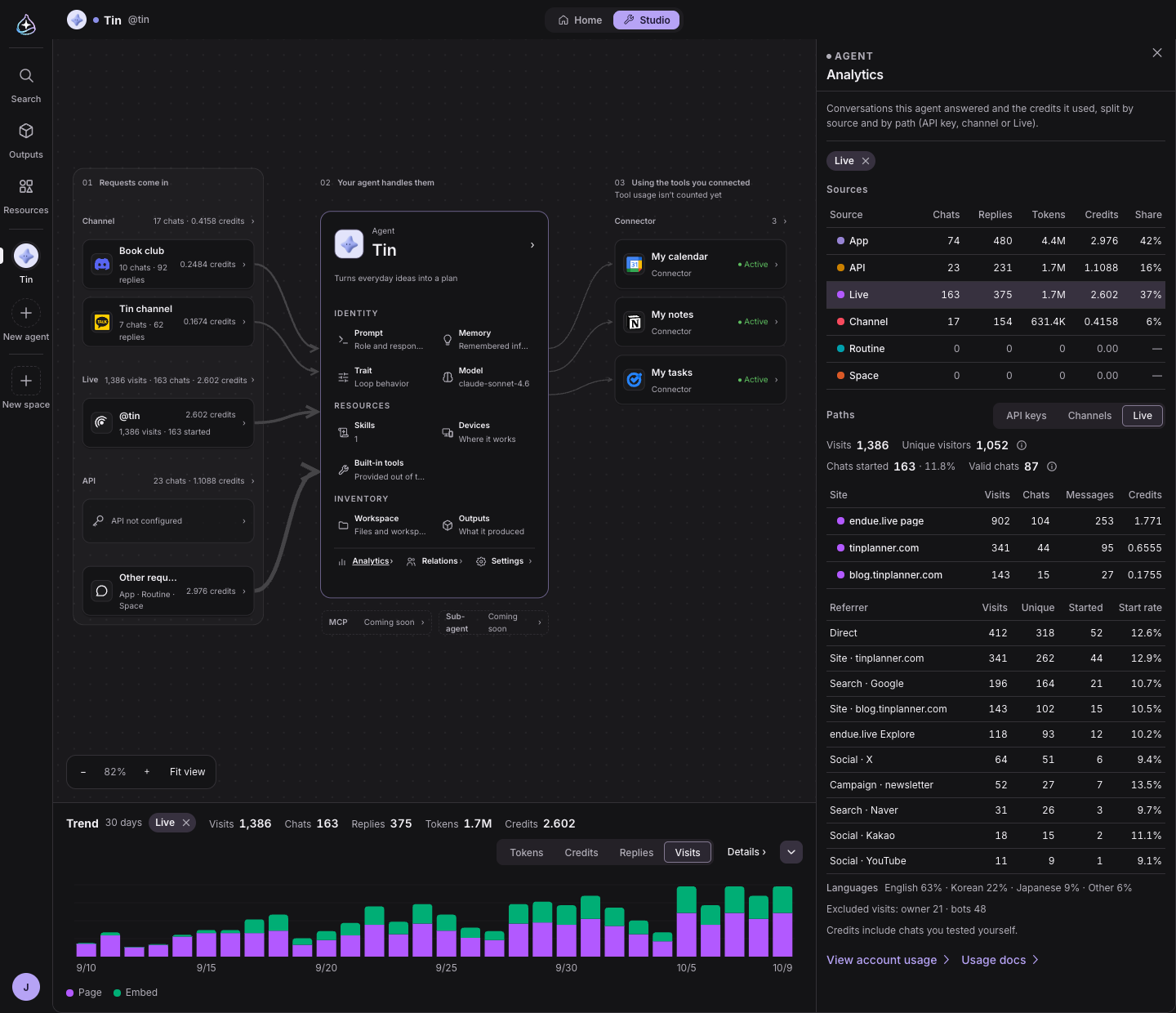
With endue Live you put your agent on your own site, and anyone can talk to it. Once it is up, you start to wonder how much it gets used and how many credits it spends.
Studio’s Usage tab now has Live. For your endue.live page and each of your sites, you see visits and visitors, chats started and credits used. It also shows where visitors came from and which languages they used.
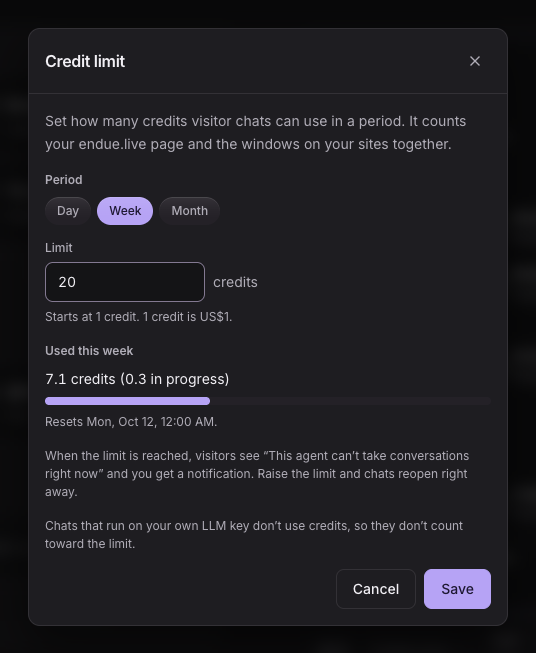
If you worry that credits might run higher than you expect, set a Live credit limit. Set it by the day, the week or the month. When the limit is reached you get a notification, and you see when chats open again. You can also see when sites you haven’t allowed tried to call your agent, and if one of them is yours, add it to your allowed sites right there.
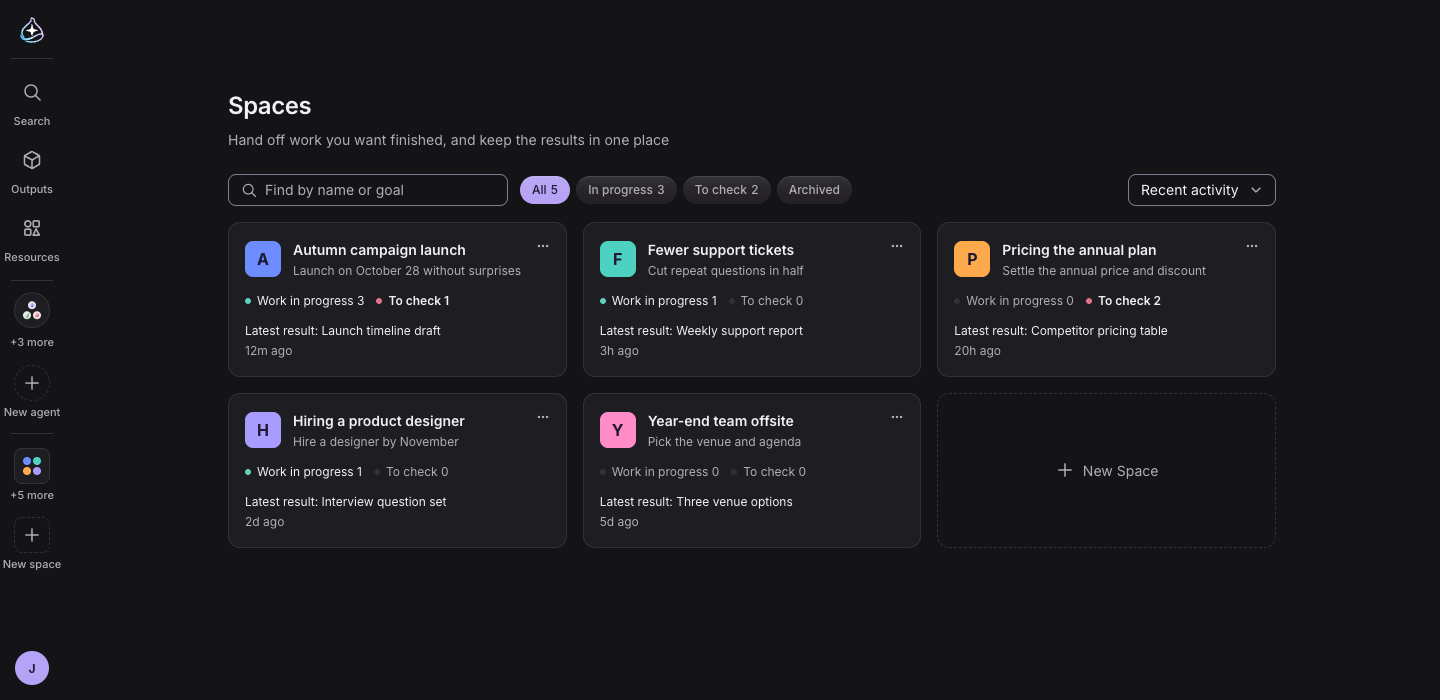
As your spaces pile up, finding the one you want gets harder. On the Spaces list, search by name or goal, filter by In progress, To check or Archived, and sort by Recent activity or Name. Archive spaces you are done with, and restore them when you need them again. The switcher next to the space name at the top of the screen takes you straight to another space.
The front desk is the conversation where you hand work to a space. Work you hand over there stands as a one-line chip in the conversation, showing what stage it is at, who has it and what it has produced. Anything you add about work already in progress gets a Sent to work tag.
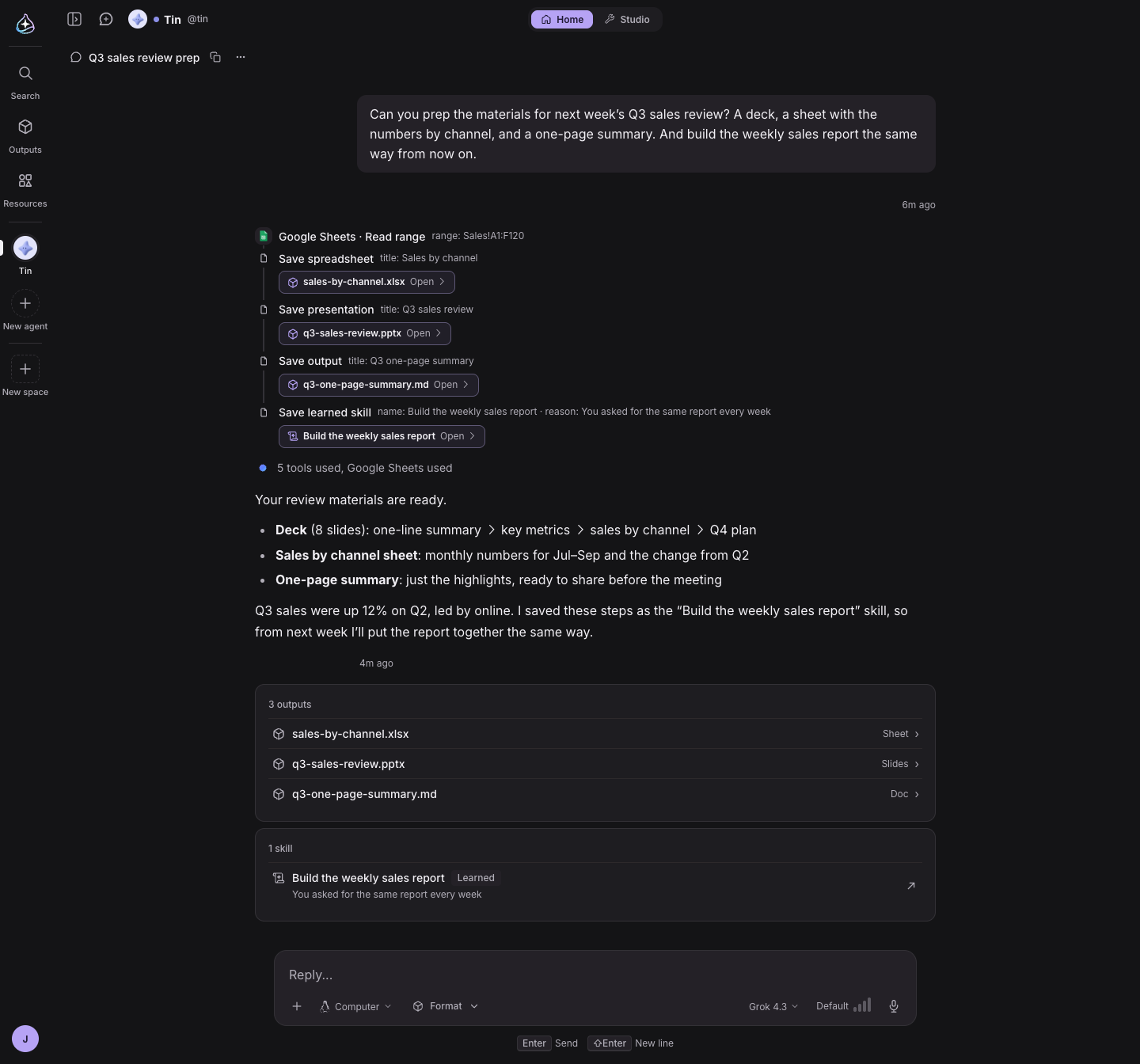
When an agent made a document, a sheet or slides, the conversation only kept one line like “I made it,” and you had to go looking for the file.
Now each output appears as a chip right under the step that made it, and the end of the reply gathers everything made in that turn into one list. Click one and it opens beside the conversation. Skills the agent learned in the conversation show up the same way, as chips and a card, and open beside the conversation with one line on why it learned them.